Blog
Business Phone System
Top 10 Best Business Phone Systems for Small Businesses in 2026

Top 10 Best Business Phone Systems for Small Businesses in 2026
Compare the 10 best small business phone systems based on features, pricing, and ease of use to find the right fit for your business.



In this article
- Key Reasons to Use a Cloud VoIP Phone Systems for Small Businesses
- The Best Business Phone Systems at a Glance
- What Small Businesses Need in a Phone System
- DialLink: The Best Overall Small Business Phone System
- Quo: Simple Small Business Phone System
- RingCentral: Small Business Phone System with Unified Calling, Video, and Messaging
- Dialpad: AI-powered Phone System for Sales and Support Teams
- Aircall: Cloud Phone System for Sales and Support Teams
- Grasshopper: Virtual Phone System for Solopreneurs and Micro-businesses
- Google Voice: Phone System Add-on for Small Businesses Using Google Workspace
- Zoom Phone: Business Phone System for Teams Already on Zoom
- Vonage: Flexible VoIP for Small Businesses that Need Customization
- Ooma Office: VoIP Phone System for Office-based Small Businesses
Key takeaways
- For most small businesses, cloud VoIP phone systems are the best business phone system, with minimal setup, lower upfront and ongoing costs, and features once limited to enterprises built into standard plans.
- When comparing providers, look for easy setup, core features on entry plans, honest pricing that includes add-ons, mobile-first apps, AI included in the plan, and easy scaling.
- Quo suits small teams that want simple calling and texting, though it has no desk phone support or phone menus on its entry plan. Grasshopper fits better solopreneurs and micro-businesses better than growing teams.
- RingCentral, Dialpad, Vonage, and Ooma offer broader feature sets but charge extra for key capabilities like AI receptionists, phone menus, or call queues, while Aircall requires at least three licenses.
- Google Voice and Zoom Phone make the most sense for teams already using Google Workspace or Zoom, since much of their value depends on those platforms.
- DialLink is the best overall pick for SMBs and startups, with a free local number for every user, call management and messaging from the entry plan, and built-in AI with no add-on fees.
Finding the best phone system for your small business is harder than ever. With so many business phone systems available today, finding the right fit can quickly become overwhelming.
That’s why we’ve done the heavy lifting for you, shortlisting the top-rated small business phone systems, so you can compare them with confidence without getting lost in technical details.
Key Reasons to Use a Cloud VoIP Phone Systems for Small Businesses
In this guide, we compare cloud-based VoIP phone systems because, for most small businesses today, they're the best choice.
One of the main reasons is the reduced need for physical setup. Cloud VoIP systems don't require complex on-premises infrastructure or time-consuming installations. Unlike traditional phone systems, VoIP can be deployed quickly with minimal equipment, such as a desk phone or even just a laptop.
Cost efficiency is another key factor. Without on-premises hardware, upfront costs are significantly lower, and ongoing maintenance is minimal since your provider handles updates and maintenance.
One of the biggest shifts is in the feature set. Capabilities once limited to large enterprises are now available in standard VoIP plans. Features like auto-receptionists, call routing, voicemail-to-email, and business text messaging come built in, giving smaller businesses access to tools that were previously out of reach.
The Best Business Phone Systems at a Glance
Here's a quick look at the top picks before we get into the details.
| Provider | Best For | Starting Price (Yearly) | Free Trial |
|---|---|---|---|
| DialLink | Best overall for SMBs and startups | $15/user/mo | 7 days |
| Quo | Best for remote teams and shared numbers | $15/user/mo | 7 days |
| RingCentral | Best for unified calling, video, and messaging | $20/user/mo | 14 days |
| Dialpad | Best AI call features for sales/support | $15/user/mo | 14 days |
| Aircall | Best for CRM-integrated sales teams | $30/license/mo (min 3) | 7 days |
| Grasshopper | Best for solopreneurs and micro-businesses | $14/mo flat-rate | 7 days |
| Google Voice | Best for Google Workspace users | $10/user/mo | None |
| Vonage | Best for businesses that need customization | $13.99/user/mo | None |
| Zoom Phone | Best for Zoom-first teams | $16/user/mo | 30 days |
| Ooma Office | Best for simple desk-phone setups | $19.95/user/mo | 30 days |
Pricing reflects publicly listed starting rates as of May 2026 on annual billing. Always verify current pricing on the provider's website before making a decision.
What Small Businesses Need in a Phone System
Before diving into each provider, here are the factors that matter most to small businesses when choosing a phone system:
Ease of setup and use
Most small businesses don't have dedicated IT staff, so the phone system needs to be something you can set up and manage yourself. Look for a platform that's intuitive enough to use from day one, with no training required and no need to hire outside technical help to get started or make changes.
The features you actually need, available from day one
Small businesses don't need complex call center functionality, but they do need the basics that make them look and operate professionally: auto-attendant, business hours routing, call forwarding, and shared numbers. What matters is that these features are available on basic-level plans. You shouldn't have to upgrade to a higher tier just to unlock the one feature your business needs.
Honest value for money, including add-ons
Don't just compare base prices. Look at what's actually included in the plan you'd realistically sign up for. Some providers keep headline prices low but charge extra for features that should come standard. The right question isn't "what's the monthly price?" but "what do I get for that price, and what will cost me extra?"
Mobile-first access
Most small teams today are distributed, and many don't have a fixed office at all. Your phone system should support your work style by working just as well on a laptop or mobile as on a desk phone, so your team can take and receive calls from wherever they're working.
AI that takes routine work off your plate
Small teams are always looking for ways to do more with less. AI features like call summaries, voicemail transcription, and AI voice agents can save real time every day. Look for a provider that includes these features in the plan rather than charging for them as add-ons.
Scalability without friction
Your phone system shouldn't slow you down when you grow. Adding a new team member, getting a number in a new city, or adjusting how calls are routed should take minutes, not days. Look for a provider where scaling up (or down) is straightforward and doesn't come with a significant cost jump.
Top 10 Best Business Phone Systems for Small Businesses
Below, you’ll find a detailed comparison of the top business phone systems for small businesses. For each provider, we cover key features, limitations, and pricing, so you can see which one fits your team’s needs and budget.
DialLink: The Best Overall Small Business Phone System
DialLink is a business phone system designed for small teams that want a professional setup without unnecessary complexity. It combines calling, SMS, and WhatsApp for Business messaging in one app, so your team handles all communication from a single place. Every interaction is organized in a unified thread per contact, so context is always available without digging through separate tools.
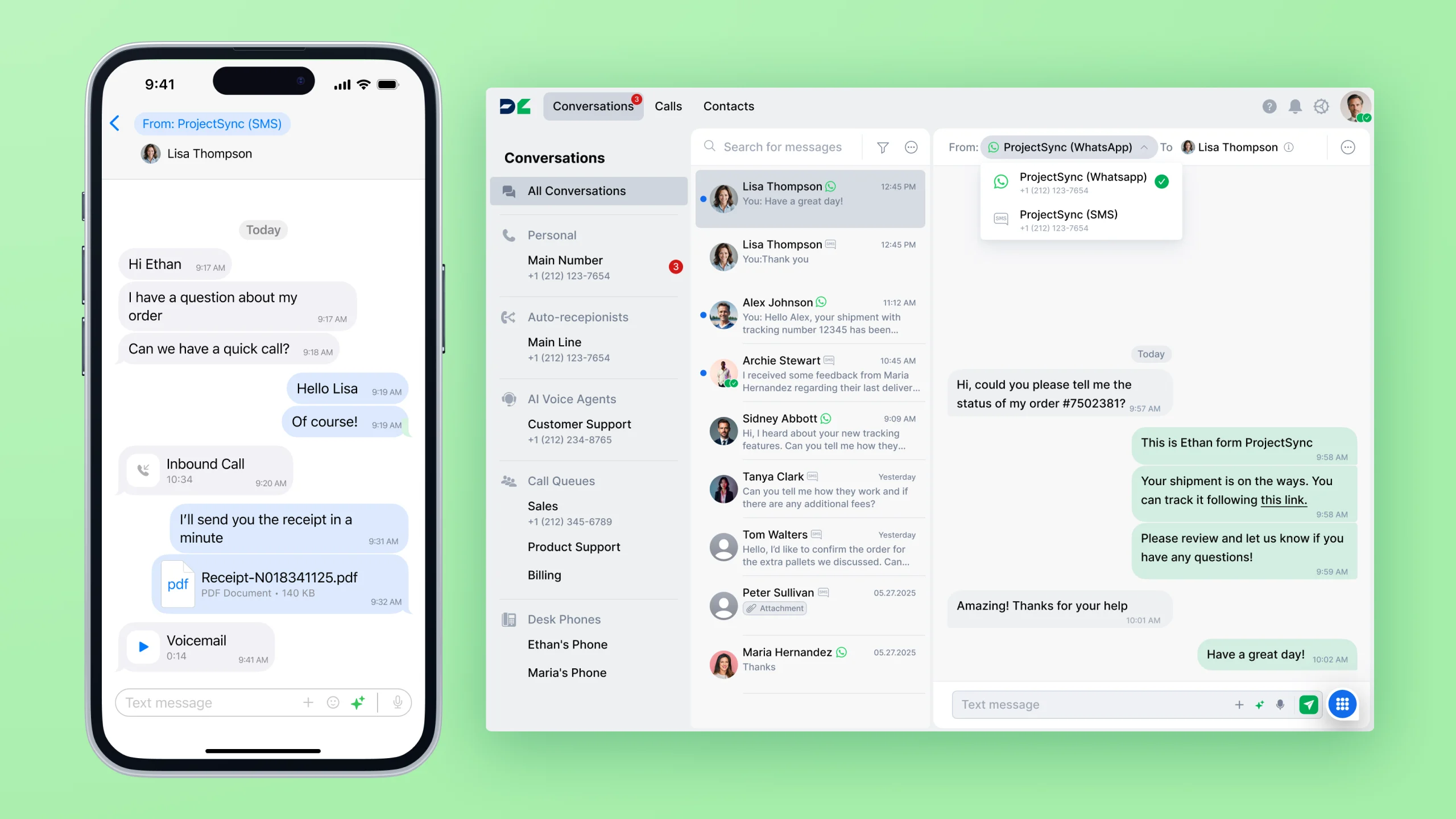
Key features:
- Every user on every plan gets a free US local number included, with a solid package of minutes and messages. Additional local and toll-free numbers are available and managed from one admin portal.
- DialLink is designed for non-technical users. The admin portal lets you add users, assign numbers, and configure call routing without IT knowledge or outside help. Most small businesses are up and running the same day, they sign up.
- Auto-receptionist, business hours routing, basic phone menus, shared numbers, and call forwarding are available from the entry plan.
- Full-featured apps are available for iOS, Android, Windows, and Mac. Desk phones are also supported.
- AiVA, DialLink’s AI voice agent, handles routine inbound calls 24/7 and is built into the phone system with no additional purchase required. AI-generated call transcripts, summaries, action items, and sentiment analysis are also included in the core plans.
- Adding a new team member or a number in a new city takes minutes from the admin portal. Additional US and Canada local and toll-free numbers are available at fair additional cost of $5/month and $7/month respectively.
Limitations:
- No visual call flow designer.
- Most AI capabilities are not available at the entry plan.
- User-owned desk phones are supported only on the higher-tier plan.
Pricing
DialLink’s pricing is transparent and predictable, with no surprise add-ons. Plans start at $15 per user per month for the Essential tier, $25 for Professional, and $40 for Enterprise (billed annually). With monthly billing, pricing starts at $20 per user per month and goes up to $50.
Summary
DialLink is a strong all-around choice for small businesses that want a professional phone system that's easy to set up and manage without IT support. It covers the core communication channels, includes essential call handling features from the entry plan, and builds AI capabilities that most competitors charge extra for, all at a predictable price.
Quo: Simple Small Business Phone System
Quo is a cloud-based phone system built for startups and small teams that need a straightforward way to manage calls and texts.
Key features:
- Each user gets one local or toll-free number included, with unlimited calling and texting within the US and Canada.
- Quo is one of the easiest systems to get started with. No technical setup is required, and most teams are live within minutes.
- Shared numbers, auto-receptionist, and call forwarding are included from the entry plan. Phone menus, even basic ones, require an upgrade.
- Available on iOS, Android, and desktop.
- Sona, Quo's AI receptionist that answers incoming calls, routes them, and handles common questions, is included on all plans with a base allowance of free automation credits per month
- Call transcription, summaries, and suggested replies are also available within core plans.
- Adding users and numbers takes a couple of clicks inside the platform. Additional numbers are $5 per number per month.
Limitations to consider:
- Desk phones are not supported on any plan.
- The Starter plan does not include phone menus, and call management features are basic across all plans.
Pricing
Quo plans start at $15/user/month for Starter, $23 for Business, and $35 for Scale (annual billing). Monthly billing is $19, $33, and $47 respectively.
Summary
Quo is a good fit for small businesses that want a simple, easy-to-use phone system for calling and texting without a complex setup. But for businesses that need phone menus, more advanced call handling, or desk phones, Quo will require either a plan upgrade or may not be the right fit at all.
RingCentral: Small Business Phone System with Unified Calling, Video, and Messaging
RingCentral's business phone system, RingEX, combines voice calling, SMS, video meetings, and team messaging in a single interface. For small businesses that want to consolidate multiple communication tools under one provider and have the budget for a more feature-complete solution, it covers a lot of ground.
Key features:
- Each user gets one free local or toll-free number. Unlimited domestic calling is included for the US and Canada.
- Auto-attendant, multi-level IVR menus, call queues, and advanced call routing are all available within the core plans.
- RingCentral has solid apps for iOS, Android, Windows, and Mac. Desk phones are also supported.
- AI-generated call transcripts and meeting summaries are included on all plans. However, the AI Receptionist that handles inbound calls automatically is a paid add-on at $39 per month and is not part of any base plan.
Limitations to consider:
- RingEX comes with a learning curve. Small teams without dedicated IT support often find initial setup and configuration more time-consuming than expected. The breadth of features adds complexity for smaller teams that only need the basics.
- SMS is capped at 25 to 100 messages per user per month depending on the plan, which may be insufficient for small businesses that use text messaging actively.
- The AI Receptionist is not included in any base plan and is available as a separate add-on at $39 per month.
- Plans start at $20/user/month, which is higher than several alternatives at a comparable feature level for small teams.
Pricing
RingEX plans range from $20 to $35 per user per month (annual billing), or $30 to $45 (monthly).
Summary
RingCentral is a comprehensive platform that small businesses can grow into, but the price point and complexity may be more than a lean team needs, especially at the start. The SMS caps and additional cost for the AI Receptionist are worth factoring in if those features matter to you.
Dialpad: AI-powered Phone System for Sales and Support teams
Dialpad Connect is a business phone system that unifies voice calling, SMS, and team chat in one platform with a strong AI focus.
Key features:
- Each user gets a free local number with unlimited calling. Toll-free numbers are available on all plans at an extra cost.
- Dialpad has a clean, well-designed interface and is generally easy to get started with. Adding users and setting up basic routing is straightforward.
- Auto-attendant, call routing, and ring groups are included in the base plan.
- Dialpad is available on desktop, laptop, iOS, Android, and desk phones.
- Real-time call transcription, voicemail transcription, call summaries, and automated action items are included on all plans.
Limitations to consider:
- IVR menus and automated callbacks are not part of Dialpad Connect and require a separate support product.
- SMS is capped at 250 messages per user per month.
- US and Canada toll-free numbers come at an additional $15 per number per month on annual billing, which is higher than most competitors.
- AI voice agents are only available as a separate product, billed based on the number of conversations handled.
Pricing
Dialpad Connect starts at $15/user/month for Standard and $25 for Pro (annual billing). Monthly billing is $27 and $35 respectively.
Summary
Dialpad’s business phone system covers the core communication needs of most small businesses. However, many advanced capabilities, especially AI features, are not included in the base plan and require add-ons or upgrades to higher-tier products. For small teams, these additional costs can add up quickly.
Aircall: Cloud Phone System for Sales and Support Teams
Aircall brings voice, SMS, and WhatsApp into a single workspace, built specifically for sales and support teams that handle a meaningful volume of customer calls and need deep CRM integration.
Key features
- Each plan comes with one free local or toll-free number with unlimited calling within the US and Canada (toll-free minutes not included).
- Additional local and toll-free numbers are available at $6 per number per month.
- Aircall includes a visual smartflow editor that makes it easy to build call routing flows without technical knowledge. Initial setup is manageable for non-technical teams,
- Phone menus, call queues, smart routing, and ring groups are available from the entry plan. Shared numbers and a unified workspace for voice and SMS are included.
- iOS, Android, Windows, and Mac apps are available. Desk phones are also supported.
- An AI voice agent for 24/7 inbound call handling is included in core plans and billed per minute of usage. AI call summaries and sentiment analysis are add-ons on the Essentials plan. Voicemail transcription is included from entry level.
Limitations to consider:
- Aircall charges per license rather than per user and requires a minimum of 3 licenses for entry and professional plans. This minimum commitment and per-license pricing can make it less cost-effective for very small teams.
- A free local number is included per account, not per user. If each team member needs their own number, additional numbers have to be purchased separately.
- SMS is not included in any subscription plan.
- AI features (call summaries, sentiment analysis) are add-ons on the Essentials plan at additional cost
Pricing
Aircall pricing starts at $30 per user/month (annual) or $40 (monthly) for the entry plan, and $50 or $70 for the next tier, with custom pricing for enterprise.
There’s a minimum of 3 users for standard plans and 25 for custom plans.
Additional costs include AI features ($9/user/month), AI voice agent usage (from $0.49/minute), and WhatsApp for Business ($10/user/month).
Summary
Aircall is a good fit for small businesses that need at least three user licenses from the start and are comfortable using shared numbers for teams like sales or support, rather than individual numbers per user. For businesses that need personal numbers for each team member, rely on SMS, or want an all-in monthly price that includes AI summaries, the add-on costs add up quickly.
Grasshopper: Virtual Phone System for Solopreneurs and Micro-businesses
Grasshopper is one of the simplest phone systems available, designed for solo business owners and very small teams. It focuses on one core use case: separating business and personal calls with a dedicated phone number.
Key features:
- Plans start with one local or toll-free number. The Small Business tier includes up to five numbers. Calling and texting are unlimited within the US and Canada.
- Grasshopper is one of the easiest phone systems to set up. You pick a number, download the app, and you’re done. There are no complex configurations or routing logic to manage.
- Grasshopper only covers the very basics: voicemail, call forwarding, parallel calls, SMS, and call recording.
- Grasshopper works on mobile and desktop apps for iOS, Android, Windows, and Mac.
- Grasshopper does not include AI features. There is no call transcription, AI voice agent, voicemail summarization, or automated handling of routine calls.
- Additional numbers cost $9/month, and extra extensions are $3/month.
Limitations to consider:
- Features commonly included in entry-level plans from other providers, such as auto-attendant, phone menus, and business-hours routing, are not available on any Grasshopper plan.
- No AI features on any plan.
Pricing
Grasshopper offers 3 paid plans:
- True Solo: $14/month (1 number, 1 extension)
- Solo Plus: $25/month (1 number, 3 extensions)
- Small Business: $55/month (5 numbers, unlimited extensions)
Pricing above is available on a monthly or annual basis (yearly pricing provides a 10% discount.)
Summary
Grasshopper is best suited for solopreneurs, consultants, and micro-businesses that need a simple way to handle business calls with a dedicated number. It works well for teams that share a couple of phone lines and don't need structured call routing or advanced features.
At a similar price point, several competitors include auto-attendant, phone menus, call transfers, and AI capabilities that Grasshopper doesn't offer, so it's worth comparing options if you expect your needs to grow.
Google Voice: Phone System Add-on for Small Businesses Using Google Workspace
Google Voice for Business is a simple cloud VoIP phone option that works as an add-on to a Google Workspace subscription. It's worth considering if your team already runs on Google Workspace (Gmail, Calendar, Meet) and you want basic business calling without adopting a separate platform. The familiarity of the Google ecosystem and the clean interface make it easy to get started.
Key features:
- Each user license includes one local phone number with unlimited US calling and texting.
- Google Voice is straightforward to set up, especially for teams already using Google Workspace. Adding users and numbers is managed through the Google Admin console. The learning curve is minimal for anyone familiar with Google’s interface.
- Auto-attendant and ring groups are only available on the Standard plan and above, not on the entry Starter plan.
- Available on iOS, Android, and via a web app. Desk phone support is available on the Standard plan and above.
Limitations to consider:
- Advanced Google Voice plans require a Google Workspace subscription, which starts at $7/user/month separately.
- Auto-attendant and ring groups are not available on the Starter plan. You need the Standard plan ($20/user/month + Workspace) to get them.
- The Starter plan is limited to a maximum of 10 users.
- Google Voice does not include AI features. There is no call transcription, call summaries, action items, or AI voice agents on any plan.
Pricing
The Starter plan starts at $10 per user per month, the Standard plan at $20, and the Plus plan at $30. Google Voice is typically purchased as an add-on to a Google Workspace subscription, although the Starter plan can be used independently in limited cases. Monthly billing increases prices by approximately 16%.
Summary
Google Voice can be a reasonable option for very small businesses already using the Google Workspace ecosystem that only need basic calling and texting.
However, as businesses grow, the limitations quickly become apparent. Features many teams eventually need, such as advanced auto-attendants, more structured call handling, and AI capabilities, are unavailable.
In addition, the required Google Workspace subscription increases the overall cost, making the solution less affordable than the headline pricing may initially suggest.
Zoom Phone: Business Phone System for Teams Already on Zoom
Zoom Phone is a VoIP phone system built by Zoom, designed for businesses that are already standardized on Zoom for video meetings and want to add business calling within the same platform. For small teams that heavily use Zoom, it's a practical way to consolidate tools without adopting something new.
Key features:
- Each user gets a local number with unlimited or metered calling and unlimited SMS and MMS.
- Zoom Phone is easy to set up, particularly for teams already using Zoom for video meetings. Admins manage users and settings through the Zoom admin portal, which follows familiar interface patterns. Most small businesses can be up and running quickly without IT support.
- All plans include unlimited auto-attendants, phone menus, holiday and business hours routing, call queues, and call parking from the entry level.
- AI-generated post-call and voicemail summaries and action items are included on all plans.
- Available on iOS, Android, Windows, Mac, and Linux. Desk phones are also supported.
- Additional local and toll-free numbers can be added at $5 per number per month. Local and toll-free numbers are available in 40+ countries.
Limitations to consider:
- AI features beyond call summaries require paid add-ons.
- The AI receptionist is available as a paid add-on and is not included in any base plan.
Pricing
When billed annually, Zoom Phone starts at $10 per user per month for metered calling in the U.S. and Canada, or $15 for unlimited calling. Higher-tier plans, such as Pro and Business, include unlimited calling only. Monthly billing increases prices by approximately 15%.
Summary
Zoom Phone is a solid choice for small businesses already using Zoom for meetings who want to add calling without switching platforms. The entry-level pricing is competitive, and having calls and meetings in one place reduces tool switching. Teams that aren't already Zoom-first will likely find more value elsewhere.
Vonage: Flexible VoIP for Small Businesses that Need Customization
Vonage offers a business communication platform covering calling, messaging, and video in one app. Its key differentiator is flexibility through its API layer, which allows businesses with technical resources to build custom call flows or extend the system into their own applications. For small businesses without developer resources, this advantage is largely irrelevant, and the pricing structure can become a frustration.
Key features:
- Each user includes one local phone number with unlimited calls and texts within the US, Canada, and Mexico.
- Plans include a virtual receptionist, call forwarding, and call groups. Essential features like call queues and conference calls require purchasing add-ons.
- The platform supports desk phones as well as iOS, Android, Windows, and Mac apps.
- An AI voice assistant capable of handling inbound and outbound calls is available, though pricing requires contacting sales. AI call transcriptions and summaries are also available but are not part of the core phone system.
Limitations:
- Vonage requires developer or IT involvement to set up and maintain, which is a significant barrier for most small businesses.
- Many features that come standard with competing platforms require paid add-ons, including call queues, call recording, and AI capabilities.
- Additional local numbers are $9.99/month, which is higher than most competitors.
- Desk phone support is only available on the Premium plan and above.
Pricing:
Vonage uses per-user pricing that scales down as your team grows. Plans start at $13.99 per user per month for Starter, $20.99 for Premium, and $27.99 for Advanced on annual billing. For teams of 5–19 users, prices drop to $12.59, $19.99, and $26.99 per user per month respectively. Monthly billing is also available at higher rates.
Summary:
Vonage can work for small businesses that value flexibility and have the technical resources to take advantage of its API layer. For most small businesses, the setup complexity and the number of features that require paid add-ons, including ones that come standard elsewhere, make it a difficult platform to recommend at face value. The add-on costs also accumulate quickly, meaning the final price is often significantly higher than the headline plan suggests.
Ooma Office: VoIP Phone System for Office-based Small Businesses
Ooma Office is a cloud office phone system focused on simplicity, predictable pricing, and strong desk phone support. It's a good option for office-based small businesses that want a reliable phone setup with a known monthly cost, no annual contract required, and good hardware support for teams that prefer traditional desk phones.
Key features:
- Each account includes a company local number and one free toll-free number. Every user also gets their own local number. Unlimited calling is included for the US, Canada, Mexico, and Puerto Rico, along with free inbound minutes for toll-free calls.
- Setup is quick, the admin portal is intuitive, and no technical support is needed to get started. Day-to-day changes like adding users or adjusting business hours are easy to manage from the admin panel.
- Auto-attendant with call routing and business hours scheduling are available from the entry plan, along with voicemail transcription and ring groups. Phone menus, call queues, and call recording require the Pro plan.
- Strong desk phone hardware support makes Ooma a practical choice for office-based teams. Mobile and desktop apps are also available for iOS, Android, Windows, and Mac.
- An AI answering service is available as an add-on. It handles incoming calls, gathers caller information, answers common questions, flags urgency, and sends notifications.
Limitations to consider:
- Phone menus and call queues are only available on higher-tier plans, not on the entry Essentials plan.
- SMS is not included in the entry plan, and higher tiers cap messages at 250 or 1,000 per month.
- The AI answering service is an add-on at $14.99 per account per month and is not included in any base plan.
- AI transcriptions and summaries are only available on higher-tier plans, whereas many competitors include them from their entry-level plans.
Pricing
Plans range from $19.95 to $29.95 per user per month with no annual contract required.
Summary
Ooma Office is a solid pick for small, office-based businesses that want predictable pricing, no long-term commitment, and reliable desk phone support. Teams that need phone menus, call queues, or AI features from day one will need to budget for a higher-tier plan.
Try the Best Small Business Phone System
We've covered the top phone systems for small businesses, each with different strengths to match different team needs and working styles.
While this guide gives you a clear overview, the best way to decide is to try a solution and see how it fits your workflow.
Start your 7-day free trial with DialLink, set up your business phone system in minutes, and see how it works for your team in real scenarios.
The cost depends on the type of system (landline vs. VoIP), deployment model (on-premise, cloud, or hybrid), and the provider’s pricing. For most small businesses, cloud-based VoIP systems are the most cost-effective, with plans typically starting around $15 per user per month.
Yes. Virtual phone systems are one of the most popular options for small businesses today.
A multi-line phone system allows your business to handle multiple calls at the same time across different team members or extensions. You’ll likely need one if more than one person handles calls, or if you want to avoid missed calls and busy signals.


Arina Khoziainova
Content Writer at DialLink
Arina is a content writer with over 7 years of experience in the IT industry. At DialLink, she creates clear, insightful content that helps small business and startup owners simplify communication and drive growth using modern tools. With a strong focus on practical value, Arina transforms complex topics into accessible, actionable stories.

Keep Reading

Best Auto-Attendant Systems & Services for Small Businesses
Explore the best auto attendant systems and software for small businesses. Learn features, types, and top providers.
December 23, 2025
10 minutes

Auto Attendant vs Call Queue: What Small Businesses Need to Know
Discover the differences between auto attendants and call queues, and how your small business phone system can use both for better call handling.
December 16, 2025
8 minutes

Auto Attendant vs IVR: What’s the Difference and Which One to Choose for a Small Business
Discover how auto attendants and IVR systems differ, how they work together, and which call routing option fits your small business best.
December 15, 2025
9 minutes

Local Vanity Phone Numbers for Business: What They Are and How to Get One
Read about what a vanity local phone number is, how businesses use them, and how to get one for your company.
December 12, 2025
8 minutes

Business Voicemail Greeting Examples for Every Situation (and Tips)
Explore a collection of voicemail greeting examples tailored to various industries and scenarios.
December 11, 2025
12 minutes
How to Get a Local Phone Number for Your Business
Learn how to check local phone number availability, choose the right one, and purchase it for your business with DialLink.
December 10, 2025
8 minutes

The Ultimate Guide to Local Phone Numbers for Business
Explore what local phone numbers are and how your business can easily get one.
December 09, 2025
6 minutes

Overview of Google Voice Local Phone Numbers
Get an overview of Google Voice, including its features, pricing, value, and key limitations.
December 08, 2025
9 minutes