Blog
Business Phone System
Auto Attendant vs IVR: What’s the Difference and Which One to Choose for a Small Business

Auto Attendant vs IVR: What’s the Difference and Which One to Choose for a Small Business
Discover how auto attendants and IVR systems differ, how they work together, and which call routing option fits your small business best.



In this article
- What is an Auto Attendant and How Does It Work?
- What is an IVR (Interactive Voice Response) and What Does It Do?
- Difference Between an IVR and Auto Attendant: Key Features Explained
- IVR or Auto Attendant: Which Is Better for Small Business Communication?
- What is Multi Level Auto Attendant?
- Real-World Example: Auto Attendant and IVR in Action
- Conclusion: The Best IVR and Auto Attendant for Business Communication
If you already use a business phone system to manage incoming calls, you’ve probably come across two features that help automate the first touchpoint with customers: IVR menus and auto attendants. They often get grouped together, and many people assume they’re interchangeable.
But while both tools route calls, they serve different purposes. The main difference between an auto attendant and an IVR is that an auto attendant routes calls automatically based on business-defined rules, while an IVR allows callers to interact with a menu using voice or keypad input.
Understanding how auto attendant and IVRs differ is key to choosing the right setup for your workflow, customer experience, and overall business needs.
What is an Auto Attendant and How Does It Work?
An auto attendant is an automated phone answering system that greets callers with a pre-recorded message and routes their calls based on preset rules.
Instead of speaking with a human receptionist, callers hear your welcome message and are automatically directed to the next step, such as a phone menu, team member, or voicemail.
How Does an Auto Attendant Work?
An auto attendant must be linked to a business phone number, whether local or toll-free, to handle incoming calls automatically. When someone calls your number, the auto attendant answers, plays your pre-recorded welcome message, and then routes the call to a predefined destination such as a specific user, a small team, or voicemail.
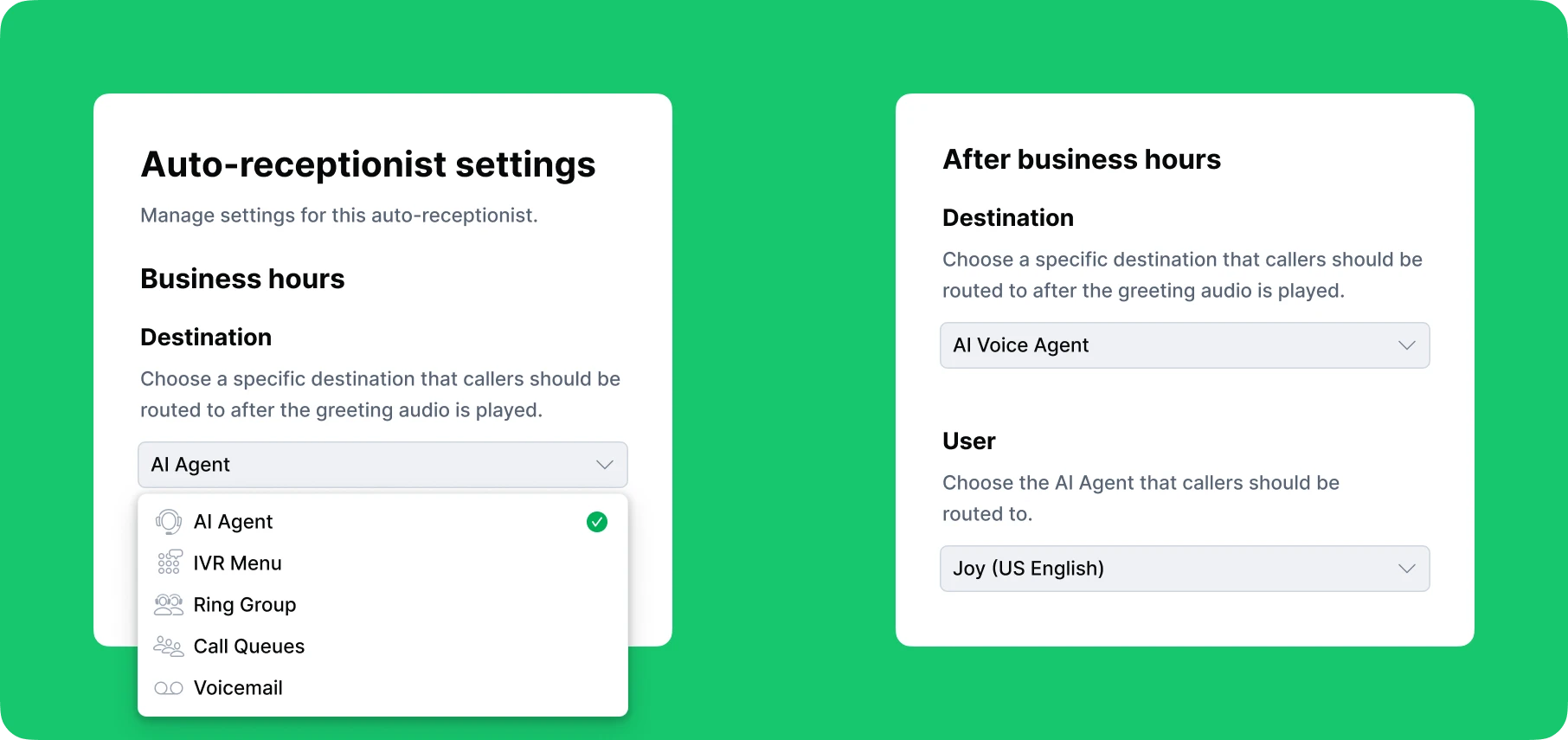
A key advantage of an auto attendant is that its behavior can change based on your business hours. During office hours, it can play one greeting and route callers to team members who are available to answer. After hours, the same auto attendant can play a different message and send callers to voicemail or an on-call group. You configure the rules once, and the system follows them automatically.
Modern auto attendants can also send automatic text replies to callers who text your business number or who miss your call. This keeps your business responsive and helps customers feel acknowledged even when no one is available to answer live.
What is an IVR (Interactive Voice Response) and What Does It Do?
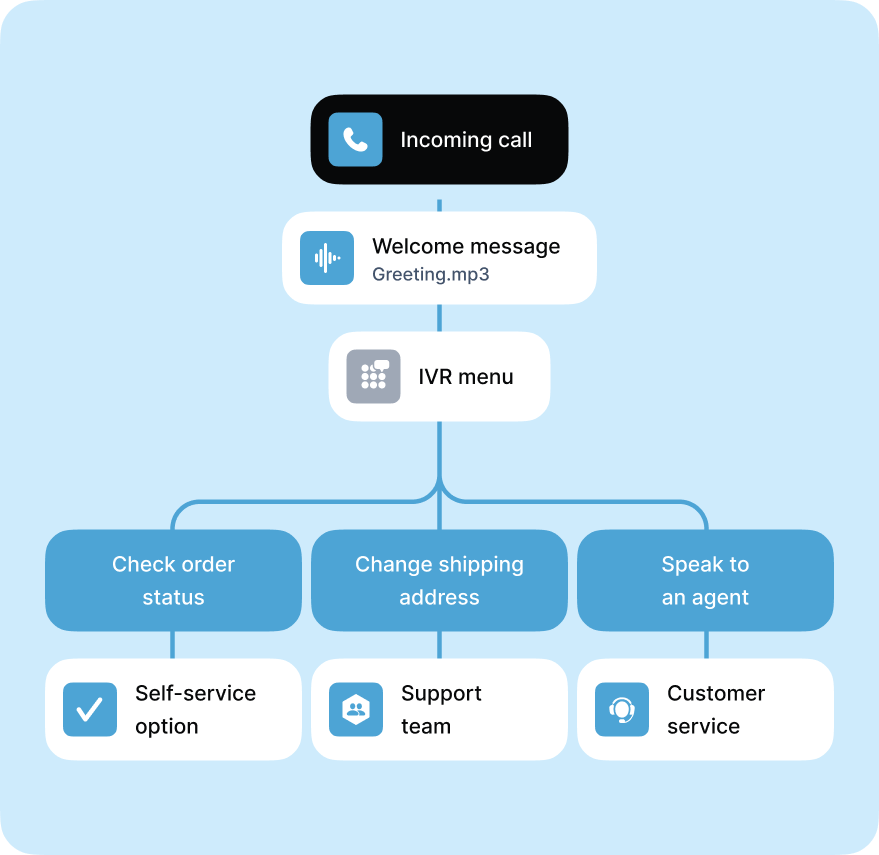
An interactive voice response system (IVR) is another phone system feature that helps route inbound calls. It’s the familiar phone menu most people have heard many times, like “Press 1 for sales, press 2 for support.” With an IVR menu, callers are presented with options that guide them to the right destination. The system reads out a list of predefined choices, and callers respond by speaking their selection or pressing a number on their keypad.
How Does an IVR Work?
Like an auto attendant, an IVR must be assigned to a business phone number. When someone calls your number, the IVR greets them and presents a set of menu options, such as sales, support, or billing. Once the caller chooses an option, the system routes the call to the appropriate destination according to your routing rules.
IVRs can process different types of input depending on the technology. Some recognize only keypad selections, while more advanced interactive voice response systems can understand voice commands. This allows callers to simply say “sales” or “support” instead of pressing a button.
IVR menus can also be single-level or multi-level. A single-level IVR offers one set of choices and then sends callers directly to their final destination. A multi-level IVR presents an initial menu, then provides additional options based on the caller’s selection. This allows businesses to organize calls more effectively, especially when they have multiple departments or service categories.
Modern IVRs can do more than basic call routing. In some systems, they can provide self-service options such as checking account balances, scheduling appointments, or accessing order updates without speaking to a live agent. The complexity and capabilities of an IVR depend on the phone system provider.
Explore what IVR systems are, how they work, and best practices for creating a customer-friendly IVR menu.
Difference Between an IVR and Auto Attendant: Key Features Explained
While both auto attendants and IVR menus help route incoming calls, they work in different ways.
-
An auto attendant follows a routing path defined entirely by the business. Callers do not choose where they want to go. The system plays a greeting, shares important information, and then routes the call automatically to a predetermined destination.
An IVR menu, on the other hand, gives callers options. The system presents a list of menu choices, and callers interact using keypad inputs or voice commands to select where they want to be routed.
-
IVRs also support detailed decision trees and multi-level menus that can branch into many different paths. While this allows for a highly customized caller experience, it also makes IVRs more complex to design, set up, and maintain. Auto attendants, with their simpler and more direct routing, are generally more cost-effective and easier to manage.
-
Another key difference is interaction. IVRs interact with callers, allowing them to choose their path. Auto attendants do not; they route based on rules you set.
-
Auto attendants are also more flexible when it comes to business schedules. They can automatically adjust call flows based on the time of day, sending callers to different destinations during working hours, after hours, weekends, or holidays.
In short, the comparison between auto attendants and IVRs shows that the auto attendant provide simple, time-based routing managed by the business, while the IVRs provide interactive, menu-based routing managed by the caller.
IVR or Auto Attendant: Which Is Better for Small Business Communication?
Although there are differences between an auto attendant and an IVR, they are not competing tools. In fact, small businesses get the best results when both systems work together.
An auto attendant can act as the first layer, greeting callers, sharing important information, and routing calls based on your business hours. During office hours, it can direct callers to your IVR menu, where they can choose the destination that best fits their needs.
After hours or on weekends, the same auto attendant can play a different message and route callers to voicemail, an AI voice agent that can answer routine questions, or a small group of on-call team members.
Using both systems together allows small businesses and startups to stay flexible. You can offer callers more choices when your team is available, while still maintaining consistent and efficient routing when the office is closed. This combination ensures more control over how inbound calls are handled.
What is Multi Level Auto Attendant?
You may have heard the term “multi-level auto attendant”, but what does it actually mean?
A multi-level auto attendant, sometimes called a multi-level phone menu or multi-layer auto attendant, is a combination of an auto attendant and an IVR menu. The “multi-level” part refers to having more than one layer of options in your phone system menu hierarchy. Instead of offering a single set of choices, callers move through additional submenus based on the options they select, enabling more advanced call routing.
For example, the main greeting might say, “Press 1 for English or 2 for Spanish.” After choosing a language, the caller may hear another menu such as “Press 1 for Sales, 2 for Support, 3 for Billing.” If they press 2 for Support, they might receive a third menu like “Press 1 for Technical Issues or 2 for Account Issues.”
For the caller, the experience feels like one smooth, uninterrupted process. The auto attendant greets them, presents the first set of options, and then leads them into submenus that help narrow down their needs before routing them to the right destination.
Multi-level auto attendants are especially helpful for businesses with multiple departments or detailed service categories, since they allow callers to self-select exactly where they need to go.
Real-World Example: Auto Attendant and IVR in Action
To understand the difference between an auto attendant and an IVR, it helps to look at a real example. Below are an auto attendant use case and an IVR use case. Together, they show how both systems support each other in a typical business phone scenario for a small real estate agency.
Imagine you run a small real estate office. When a client or prospect calls during business hours, this is what happens:
Phase 1: Auto Attendant as the Virtual Receptionist
Your auto attendant answers the call instantly. It recognizes that the call is coming in during business hours and follows the daytime call flow. It plays your greeting, such as: “Welcome to Lovely Home Agency. We are happy to assist you today.”
After sharing the greeting or any important information, the auto attendant moves the caller to the next step. This scenario is a simple auto attendant setup example showing how it can replace a human receptionist.
Phase 2: IVR Menu
Next, the auto attendant routes the caller to your IVR menu. This IVR use case lets the caller choose what they need. The IVR reads out options such as:
- Press 1 to schedule an appointment
- Press 2 for billing
- Press 3 for hours and location
- Press 0 to speak with a team member
The caller makes a selection, and the system forwards the call to the appropriate destination. This is a common example of IVR use in small business environments where callers need quick access to specific services.
Many small businesses start with a single-level auto attendant. But as call volume increases or caller needs expand, the menu can become crowded. For example, you may need to support multiple locations, languages, or service categories.
At this point, upgrading to a multi-level auto attendant can make navigation easier for callers. Instead of offering many options at once, you create simple menu layers that guide callers step by step.
Conclusion: The Best IVR and Auto Attendant for Business Communication
For any small business looking to organize its incoming call flow, it is important to understand the difference between an IVR and an auto attendant. Both features help route calls and save time and money, but as you have seen in this guide, each one offers unique advantages.
If you are deciding between an auto attendant and an IVR menu, consider using both together. They complement each other and create a smoother, more flexible caller experience.
With the DialLink business phone system, you do not have to choose. Our platform includes both auto attendants and IVR menus built directly into the system, so your small business can handle every call professionally and efficiently.
The best part is that both features are easy to set up, even for small teams without dedicated IT support. The intuitive interface walks you through each step, making configuration simple and fast.
The main difference is interaction. An auto attendant plays a greeting and routes calls automatically based on rules you set. Callers cannot choose where they want to go.
An IVR, on the other hand, presents a phone menu and allows callers to select options using their voice or keypad. IVRs support more complex routing paths and multi-level menus.
No. They are related but not the same. In short, an auto attendant handles simple, time-based call routing, while an IVR offers interactive menus that let callers choose where they’re routed.
A multi-level auto attendant is a virtual receptionist that greets callers and guides them through more than one layer of menu options. Technically, it is a combination of an auto attendant and an IVR.
Both systems are useful, but they serve different purposes. An auto attendant is best for simple call routing and time-based flows. An IVR is better when callers need to choose from multiple options or when the business has several departments.
Most small businesses get the best results by using both together: auto attendant for scheduling and initial greeting, and IVR for caller-driven routing.
Featured Tags
Share


Arina Khoziainova
Content Writer at DialLink
Arina is a content writer with over 7 years of experience in the IT industry. At DialLink, she creates clear, insightful content that helps small business and startup owners simplify communication and drive growth using modern tools. With a strong focus on practical value, Arina transforms complex topics into accessible, actionable stories.

Keep Reading

Auto Attendant vs Call Queue: What Small Businesses Need to Know
Discover the differences between auto attendants and call queues, and how your small business phone system can use both for better call handling.
December 16, 2025
8 minutes

Auto Attendant Recordings: Examples, Samples and Best Practices for Small Businesses
Explore auto attendant recording examples, samples, and tips for small businesses and startups to create professional phone greetings.
December 24, 2025
7 minutes

Best Auto-Attendant Systems & Services for Small Businesses
Explore the best auto attendant systems and software for small businesses. Learn features, types, and top providers.
December 23, 2025
10 minutes
Auto Attendant Call Flow Templates
Use these auto attendant templates to create your own business-hours, after-hours, and holiday call handling logic.
May 28, 2026
11 minutes
Types of Business Phone Systems: Cloud, VoIP, PBX & More
Discover different types of business phone systems, how they differ, and which options may be the best fit for your business.
January 07, 2026
12 minutes

Google Voice Business Phone System: Features, Pricing, and Limitations for Small Businesses
Learn how the Google Voice business phone system works, explore plans, features, and limitations for small businesses and startups.
January 05, 2026
10 minutes

Auto Attendant Message Examples and Scripts for Small Businesses
Find a list of auto attendant message examples, samples, and scripts that you can use for your small business phone system.
December 25, 2025
10 minutes

Google Voice Auto Attendant: What It Is and How It Works
Explore how Google Voice auto attendant works and whether it’s right for your small business.
December 22, 2025
9 minutes