Blog
Business Phone System
Auto Attendant vs Call Queue: What Small Businesses Need to Know

Auto Attendant vs Call Queue: What Small Businesses Need to Know
Discover the differences between auto attendants and call queues, and how your small business phone system can use both for better call handling.



In this article
- What Is an Auto Attendant and How Does It Work?
- What Is a Call Queue and How Does It Work?
- Differences Between an Auto Attendant and a Call Queue in Call Handling
- How Auto Attendant and Call Queue Work Together in Practice
- Benefits of Using Auto Attendants and Call Queues for Small Businesses
- Auto Attendant and Call Queue Historical Reports
- Conclusion
If you’re a small business owner, managing incoming calls can feel overwhelming, especially with all the features small business phone systems offer. You might be asking: Do I need an auto attendant or a call queue? What’s the difference, and which one actually solves my problem?
That’s exactly what this article is here to clarify.
We’ll break down how auto attendants and call queues work, their role in the caller journey, and how they can help you deliver a more professional and organized call experience.
What Is an Auto Attendant and How Does It Work?
An auto attendant, also known as an auto call attendant or auto receptionist, is an automated phone answering system that answers incoming calls and routes callers based on predefined rules.
When someone calls your business phone number, the auto attendant responds with a custom welcome greeting and directs the call to the appropriate destination, such as a specific employee, a group of employees, or voicemail.
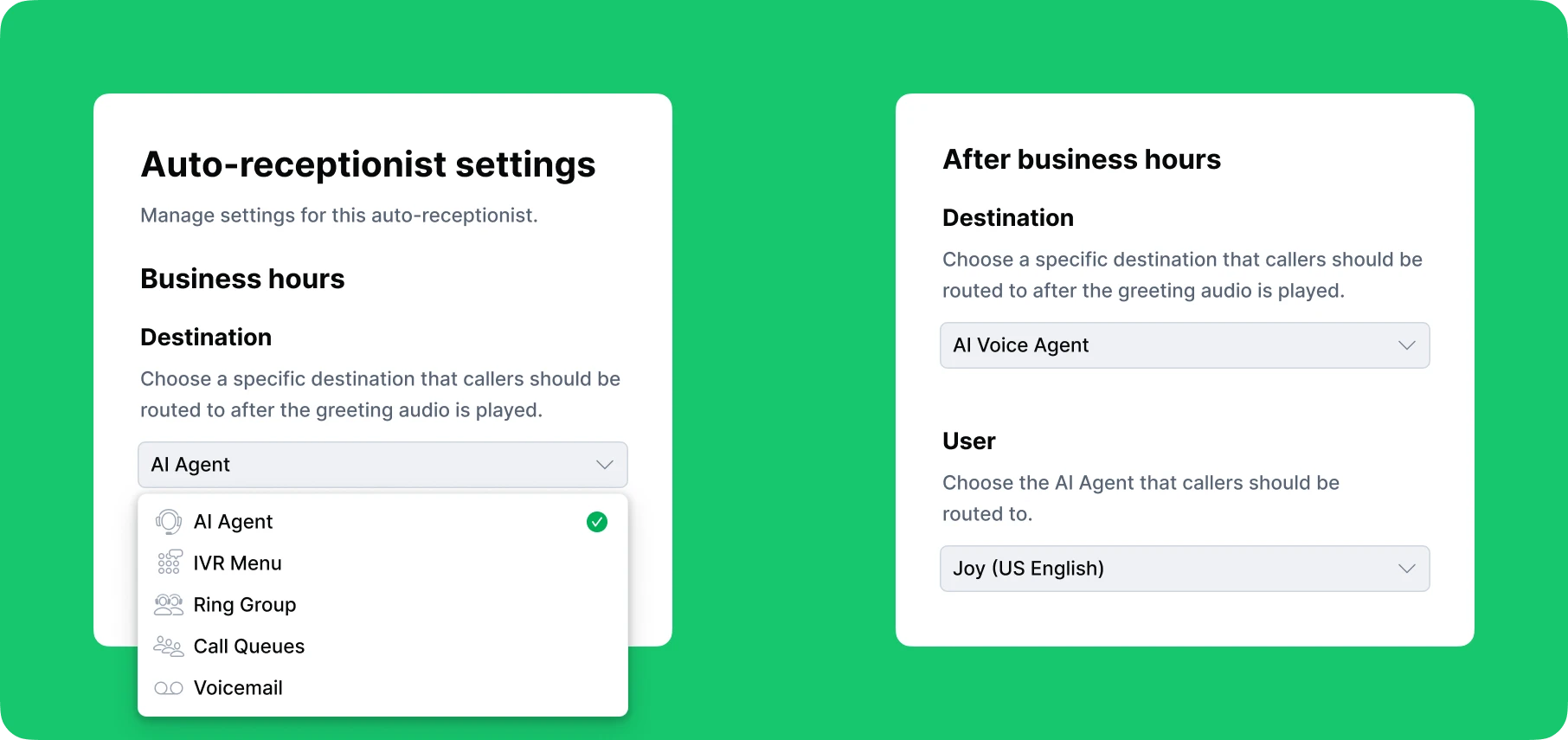
Call routing can vary depending on your business hours. During office hours, the auto attendant might connect callers to available team members. After hours, it can play a different message and route calls to voicemail or an on-call staff member.
The Role of an Auto Attendant in the Caller Journey
An auto attendant serves as a virtual receptionist or call manager that guides callers from the moment they connect with your business. It answers every incoming call, delivers a professional greeting, and follows a call flow designed around your specific routing rules.
Unlike a live receptionist, it operates without breaks and works on the weekends. This reliability helps businesses maintain a professional image while reducing the workload on live staff.
What Is a Call Queue and How Does It Work?
A call queue is a business phone system feature that places incoming calls in a virtual line when all team members are busy. Instead of sending callers to voicemail or dropping the call, it holds them in the queue and ensures they are answered in the order they arrived, or based on priority rules set by the business.
While in the queue, callers typically hear hold music or customized messages. Some systems also announce the estimated wait time or the caller’s position in line. To improve the caller experience even further, call queues can offer options such as leaving a voicemail or requesting a callback instead of waiting on hold.
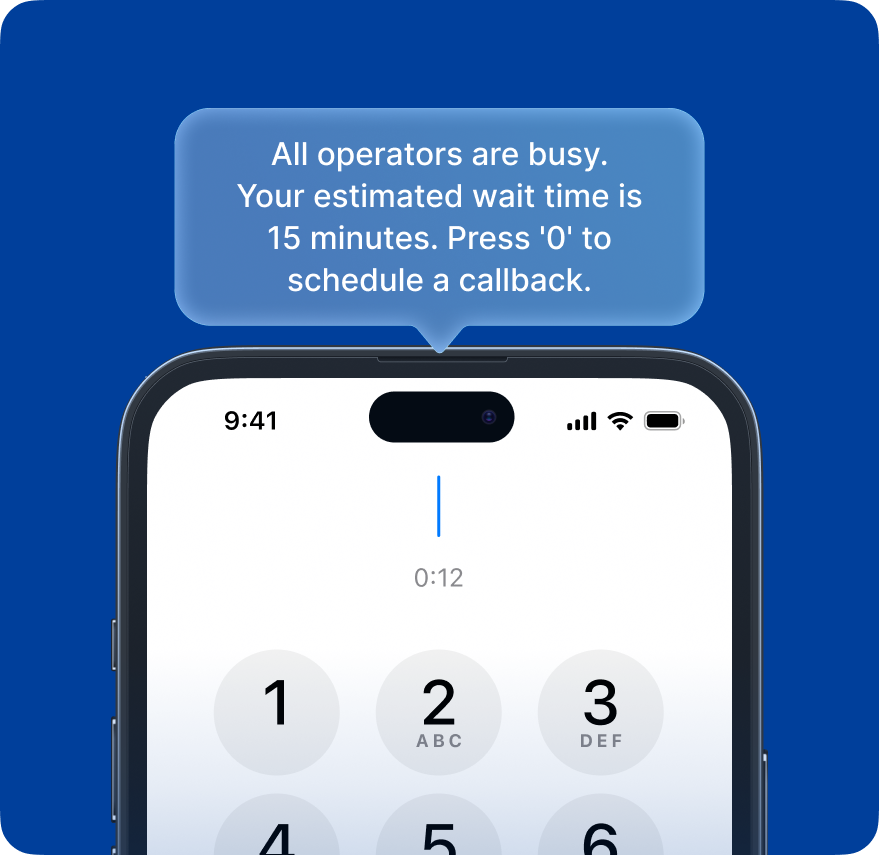
Calls are automatically distributed to available team members using different routing methods, including:
- Longest idle: sends the call to the team member who has been available the longest
- Rotating: distributes calls evenly by rotating through team members
- Sequential: tries agents in a specific order
- Simultaneous: rings all assigned agents at once
How Do Callers Reach a Call Queue?
A call queue can be linked to one or more business phone numbers. Calls to those numbers are directed into the queue. For businesses with multiple departments, call queues are often used after an IVR (Interactive Voice Response) menu. The phone menu routes the caller based on their selection and then places them in the appropriate queue.
Differences Between an Auto Attendant and a Call Queue in Call Handling
Auto attendants and call queues are both essential features of effective inbound call management, helping businesses reduce missed business calls and ensure a smooth caller experience. While they work together, each plays a different role in how calls are handled.
An auto attendant functions as a digital receptionist, answering incoming calls and routing them based on predefined call flows.
A call queue, or phone queue system, is a virtual waiting line that holds incoming calls when all agents are busy. Instead of dropping calls, the queue keeps callers in line, plays hold music or announcements, and distributes calls automatically once an agent becomes available.
These tools are often used together to enable more advanced call handling. For example, an auto attendant acting as a virtual receptionist for a small business can route calls during office hours directly to a call queue.
One of the most popular setups, especially in virtual call centers, is pairing an auto attendant with an IVR menu. This allows callers to be routed to specific call queues based on their needs, such as sending account-related inquiries to an “account support” queue and technical issues to a “tech support” queue.
Learn more about IVR menus and how they work.
Call Queue vs Auto Attendant: Functionality Comparison
The table below outlines the core functional differences between an auto attendant and a call queue:
| Functionality | Auto Attendant | Call Queue |
|---|---|---|
| Primary role | First-line call routing | Hold and distribute calls |
| Caller wait time | Minimal | Varies with queue length |
| Agent involvement | Only after routing | Mandatory for resolution |
| Ideal scenarios | Basic call routing | High-volume support |
| Routing triggers | Predefined rules based on business hours | Agent availability, longest idle, round-robin, and skill-based routing |
Auto Attendant vs Call Queue: Feature Comparison
The following table compares key features of auto attendants and call queues:
| Feature | Auto Attendant | Call Queue |
|---|---|---|
| Custom greeting | Yes | Yes |
| Phone number support | Yes, can be assigned to multiple numbers | Yes, can be assigned to multiple numbers |
| Custom business hours | Yes, supports time-based routing | Yes, supports time-based queue behavior |
| Routing method | Basic routing based on rules | Advanced routing: agent availability, longest idle, round-robin, skill-based |
| Hold music | Yes | Yes |
| Auto callback option | No | Yes |
| Voicemail option | Yes | Yes |
| Call overflow handling | Limited (e.g. voicemail) | Yes |
How Auto Attendant and Call Queue Work Together in Practice
A mid-sized real estate agency uses a small business VoIP system to manage a steady stream of inquiries from buyers, sellers, and renters. When someone dials the main office line, the call reaches an auto attendant that answers with a welcome greeting.
The auto attendant is integrated with an IVR phone menu that presents callers with clear options such as “Press 1 for property listings, 2 for mortgage consultation, or 3 to speak with an agent.”
Once a selection is made, the caller is routed into a dedicated call queue that uses simultaneous call handling, ringing all available agents at once to ensure the fastest response.
If no agents are available, the system activates call wait time solutions like estimated wait times, hold music featuring real estate information, or a callback request.
By combining an auto attendant with smart call queuing, the agency handles high call volumes efficiently, minimizes missed opportunities, and delivers a seamless client experience.
Benefits of Using Auto Attendants and Call Queues for Small Businesses
For small businesses and startups, implementing an automated call handling system with an auto attendant and call queues comes with various benefits:
-
Professional first impression. An auto attendant answers every call with a customized greeting, creating the impression that your business has a dedicated receptionist. This helps establish professionalism from the first interaction, while also allowing you to share important information such as business hours, promotions, or service updates.
-
Reduced missed calls. Auto attendants and call queues work together to ensure no call goes unanswered. The auto attendant handles every incoming call 24/7. For after hours and holiday calls, it can route them to voicemail, an on-call agent, or even an AI voice assistant. This ensures that customers never hear unanswered rings.
Meanwhile, the call queue prevents lost calls due to busy lines by placing callers in a virtual line until an agent becomes available.
-
Improved customer satisfaction. By combining a smart auto attendant with an efficient call queue, callers are directed quickly to the right destination. Even if there’s a short wait, customers hear hold music or real-time updates rather than silence, making the experience more engaging and reassuring. The result is faster service and a smoother overall experience that leaves a positive impression.
Auto Attendant and Call Queue Historical Reports
As a small business owner, it’s natural to ask: Can I track how my auto attendant and call queue are performing? The answer depends on your phone system provider. With a solution like DialLink, the answer is yes.
DialLink’s business phone system provides detailed call timelines that map every step of the PBX call flow. You can see when a caller reaches the auto attendant, which menu option they select, what call queue they enter (and at what position), how long they wait, which team member handles the call, and when the interaction ends. In short, you gain full visibility into the caller’s journey from start to finish.
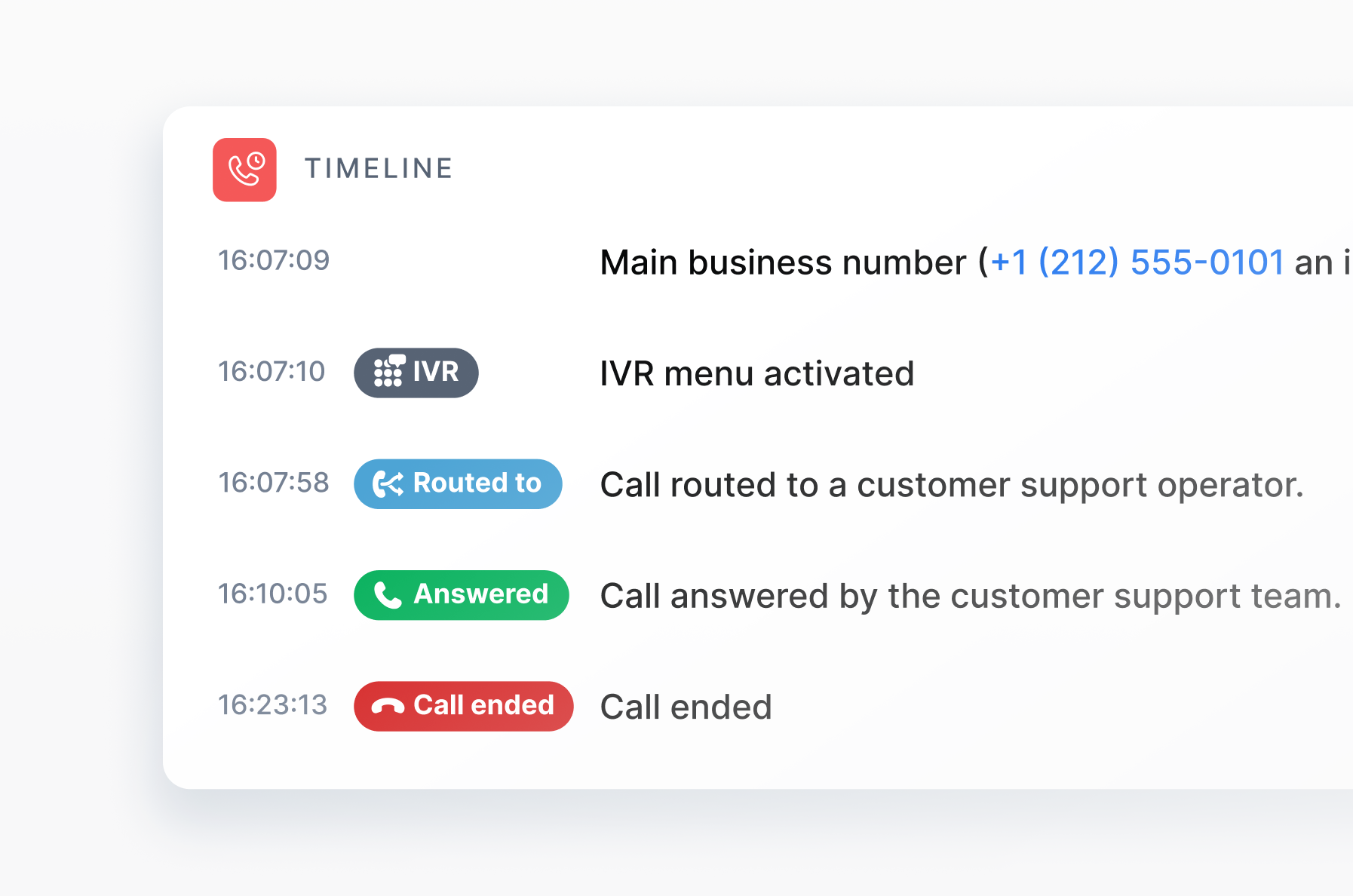
For small businesses, these historical reports are invaluable. They help you:
- Identify call volume patterns
- Measure call wait times and agent responsiveness
- Evaluate whether your current auto attendant menu is routing calls effectively
You can answer key questions like:
- “How long are customers waiting on hold on average?”
- “Are calls being routed to the right teams quickly?”
- “Is our new call menu actually improving efficiency?”
Armed with these insights, you can fine-tune routing logic, update menus, and improve the overall caller experience.
Conclusion
Auto attendants and call queues are both essential tools for effective inbound call management, but they serve different purposes. While the auto attendant acts as a virtual receptionist, the call queue ensures that calls are handled efficiently by keeping callers in line until a team member is available.
That’s why it’s not about choosing one over the other, but about using both together to create a seamless and professional caller experience.
With a solution like DialLink’s business phone system, you don’t have to choose. It combines both features in a single platform, letting you set them up effortlessly through an intuitive interface.
An auto attendant acts as a virtual receptionist that answers incoming calls, plays a greeting, and routes callers based on rules. A call queue, on the other hand, holds callers in a virtual line when all agents are busy and distributes calls as agents become available.
Yes, many businesses benefit from using both. The auto attendant helps route incoming calls, while the call queue ensures callers aren’t lost during busy periods.
You don’t always have to choose. Many small businesses benefit from using both. An auto attendant is ideal for greeting callers and routing them based on their needs or the time of day. A call queue is best when you have multiple agents handling calls and want to manage wait times efficiently.
When all agents are unavailable, callers are placed in a queue where they can hear hold music, estimated wait times, or their position in line. Many systems also offer a callback request or a voicemail option to prevent dropped calls and keep the experience smooth.
Featured Tags
Share


Arina Khoziainova
Content Writer at DialLink
Arina is a content writer with over 7 years of experience in the IT industry. At DialLink, she creates clear, insightful content that helps small business and startup owners simplify communication and drive growth using modern tools. With a strong focus on practical value, Arina transforms complex topics into accessible, actionable stories.

Keep Reading

Auto Attendant vs IVR: What’s the Difference and Which One to Choose for a Small Business
Discover how auto attendants and IVR systems differ, how they work together, and which call routing option fits your small business best.
December 15, 2025
9 minutes

Auto Attendant Recordings: Examples, Samples and Best Practices for Small Businesses
Explore auto attendant recording examples, samples, and tips for small businesses and startups to create professional phone greetings.
December 24, 2025
7 minutes

Best Auto-Attendant Systems & Services for Small Businesses
Explore the best auto attendant systems and software for small businesses. Learn features, types, and top providers.
December 23, 2025
10 minutes
Auto Attendant Call Flow Templates
Use these auto attendant templates to create your own business-hours, after-hours, and holiday call handling logic.
May 28, 2026
11 minutes
Types of Business Phone Systems: Cloud, VoIP, PBX & More
Discover different types of business phone systems, how they differ, and which options may be the best fit for your business.
January 07, 2026
12 minutes

Google Voice Business Phone System: Features, Pricing, and Limitations for Small Businesses
Learn how the Google Voice business phone system works, explore plans, features, and limitations for small businesses and startups.
January 05, 2026
10 minutes

Auto Attendant Message Examples and Scripts for Small Businesses
Find a list of auto attendant message examples, samples, and scripts that you can use for your small business phone system.
December 25, 2025
10 minutes

Google Voice Auto Attendant: What It Is and How It Works
Explore how Google Voice auto attendant works and whether it’s right for your small business.
December 22, 2025
9 minutes