Blog
Business Phone System
Top 10 Best Medium-Sized Business Phone Systems in 2026

Top 10 Best Medium-Sized Business Phone Systems in 2026
Compare the top business phone systems for medium-sized businesses to find a solution that fits your team’s size, budget, and growing communication needs.



In this article
- Key Reasons to Use a Cloud VoIP Phone System for Medium-Sized Businesses
- The Best Medium-Sized Business Phone Systems at a Glance
- What Medium-Sized Businesses Need in a Phone System
- RingCentral: Unified Communications Platform
- Dialpad: AI-powered Phone System for Sales and Support Teams
- Aircall: Phone System for High-volume Sales and Support Teams
- DialLink: The Best Overall Phone System for Medium-sized Businesses
- Nextiva: Unified Phone System for Omnichannel Teams
- 8x8: Unified Communications Platform with Strong International Calling
- Ooma Office: VoIP Phone System for Office-based Medium-sized Businesses
- CloudTalk: AI Business Calling Platform with Global Reach
- Vonage: Flexible VoIP Phone System for Businesses that Need Customization
- Zoom Phone: Business Phone System Add-on for Zoom-first Teams
Key takeaways
- For most medium-sized businesses, cloud VoIP phone systems are the best fit, with faster deployment, lower upfront costs, provider-managed maintenance, and easy scaling across teams and locations.
- When comparing providers, look for enough numbers for your headcount, advanced call management, integrations with your existing tools, access across devices, AI automation, and international coverage.
- RingCentral, Dialpad, and Aircall offer broad feature sets, but capabilities like AI receptionists, IVR menus, or AI call summaries come with usage caps or at extra cost.
- Nextiva, Ooma Office, CloudTalk, and Vonage put advanced call management, AI features, or key integrations behind higher-tier plans or paid add-ons.
- 8x8 suits teams with heavy international calling, while Zoom Phone fits teams already standardized on Zoom.
- DialLink is the best overall pick for medium-sized businesses, with multi-level phone menus and call queues, AI voice agents built into the phone system, and local and toll-free numbers in 100+ countries.
For medium-sized businesses, choosing a phone system can be challenging. Basic solutions no longer meet your needs, but enterprise platforms can be too complex and costly, leaving you stuck in between.
That’s why we’ve narrowed it down to the best phone systems for medium-sized businesses, to help you speed up your research process.
Key Reasons to Use a Cloud VoIP Phone System for Medium-Sized Businesses
In this guide, we focus on cloud-based VoIP phone systems, as they’re the best fit for most medium-sized businesses today.
Unlike traditional landline or on-premise systems, cloud VoIP removes the need for physical infrastructure and ongoing maintenance. Deployment is faster, upfront costs are lower, and your provider handles updates and maintenance, so your team doesn’t have to manage it internally.
For medium-sized businesses, this is especially important as operations become more complex. Cloud VoIP gives you the flexibility to scale without friction. You can add or remove users, assign numbers across locations, and adjust call routing as your team changes.
The Best Medium-Sized Business Phone Systems at a Glance
Here’s a quick look at the top picks before we get into the details.
| Provider | Best For | Starting Price (Yearly) | Free Trial |
|---|---|---|---|
| RingCentral | Best for unified calling, video, and messaging | $20/user/mo | 14 days |
| Dialpad | Best for built-in AI across sales and support teams | $15/user/mo | 14 days |
| Aircall | Best for high-volume sales and support calls with deep CRM sync | $30/license/mo (min. 3) | 7 days |
| DialLink | Best overall for medium-sized businesses | $15/user/mo | 7 days |
| Nextiva | Best for omnichannel customer-facing teams | $15/user/mo | None |
| 8x8 | Best for teams with significant international calling | Quote-based | 30 days |
| Ooma Office | Best for office-based teams prioritizing desk phones | $19.95/user/mo | 30 days |
| CloudTalk | Best for outbound sales teams needing global reach | $19/user/mo | 14 days |
| Vonage | Best for customizable, API-first communication | $13.99/user/mo | None |
| Zoom Phone | Best for teams already standardized on Zoom | $15/user/mo | 30 days |
Pricing reflects publicly listed starting rates as of May 2026 on annual billing. Always verify current pricing on the provider’s website before making a decision.
What Medium-Sized Businesses Need in a Phone System
Before diving into each provider, let’s look at the key factors medium-sized businesses typically focus on when evaluating phone systems.
Enough seats and numbers to match your headcount
As your team grows and adds more employees, a single shared number isn’t enough. You need individual local numbers, company toll-free lines, all managed in one place and easily integrated into your call flows.
Advanced call management at scale
Medium-sized businesses need more than basic call forwarding. Multi-level IVR phone menus, call queues, skill-based routing, and business-hours routing are essential for building structured, multi-department call flows.
Integrations with the tools your team already uses
Medium-sized businesses rely on multiple tools across sales, support, and operations, so the phone system needs to fit into that ecosystem. Integrations with CRMs and support platforms ensure communication data flows seamlessly between systems, reducing manual work and keeping customer information consistent.
Mobile and desktop access, not just desk phones
Medium-sized businesses have diverse communication needs across roles. Office staff may prefer desk phones, account managers are often on the go, support teams work remotely, and field reps are rarely at a desk. A phone system needs to support all of these workflows seamlessly across devices.
Automation with AI features
Medium-sized businesses often handle a large volume of calls, so they benefit from features that automate call handling itself, like AI voice agents, and save time on manual work like call notes with AI-generated summaries and action items.
International coverage
As medium-sized businesses grow, some of them expand to clients, partners, or vendors in other countries. A phone system should support international calling and messaging, and even offer the ability to add local numbers in different countries, so the communication platform never becomes a barrier to international growth.
Top 10 Best Business Phone Systems for Medium-Sized Businesses
Below, we break down the 10 top options, what each one does best, and who it’s the right fit for, so you can compare them and choose the one that matches how your team works.
RingCentral: Unified Communications Platform
RingCentral’s business phone system called RingEX combines voice calling, SMS, video meetings, and internal chats in a single interface, which makes it a common choice for medium-sized businesses that want to consolidate multiple communication tools under one provider.
Key features:
- Each user gets one free local or toll-free number. Additional numbers are available at extra cost. Local numbers come with unlimited domestic calling in the US and Canada, while toll-free minutes are included up to a limit depending on the plan.
- Auto-attendant, multi-level phone menus, call queues, and advanced call routing are all available. Note that some features, such as automated callback, are part of RingCentral's separate call center product rather than the core phone system.
- RingCentral offers a large ecosystem of 300+ integrations, including Salesforce, HubSpot, Zendesk, Microsoft 365, and Slack.
- RingCentral offers a paid AI receptionist add-on that can handle incoming calls and route them to the right team member with context. AI-generated transcripts and summaries for both calls and video meetings are available across all plans.
- RingCentral supports iOS, Android, Windows, and Mac apps, along with a wide range of desk phones for office-based staff.
- International calling is available through add-on global calling plans that cover unlimited calls to a defined set of countries. International local and toll-free numbers can be added at an extra cost.
Limitations:
- SMS is capped at 25 to 100 messages per user per month depending on the plan, which may not be sufficient for medium-sized businesses with higher messaging needs.
- The AI Receptionist is not included in any phone system plan and is available as a separate add-on at $39 per month.
- The platform can feel complex to set up even for teams with dedicated IT support.
Pricing
RingEX plans range from $20 to $35 per user per month (annual billing), or $30 to $45 (monthly billing).
Summary
RingCentral covers most of what medium-sized businesses need from a communication platform, bringing calling, video, team messaging, and a broad integration ecosystem under one roof.
That said, teams with high messaging volumes may find the SMS caps limiting, and the additional cost of the AI Receptionist means the full feature set comes at a higher price than the base plan suggests. The initial setup can be a complex task and require the IT support staff to be involved.
Dialpad: AI-powered Phone System for Sales and Support Teams
Dialpad offers an AI business phone system called Dialpad Connect that unifies voice and video calling, SMS messages, and team chats in one platform.
Key features:
- Each user gets a free local business phone number with unlimited calling. Additional local numbers can be added from the Pro plan onwards, while toll-free numbers are available on all plans.
- Dialpad Connect includes essential call management features such as auto-attendant, department and ring groups, and call queues.
- Dialpad Connect integrates with major business platforms including Salesforce, HubSpot, Zendesk, Slack, and Microsoft Teams.
- Dialpad offers an AI voice agent that helps handle high-volume routine requests but they are not a part of their phone system. Real-time call transcription, voicemail transcription, call summaries, and automated action items are available on all plans.
- Dialpad is available on desktop, laptop, iOS, Android, and desk phones.
- International calling and messaging are supported in 70+ countries, with local number availability in 50+ countries.
Limitations:
- IVR phone menus and automated callbacks are not included in Dialpad Connect and are only available as part of a separate support product at an additional cost.
- SMS is capped at 250 messages per user per month.
- US and Canada toll-free numbers come at an additional $15 per number per month on annual billing, or $17 on a monthly plan, which is higher than most competitors.
- International toll-free numbers are not available.
- The Enterprise plan requires a minimum of 100 seats.
- AI voice agents are available as a separate product only, billed based on the number of conversations handled.
Pricing
Dialpad Connect pricing starts at $15 per user per month for the Standard plan and $25 for Pro, when billed annually. Monthly billing is $27 and $35 respectively.
Summary
Dialpad Connect is a solid option for medium-sized businesses looking for an AI-forward phone system with a clean interface and essential call management capabilities built into every plan. However, it has some notable gaps for growing teams: the absence of IVR phone menus in the core product, capped SMS, and the additional costs of toll-free numbers and AI voice agents can add up quickly. Businesses that rely heavily on structured call flows or high messaging volumes may find these limitations a drawback compared to other platforms at a similar price point.
Aircall: Phone System for High-volume Sales and Support Teams
Aircall’s business phone system brings voice, SMS, and WhatsApp into a single workspace. It’s built specifically for sales and support teams that handle a high volume of customer interactions and need structured call management, deep CRM integration, and team-level performance visibility.
Key features:
- Each plan comes with one free local or toll-free number with unlimited calling within the US and Canada (toll-free minutes not included). Additional local and toll-free numbers are available at $6 per number per month.
- Aircall offers a wide range of call management features, including phone menus, call queues, smart call routing, and ring groups. Admins can build and adjust call flows using a visual editor, making it easy to set up without technical help. The platform is also built with sales teams in mind, offering a power dialer to help teams move through outbound calls more efficiently.
- A key strength is its native integration with CRM and support tools like Salesforce, HubSpot, Zendesk, and Pipedrive.
- Aircall includes AI voice agents in its core plans, billed per minute. AI call and voicemail transcriptions are available in the core plans, while AI call summaries require a separate add-on.
- Aircall works across iOS, Android, Windows, and Mac, with desk phones also supported.
- Local numbers are available in 100+ countries, and international calling bundles are available for teams with cross-border calling needs.
Limitations:
- Aircall charges per license rather than per user, meaning costs are based on phone lines. Each plan also requires a minimum number of licenses: 3 for Essential and Professional, and 25 for Enterprise. This can make it less cost-effective than per-user pricing models.
- SMS is not included in any subscription plan.
- AI call summaries are available as an add-on at $9 per license per month and are not included in base plans.
- WhatsApp messaging is available as an add-on at $10 per license per month.
Pricing
Aircall pricing starts at $30 per user/month (annual) or $40 (monthly) for the entry plan, and $50 or $70 for the next tier, with custom pricing for enterprise.
There’s a minimum of 3 users for standard plans and 25 for custom plans.
Additional costs include AI features ($9/user/month), AI voice agent usage (from $0.49/minute), and WhatsApp for Business ($10/user/month).
Summary
Aircall is a strong fit for medium-sized businesses with active sales or support teams that handle high call volumes from shared lines and need deep CRM integration. However, its per-license pricing model can become costly for businesses that need personal numbers for individual users, as every additional phone number comes at an extra monthly charge.
Features like SMS, AI call summaries, and WhatsApp messaging are not included in base plans and each come at an additional cost, so businesses that rely on multiple communication channels should factor in the total price before committing.
DialLink: The Best Overall Phone System for Medium-sized Businesses
DialLink is a business phone system built for teams that have outgrown basic tools but don’t need the complexity of enterprise platforms. It brings calls, SMS, and WhatsApp for Business messaging into one app, so your team doesn't need to switch between tools to manage these channels. Every interaction is also unified in a single thread per contact, keeping the full context in one place. AI voice agents that handle calls 24/7 are built-in to the platform.
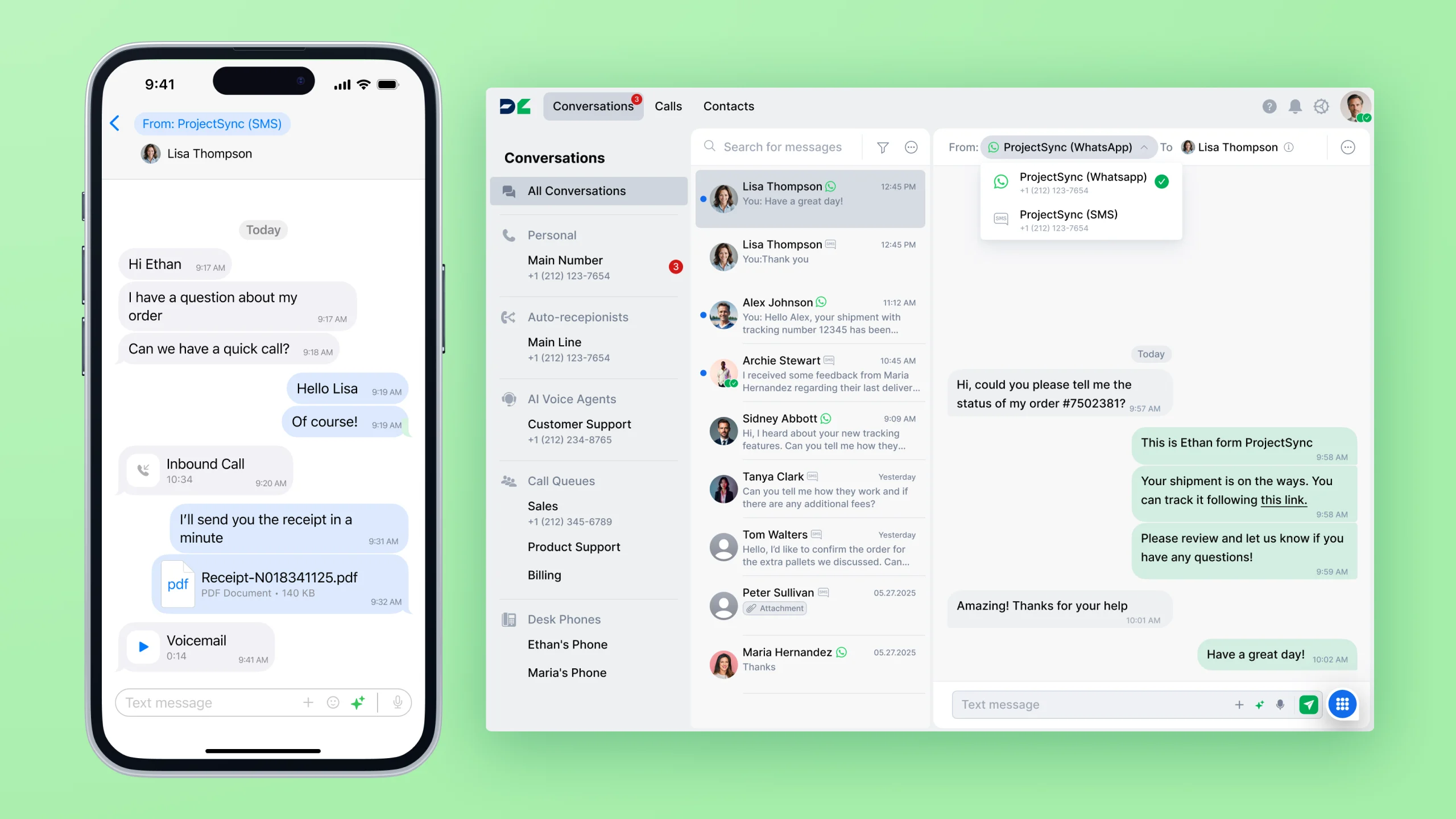
Key features:
- Every user on every subscription plan gets a free US local number with unlimited calls and messages in the US and Canada. Additional local and toll-free numbers are available at an extra cost and managed from a single admin portal.
- Auto-receptionist with business-hours routing, multi-level phone menus, and call queues let you build structured call flows across departments without needing developers. Routing can be adjusted from the admin portal as your team or structure changes.
- DialLink integrates natively with HubSpot, Salesforce, Microsoft Teams, and Slack, keeping call data and customer information accurate across your existing tools. You can also sync contacts with Microsoft 365 and Google Contacts.
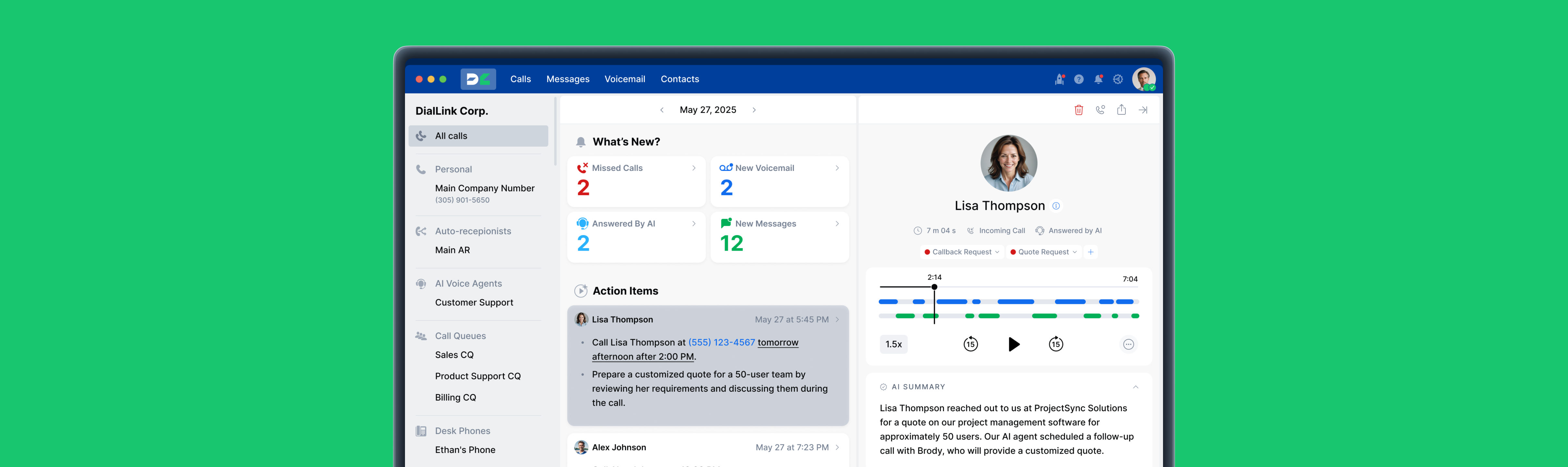
- DialLink AiVA handles routine incoming calls automatically and routes more complex ones to the right team member with context. Unlike some competitors, AI voice agents are built into the phone system and require no additional purchase or complex setup.
- The platform also provides AI-generated call transcripts, summaries, and action items to cut down on manual notes and post-call logging. AI call tagging helps organize calls and makes them easy to find later.
- DialLink offers desktop apps for Windows and Mac, as well as mobile apps for iOS and Android.
- DialLink sells desk phones that come pre-provisioned with the system and ready to use out of the box.
- International calling and messaging are available at competitive rates, with local and toll-free numbers available in 100+ countries, all managed through the same platform.
Limitations:
- Toll-free minutes are not included in subscription plans and are billed separately.
- The list of native integrations is limited and may not cover all the tools medium-sized businesses rely on.
- Support for user-owned desk phones is only available on the Enterprise plan.
Pricing
DialLink offers transparent, predictable pricing with no hidden fees or surprise add-ons. Plans start at $15 per user per month for the Essential tier when billed annually, or $20 per user per month with monthly billing. View the full pricing here.
Summary
DialLink is a strong all-around choice for medium-sized businesses that want a balance of communication channels, advanced call management, and built-in AI, without the complexity of larger platforms or the unpredictable add-on costs that come with them.
Nextiva: Unified Phone System for Omnichannel Teams
Nextiva brings voice, video, team chat, SMS, WhatsApp, email, and social media accounts into one platform, NextivaONE. For medium-sized businesses with customer-facing teams handling inbound inquiries across multiple channels, this unified inbox adds real operational value.
Key features:
- Each user license includes a free US or Canada local phone number with unlimited calling and messaging within the US and Canada. Toll-free numbers with limited minute packages are included in higher-tier plans and available as an add-on on the entry plan.
- Auto-attendant, phone menus, basic call routing, and ring groups are available across plans. Advanced call management features like call queues are only available on the higher-tier plan. A visual call flow designer is also included.
- Integrations with Google, Outlook, and Microsoft Teams are available within core plans.
- AI features including an AI voice assistant, call notes, and summaries are available on the higher-tier plan.
- Mobile, desktop apps, and desk phones are supported.
- International calling and messaging are available at per-minute rates.
Limitations:
- SMS messages are limited on all plans except the highest tier.
- CRM integrations with Salesforce and HubSpot are only available as paid add-ons.
- The number of third-party software integrations is limited compared to competing platforms.
- International phone numbers are not available.
Pricing
Nextiva offers three phone system plans ranging from $15 to $75 per user per month on annual billing. On monthly billing, prices range from $25 to $75 per user per month.
Summary
Nextiva is a good fit for medium-sized businesses that need a unified view across multiple customer communication channels. However, accessing more advanced call management features and AI capabilities requires subscribing to a higher-tier plan, which significantly increases the cost. On top of that, CRM integrations with tools like Salesforce and HubSpot come at an additional charge, and the lack of international phone numbers may be a dealbreaker for teams that rely on these CRMs or are planning to expand their global presence.
8x8: Unified Communications Platform with Strong International Calling
8x8 offers a business phone system as part of their unified communication platform called 8x8 Work, which combines calls, video meetings, messaging, and team chats. Its key differentiator for medium-sized businesses is international calling: the X2 plan includes unlimited calling to 14 countries, while the X4 plan extends this to 48. For teams with frequent cross-border communication, this can significantly reduce costs compared to per-minute rates.
Key features:
- Each user gets a free US or Canada local phone number with unlimited calling within the US and Canada. Additional local and toll-free numbers are not included in base plans and are available as add-ons.
- 8x8 includes common call management features such as auto-attendant, phone menus, call queues, and ring groups.
- Integrations with Microsoft Teams, Slack, Salesforce, and Zendesk are included.
- 8x8 offers an AI agent called Intelligent Customer Assistant (ICA) that handles routine incoming calls and escalates more complex ones to agents with full context. AI call transcriptions, summaries, and action items are also available.
- Mobile and desktop apps are available for iOS, Android, Windows, and Mac. A wide range of desk phones is also supported.
- The X2 plan includes unlimited calling to 14 countries, with the X4 plan extending coverage to 48 countries. Local and toll-free numbers are available in 100+ countries.
Limitations:
- Pricing is not publicly listed, making it difficult to compare costs or understand what is included in each plan without contacting sales.
- SMS is only available in the US, Canada, and Australia (mobile numbers only).
Pricing
8x8 pricing is not publicly available and requires requesting a quote.
Summary
8x8 is a strong fit for medium-sized businesses with significant international calling needs or distributed global teams that benefit from broad country coverage within a single plan. However, the lack of transparent pricing and feature breakdown makes it harder to evaluate how cost-effective the platform is compared to alternatives.
Ooma Office: VoIP Phone System for Office-based Medium-sized Businesses
Ooma Office is a cloud VoIP system focused on simplicity, predictable pricing, and strong desk phone support. It’s designed for office-based teams that want a reliable system without lengthy deployment or IT overhead.
Key features:
- Each account includes a company local number and one free toll-free number. Every user also gets their own unique local number. Unlimited calling is included for the US, Canada, Mexico, and Puerto Rico, along with free inbound minutes for toll-free calls.
- Ooma's plans include a virtual receptionist, phone menus, ring groups, call queues, and call parking.
- Ooma integrates with popular business platforms including Salesforce, HubSpot, and Zendesk. The integration list is limited to around 19 applications, and most are only available on higher-tier plans.
- Ooma offers an AI answering service that handles incoming calls, gathers caller information, understands the reason for the call, answers common questions, flags urgency, and sends notifications. AI transcriptions and summaries are available for calls on higher-tier plans.
- Desk phone hardware is well supported, making Ooma a strong choice for office-based teams. Mobile and desktop apps are available for iOS, Android, Windows, and Mac.
- Unlimited calling covers the US, Canada, Mexico, and Puerto Rico. International calling beyond those markets is available at per-minute rates.
Limitations:
- Advanced call management features like phone menus and call queues, which are essential for organizing calls in medium-sized businesses, are only available on higher-tier plans.
- SMS is not included in the entry plan, and higher tiers cap messages at 250 or 1,000 per month, which may not be sufficient for businesses that rely heavily on messaging.
- The AI answering service is available as an add-on starting at $14.99 per account per month.
- AI transcriptions and summaries are only available on higher-tier plans, whereas many competitors include them from their entry-level plans.
- International local and toll-free numbers are not available.
Pricing
Ooma Office plans range from $19.95 (Essentials) to $24.95 (Pro) to $29.95 (Pro Plus) per user per month. No annual contract is required.
Summary
Ooma Office delivers good value for office-based medium-sized businesses that prioritize simplicity, predictable pricing, and strong desk phone support. The lack of a long-term contract commitment adds flexibility that many competitors don't offer.
However, teams that need advanced call management, high-volume messaging, or AI features from day one will need to budget for a higher-tier plan or look at alternatives that include these capabilities as standard.
CloudTalk: AI Business Calling Platform with Global Reach
CloudTalk is a cloud phone system built for sales and support teams that handle a high volume of calls. Its standout advantage for medium-sized businesses is global number coverage: local numbers are available in 160+ countries, and the platform includes outbound dialing tools designed to help sales reps work through call lists faster.
Key features:
- Each user license includes a free local phone number, selectable from 160+ countries. Unlimited calling within the US and Canada is included. Additional US and Canada local and toll-free numbers are available at $6 per number per month.
- CloudTalk offers a full suite of call management features including auto-receptionist, phone menus, skill-based and condition-based routing, ring groups, call queues, and queue callback.
- 95+ integrations are available with CRM, helpdesk, and ATS platforms.
- CloudTalk's AI voice agent handles inbound and outbound calls in 60+ languages. AI transcriptions, summaries, action notes, and sentiment analysis are also available.
- The platform works across iOS, Android, Windows, and Mac.
- International calling and messaging are available at competitive rates, with local and toll-free numbers available in 160+ countries.
Limitations:
- SMS is not included in any plan and is billed on a per-usage basis.
- Salesforce integration is only available on the highest-tier plan.
- Voicemail transcriptions are not available.
- AI call intelligence features are available as an add-on at $9 per user per month.
- AI voice agents are also an add-on. The free tier includes an AI receptionist for inbound calls with only 50 minutes included, which is unlikely to be sufficient for medium-sized business volumes. Additional minutes require purchasing bundles starting at $99 per month.
Pricing
CloudTalk plans start at $19 per user per month for Lite, $29 for Essential, and $49 for Expert (annual billing). With monthly billing, prices start at $27, $39, and $69 per user per month, respectively.
Summary
CloudTalk is a strong fit for medium-sized businesses that need global number coverage and structured call management. However, teams that rely on text messaging as a key communication channel should be aware that SMS is not included in any plan and is billed separately based on usage.
Similarly, the AI voice agent pricing can escalate quickly for businesses handling higher call volumes, as additional minutes beyond the free allowance require purchasing bundles starting at $99 per month.
Vonage: Flexible VoIP Phone System for Businesses that Need Customization
Vonage business communication platform covers calling, messaging, video, and internal chats in a single app. Its key differentiator is flexibility, with a full API layer that allows teams to build custom call flows, integrate with non-standard tools, or extend the system into their own applications. This is especially valuable for businesses with technical resources that value high-level customization.
Key features:
- Each user includes one local phone number with unlimited calls and texts within the US, Canada, and Mexico. Additional local and toll-free numbers are available at additional cost.
- Vonage business phone system’s plans include a virtual receptionist, call forwarding, and call groups. Many essential call management features, such as call queues and conference calls, require purchasing add-ons.
- Vonage offers a limited selection of third-party integrations, and some popular ones like Salesforce come at an extra cost.
- Vonage offers an AI voice assistant capable of handling inbound and outbound calls, though pricing requires contacting the sales team. Built-in AI call transcriptions and summaries are available but are not part of the core business phone system.
- The platform supports desk phones as well as iOS, Android, Windows, and Mac apps, making it suitable for both office-based and hybrid teams.
- International coverage includes local numbers in multiple countries and competitive calling rates, though pricing varies by region and should be verified before committing.
Limitations:
- Additional local phone numbers are priced at $9.99 per month, which is higher than most competitors.
- Toll-free numbers are priced at $39.99 per number per month, significantly higher than industry standards.
- On-demand call recording is only available on higher-tier plans. Automatic call recording is available as an add-on at $49.99 per month.
- Popular add-ons that are included by default in many competing platforms come at extra cost: Salesforce integration ($4.99/month), call queues ($14.99/month), and a unified inbox for SMS, MMS, and WhatsApp messages ($9.99/month).
- AI call summaries, transcriptions, and voice agents are not built into the core phone system.
- Desk phone support is only available on the Premium plan and above.
Pricing
Vonage uses per-user pricing that scales down as your team grows. Plans start at $13.99 per user per month for Starter, $20.99 for Premium, and $27.99 for Advanced on annual billing. For teams of 5–19 users, prices drop to $12.59, $19.99, and $26.99 per user per month respectively. Monthly billing is also available at higher rates.
Summary
Vonage can work for medium-sized businesses that value flexibility and are comfortable building a custom setup through add-ons. However, the cost of those add-ons adds up quickly, and features that come standard with most competitors often carry an extra charge here. For teams looking for predictable, all-in pricing, Vonage is likely not the most cost-effective choice.
Zoom Phone: Business Phone System Add-on for Zoom-first Teams
Zoom Phone is a VoIP phone system built by Zoom, best known for its video conferencing platform. For medium-sized businesses already standardized on Zoom for meetings and collaboration, it offers a practical way to add business calling within the same interface without adopting a separate platform.
Key features:
- Each user gets a local number with unlimited or metered calling and unlimited SMS and MMS. Additional local and toll-free numbers are available at $5 per number per month.
- All plans include unlimited auto-attendants, phone menus, holiday and business hours routing, call queues, and call parking from the entry plan.
- Integrations with Salesforce, Slack, Microsoft 365, and Google Workspace are included across all plans.
- A paid AI receptionist add-on is available to greet callers, answer common questions, and route calls. All plans include post-call and voicemail AI summaries and action items.
- The platform supports desk phones for office-based staff, along with iOS, Android, Windows, Linux, and Mac apps.
- International calling is available at metered rates or as an unlimited add-on covering 15+ countries and regions at $10 per license per month. Local and toll-free numbers are available in 40+ countries.
Limitations:
- Feature set remains largely the same across all plans, leaving limited room to unlock more advanced capabilities as your business grows.
- AI features beyond call summaries require paid add-ons.
- The AI receptionist is available as a paid add-on and is not included in any base plan.
Pricing
When billed annually, Zoom Phone starts at $10 per user per month for metered calling in the U.S. and Canada, or $15 for unlimited calling. Higher-tier plans, such as Pro and Business, include unlimited calling only. Monthly billing increases prices by approximately 15%.
Summary
Zoom Phone is a strong fit for medium-sized businesses already using Zoom for meetings that want to consolidate calling into the same platform at a competitive price. The entry-level pricing is attractive, and having calls, meetings, and messaging in one place reduces tool sprawl. However, businesses looking to grow into more advanced call management or AI capabilities may find the feature ceiling limiting.
Try the Best Medium-Sized Business Phone System
We’ve covered the top phone systems for medium-sized businesses, each offering its own strengths to support the needs of growing teams.
While this guide helps you compare options, the best way to choose is to test how a system performs in your day-to-day operations.
Start your 7-day free trial with DialLink, set up your phone system quickly, and see how it supports your team across departments and locations.
The cost depends on the system type (landline vs. VoIP), deployment model (on-premise, cloud, or hybrid), and the provider. For most cloud-based VoIP systems, entry plans start around $15–$25 per user per month (annual billing).
However, these basic plans often don’t include the features medium-sized businesses need. In practice, costs are higher once you account for advanced call management, AI features, and integrations. It’s best to budget for the plan that matches your requirements, not just the lowest advertised price.
Phone systems for medium-sized businesses need to support more users, more numbers, and more complex call flows. Admins should be able to easily manage users, assign different types of numbers, and configure how calls are routed across departments.
They also require more advanced capabilities, such as multi-level phone menus, call queues, skill-based routing, and business hours routing. Integration needs are higher as well, with CRM, helpdesk, and collaboration tools expected to stay in sync.
Not necessarily. Many medium-sized businesses operate entirely through desktop and mobile apps. However, some roles still benefit from desk phones.
Most modern systems support various options, so teams can choose what works best for each role.


Arina Khoziainova
Content Writer at DialLink
Arina is a content writer with over 7 years of experience in the IT industry. At DialLink, she creates clear, insightful content that helps small business and startup owners simplify communication and drive growth using modern tools. With a strong focus on practical value, Arina transforms complex topics into accessible, actionable stories.

Keep Reading
Top 10 Best Business Phone Systems for Small Businesses in 2026
Compare the 10 best small business phone systems based on features, pricing, and ease of use to find the right fit for your business.
October 20, 2026
23 minutes

Best Auto-Attendant Systems & Services for Small Businesses
Explore the best auto attendant systems and software for small businesses. Learn features, types, and top providers.
December 23, 2025
10 minutes

Auto Attendant vs Call Queue: What Small Businesses Need to Know
Discover the differences between auto attendants and call queues, and how your small business phone system can use both for better call handling.
December 16, 2025
8 minutes

Auto Attendant vs IVR: What’s the Difference and Which One to Choose for a Small Business
Discover how auto attendants and IVR systems differ, how they work together, and which call routing option fits your small business best.
December 15, 2025
9 minutes

Local Vanity Phone Numbers for Business: What They Are and How to Get One
Read about what a vanity local phone number is, how businesses use them, and how to get one for your company.
December 12, 2025
8 minutes

Business Voicemail Greeting Examples for Every Situation (and Tips)
Explore a collection of voicemail greeting examples tailored to various industries and scenarios.
December 11, 2025
12 minutes
How to Get a Local Phone Number for Your Business
Learn how to check local phone number availability, choose the right one, and purchase it for your business with DialLink.
December 10, 2025
8 minutes

The Ultimate Guide to Local Phone Numbers for Business
Explore what local phone numbers are and how your business can easily get one.
December 09, 2025
6 minutes