
The Business Phone System for Real Estate
In real estate, a missed call can mean a lost listing or a buyer choosing another agent. DialLink’s business phone system unifies calls, messages, and team chats in one platform, helping you capture leads faster, handle tenant requests efficiently, and maintain professional communication across every property and location.

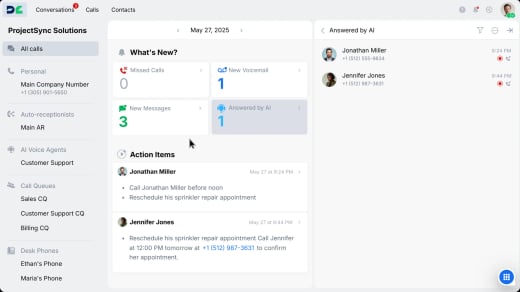
Capture Every Inquiry, Win More Listings

Easily get a dedicated business phone number
Keep your personal and work communications separate by setting up business numbers for each team or region, managed from one platform.

Route calls to the right agent or property
Automatically direct incoming calls based on property location, price range, or listing type, ensuring every client reaches the right agent the first time.

Never miss a sales lead or urgent request
Make sure every call is answered. Incoming calls can ring multiple agents at once or route through a queue, helping your team respond fast and close more deals.
Communicate with Clients on Their Preferred Channel

Send instant updates via SMS
Keep buyers, sellers, and tenants informed in real time by texting new listings, showing confirmations, or offer updates from your business number.

Connect with clients on WhatsApp for Business
Easily share property photos, short videos, and updates through WhatsApp Business, giving clients a fast and familiar way to stay in touch.

Showcase listings with rich RCS messages
Send interactive, branded messages that include property photos, virtual tour links, and call-to-action buttons to engage clients.
Improve Team Collaboration Across Properties and Offices

Share numbers and full communication history
Agents, property managers, and maintenance teams can access the same phone number with full visibility into calls and messages, so nothing gets missed.

Transfer calls with full context to your teammates
Easily route calls between agents or departments with all the details included, minimizing back-and-forth and ensuring smooth client handoffs.

Coordinate internally on client conversations
Use internal chat threads to discuss pricing strategy, negotiate offers, or coordinate showings without leaving the client conversation.
Call and Message from Anywhere:
Office, Open House, or On the Go

Take your business phone wherever you work
Make and receive calls or messages from your business number on any device: smartphone, tablet, laptop, or desk phone.

Never miss an important client message
If you can’t pick up a call, get voicemail transcriptions instantly in your app or email, so you can quickly follow up even during meetings or showings.
Let AI Handle the Busywork While You Close Deals

Get actionable notes from every call
Save time on manual note-taking, especially when you’re on the go with automatically generated call summaries and action items after every conversation.

Respond faster across all messages
Use AI-suggested replies that adapt to each conversation, allowing you to respond to customers quickly with just a few clicks.

Create professional greetings in seconds
Generate unlimited custom phone greetings using AI text-to-speech technology that turns your written message into a natural-sounding voice.

Why Real Estate Professionals Choose DialLink

Easy to set up and manage
Launch your phone system in minutes with an intuitive interface built for busy agents, not IT professionals.

Work from anywhere
Take calls and manage clients from your car, an open house, or your home office using the phone system on your mobile, laptop, or desk phone.

Flexible and affordable plans
Pay only for what you need with transparent, scalable pricing made for teams of any size.
Connect DialLink to Your Essential Real Estate Tools
Integrate DialLink with the business applications your team already relies on.



Frequently Asked Questions
What's the best phone system for real estate agents and brokerages?
One that combines calls and messages, mobile access, and AI automation. DialLink offers all of the above in one easy-to-use platform.
Can AI voice agents qualify leads for real estate?
Yes. AI agents can answer calls, ask qualifying questions, and route inquiries to the right agent.
Can I use DialLink with my existing real estate CRM?
Absolutely. DialLink integrates with CRMs like HubSpot and Salesforce, syncing client data and automating call logging. You can also use our API to integrate it with other business tools.
Do agents need to be in the office to take calls?
No. Agents can make and receive calls from anywhere using DialLink’s mobile or desktop apps.
Does DialLink support voicemail transcription and after-hours routing?
Yes. You can automatically transcribe voicemails and route calls based on business hours.


