
Capture More Business with Inbound Call Management Solution
Every time someone contacts your business, a prompt response is essential. Missed calls, long hold times, and misdirected callers create a poor experience that can cost you customers. According to PwC, 32% of customers stop doing business with a brand they love after just one bad experience. DialLink’s inbound call management software helps you organize incoming calls. This ensures every caller reaches the right person and no call goes unanswered.

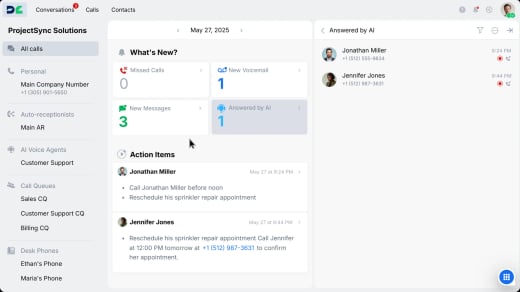

Make your business easy to reach
Set up toll-free and local phone numbers to serve customers across regions. DialLink manages all your business phone numbers and gives you full control and visibility over every incoming call.
Already have an existing phone number? Easily port it with an automated number porting process.
Choose Your Local Phone Number

Capture every call with a 24/7 auto-receptionist
Eliminate front desk bottlenecks with an auto-attendant that greets callers and sends them to the right person. Customize call flows based on your schedule. Send callers to team members during business hours and transition them to voicemail or AI-powered support after hours.
Smart call routing options for every scenario
Your inbound call management system automatically directs incoming calls to:

IVR menus
Guide callers through phone menus so they can easily choose the department or service they need.

Call queues
Place callers in a virtual waiting line with hold music and callback options.

Ring groups
Send calls to multiple team members at once to ensure quick response.

Team member
Route calls straight to an individual for direct handling.

Voicemails
Ask callers to leave a message, when no one is available, ensuring inquiry is captured.

AI voice agents
Automate routine customer call and provide after-hours support with AI.
Make inbound call handling easy for your team
Give your team the tools they need to manage incoming calls smoothly and improve customer service quality and efficiency.
Handle multiple calls at once
Accept parallel calls to manage multiple conversations at the same time.

Redirect calls automatically
Forward calls to other numbers based on business hours.

Transfer calls with full context
Hand off callers smoothly to the right team member without clients repeating information.

Place calls on hold
Pause calls with music or custom messages while consulting colleagues or gathering information.

Get hours back in your day with AI
Stop spending time on administrative tasks that AI can handle instantly, so you can spend more time talking to customers.
Read text instead of replaying calls
Get instant voicemail and call transcriptions to quickly locate important information.

Find any conversation in seconds
Automatically categorize and tag calls by topic or outcome for easy searching and reporting.

Get actionable notes from every call
Extract key discussion points and action items so you know exactly what to follow up on.

Instantly save contacts from incoming calls
Add unknown callers as new contacts with their names and numbers detected automatically.


Integrate DialLink’s inbound call management software to your favorite business tools
Connect DialLink with the business applications your team already relies on.




Frequently Asked Questions
What is inbound call management?
Inbound call management refers to the strategies and technologies businesses use to efficiently handle incoming customer calls. It involves organizing and optimizing call flow so calls quickly reach the right team member or department. This helps resolve customer inquiries faster and more effectively.
What are the types of inbound calls?
Businesses categorize inbound calls based on the caller’s intent. Common types include:
Customer support calls: Clients seeking assistance with product issues or service disruptions
Inquiry calls: Questions about products, pricing, or company policies
Sales calls: Potential customers wanting to learn more about products or services before making a purchase
Order placement calls: Customers placing orders directly over the phone
Billing and payment calls: Inquiries about billing, payment processing, refunds, or invoices
Complaint or feedback calls: Existing customers sharing feedback, lodging complaints, or seeking issue resolution
What are the key features of inbound call management solutions?
The key features of inbound call management include:
Auto-attendant: A virtual receptionist that greets callers and routes them based on predefined rules.
Interactive voice responses (IVRs): Automated phone systems guide callers through menu options and send them to the right destination.
Call queue: A virtual waiting line that organizes incoming calls during busy periods. This helps reduce wait times and ensures calls are answered in the right order.
Call forwarding: Redirects calls to another number when you’re busy, unavailable, or away from your primary device.
Call transfer: Allows you to send a live call to another team member or department, with or without context.
Automated callback option: Allows callers to request a callback instead of waiting in a queue.
24/7 AI voice agents: AI-powered agents handle calls after hours or when your team is unavailable. This helps provide support without adding more staff.
CRM integration: Connects your inbound call management system with your CRM tools to sync customer information. This helps create more personalized customer interactions.
How Virtual Phone System Streamlines Inbound Call Management?
Virtual phone systems come with a set of advanced features such as auto-attendants, IVR menus, call queues, and ring groups. These features are designed to route callers to the right destination as quickly as possible. They also include tools that help agents handle calls more efficiently, like parallel calling, call transfers, and conference calling.
Many platforms now support shared lines and shared inboxes, giving teams full visibility into all calls, texts, and voicemails. This makes it easier for teammates to collaborate and continue conversations. It also helps ensure no customer request is missed.
Modern phone systems also offer AI automation that helps businesses save hours on inbound call management. AI voice agents can answer calls 24/7 and handle routine inbound inquiries, reducing the workload for your team. They also come with advanced capabilities such as call transcriptions, summaries, action items, and intelligent call tagging.
How can inbound call center software benefit both sales and support teams?
Inbound call center services streamline the way your sales and support teams handle incoming calls. By routing each call to the right person or department, your team can respond faster and more effectively, whether it’s closing a deal or resolving an issue. With a dedicated phone number and smart call routing, customers reach the right agent without delays. Plus, combining inbound and outbound call center capabilities helps your team follow up, upsell, or re-engage leads — all from a single platform.
How are DialLink features priced?
DialLink offers three pricing plans designed to meet the needs of every business. For more information, visit our pricing page.


