Blog
Business Phone System
Google Voice Auto Attendant: What It Is and How It Works

Google Voice Auto Attendant: What It Is and How It Works
Explore how Google Voice auto attendant works and whether it’s right for your small business.



In this article
- What is Google Voice?
- What is a Google Voice Auto Attendant and How Does It Work?
- Google Voice Auto Attendant Costs and Plan Options
- How Much Does Google Voice Auto Attendant Cost?
- Google Voice Multi-Level Auto Attendant: How Does It Work?
- Why Do Businesses Use Google Voice Auto Attendant?
- Limitations of Google Voice Auto Attendant for Businesses
- DialLink: An Alternative to Google Voice Auto Attendant for Business
Google Voice is a popular choice among small businesses looking for a straightforward way to manage business calls. As part of Google Workspace, it includes an auto attendant feature that helps automate call handling with minimal configuration.
In this post, we’ll explore what Google Voice auto attendant is, how it works, whether it’s free, and the limitations you should be aware of before using it.
What is Google Voice?
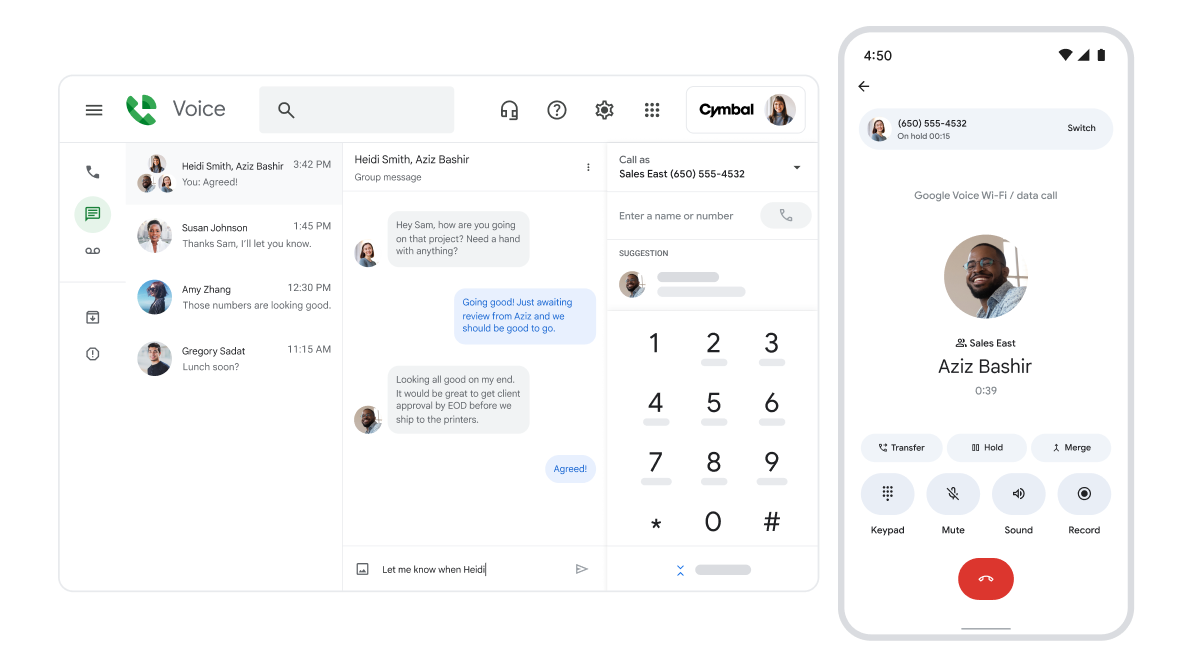
Google Voice is an online phone service launched by Google in 2009. It began as a free tool for personal use and later expanded into a paid phone solution for businesses. Today, it operates as part of Google Workspace, Google’s cloud-based productivity suite.
Technically, Google Voice functions as a VoIP phone service, meaning it uses the internet to make and receive calls. It also supports texting, allowing users to place calls and send messages from the same app.
What is a Google Voice Auto Attendant and How Does It Work?
The Google Voice auto attendant is a built-in feature that acts as an automated receptionist for your phone system. It answers incoming calls and welcomes callers by playing a customized greeting.
After the welcome message, the Google auto attendant guides callers through a menu of options. Based on the caller’s selection, the system can route the call to submenus, individual users, ring groups, external phone numbers, or voicemail.
The auto attendant also adapts to your schedule. For after-hours calls, it can play an alternate greeting and follow separate routing rules. You can also set up special call flows for holidays or days when your business is closed, ensuring callers always receive the right information.
Google Voice Auto Attendant Costs and Plan Options
Many businesses assume they can get a free Google Voice auto attendant, but this is a common misconception. The confusion usually comes from the fact that Google offers a free Google Voice account for personal use. While the personal plan supports basic calling, texting, and voicemail, it does not include business features such as an auto attendant, ring groups, or advanced call routing.
The auto attendant is only available on paid Google Voice business plans, starting with the Standard plan.
Another important consideration is pricing structure. The Google Voice business phone system is sold as an add-on to Google Workspace, meaning you cannot purchase Google Voice on its own. To use Google Voice for business, you must first have an active Google Workspace subscription.
Google Workspace: Plans and Pricing
Before adding Google Voice, you need an active Google Workspace plan, such as:
- Business Starter: $7 per user/month
- Business Standard: $14 peruser/month
- Business Plus: $22 per user/month
- Enterprise: Custom pricing
You can find full details on Google’s Workspace pricing page.
Google Voice for Business Plans
Google Voice offers three paid business plans:
| Feature | Starter | Standard | Premier |
|---|---|---|---|
| Price | $10/user/month | $20/user/month | $30/user/month |
| Number of users | Up to 10 | Unlimited | Unlimited |
| Availability | 14 countries | Unlimited regional billing | Unlimited international billing |
| Calling | Unlimited domestic | Unlimited domestic | Unlimited domestic |
| Texting | Unlimited US texting | Unlimited US texting | Unlimited US texting |
| Voicemail transcription | Yes | Yes | Yes |
| Call forwarding | Yes | Yes | Yes |
| Auto-attendant | No | Yes | Yes |
| Ring groups | No | Yes | Yes |
| Call recording | Easy | On-demand | Yes |
| Desk phone and ATA support | Yes | Yes | Yes |
How Much Does Google Voice Auto Attendant Cost?
The total cost of using a Google Voice auto attendant depends on two factors: whether your business already uses Google Workspace and how many users need access to Google Voice.
If your company already has an active Google Workspace subscription, you’ll need to add the Google Voice Standard plan to access the auto attendant feature. The total cost will be $20 per user/month.
If you’re not currently using Google Workspace, the auto attendant requires two separate subscriptions:
- Google Workspace Business Starter: $7 per user/month
- Google Voice Standard: $20 per user/month
The total cost will be $27 per user/month.
Google Voice Multi-Level Auto Attendant: How Does It Work?
Technically, Google Voice supports submenus, which means you can create a Google multi-level auto attendant for basic call routing needs. This functionality allows businesses to add more than one layer of call routing and guide callers through structured menu paths.
The setup begins with a first-level phone menu, where callers hear a greeting and are prompted to press specific keys (for example, “Press 1 for Sales and press 2 for Support”). In a Google Voice multi level auto attendant, each key can be configured to repeat the menu, play a pre-recorded message, route the call to a user, ring group, voicemail, or direct the caller to another menu.
When a caller selects an option that leads to a submenu, the Google Voice multi-level auto attendant plays a new set of prompts. This creates a second level in the call flow, making it easier to separate departments, teams, or request types in a clear and organized way.
Why Do Businesses Use Google Voice Auto Attendant?
Although Google Voice has some limitations for business use (which we’ll cover later), many startups and small businesses still choose Google Voice and its auto attendant to better organize incoming calls. Below are the main reasons why they do.
- 24/7 automated call routing. A Google Voice business auto attendant automatically answers incoming calls and routes them based on predefined rules. This ensures callers are directed to the right person or team at any time, including outside regular business hours. Businesses can set different greetings and routing behavior for working hours, after-hours, and holidays, helping maintain consistent call handling around the clock.
- More professional caller experience. Many startups and very small businesses struggle to project a professional image over the phone. Calls may go unanswered or go straight to voicemail, which can feel unprofessional or unreliable to callers. An auto attendant helps solve this by answering every call, playing a clear and professional welcome message, and routing callers to the appropriate destination. The result is a more structured, predictable, and reassuring caller experience, rather than leaving callers without guidance or context.
- Cost-effective for Google Workspace users. For businesses already using Google Workspace, adding a Google Voice auto attendant can be a cost-effective way to introduce basic call automation.
- Integration with Google Workspace. Another advantage for businesses that rely heavily on Google products is native integration with other Google services. Users can manage calls alongside Gmail, Calendar, and Contacts. For example, calls can be automatically sent to voicemail based on working hours set in Google Calendar, and voicemails or SMS can be received directly in Gmail.
- Easy administration and setup. An auto-attendant in Google Voice is designed for simple administration. Call menus, greetings, business hours, and routing rules can be managed through a centralized admin console, without requiring specialized IT knowledge. This ease of setup makes it appealing for small teams that need basic call routing without complex configuration.
Limitations of Google Voice Auto Attendant for Businesses
While Google Voice auto attendant can cover basic call routing needs for some businesses, it may present significant limitations for others.
- Higher cost for non-Google Workspace users. For businesses that do not already use Google Workspace, the cost can add up quickly. To access the auto attendant, you must pay for two separate subscriptions: Google Workspace and Google Voice. This can make Google Voice less cost-effective for teams that do not otherwise rely on Google’s ecosystem.
- Limited customer support. Customer support options are minimal. In most cases, help is limited to Google’s online documentation and community forums. There is no dedicated onboarding or hands-on support, which can be challenging if issues arise or if more complex configurations are needed.
- No third-party integrations. Google Voice does not offer native integrations with CRMs or third-party business tools outside the Google ecosystem. This limits how teams can connect calls to sales, support, or customer data. If your business uses non-Google tools, syncing call activity or automating workflows may not be possible.
- No toll-free numbers. Google Voice supports local phone numbers only. Businesses that require toll-free numbers for customer support, sales, or nationwide presence will need to use a different phone service.
- Limited calling functionality. Google Voice provides only basic call management features. Advanced capabilities such as robust call queues, parallel ringing, or advanced conference calling are limited or unavailable. In addition, feature updates are relatively infrequent, which may restrict long-term scalability for growing teams.
- No text auto-responses for auto attendant. Google Voice auto attendant does not support automatic SMS replies for missed calls or voicemails, which limits follow-up and messaging automation.
- No shared numbers or shared inboxes. Google Voice does not support shared inboxes or shared phone numbers in the way many business phone systems do. Team members cannot collaboratively manage calls and messages from a single frontline number with shared visibility and context.
- Texting limitations for auto attendant numbers. Phone numbers assigned to a Google Voice auto attendant cannot send text messages. To handle SMS conversations, businesses must purchase and manage additional phone numbers, which increases cost.
DialLink: An Alternative to Google Voice Auto Attendant for Business
Google Voice auto attendant can be a reasonable option for businesses that already rely heavily on Google Workspace and only need basic call routing. However, for teams looking for a dedicated business phone system that integrates beyond the Google ecosystem and supports more advanced collaboration and messaging workflows, DialLink offers a broader alternative.
DialLink’s auto attendant is part of a business phone system built specifically for startups and small businesses. It can be assigned to both local and toll-free phone numbers and configured through an intuitive interface.
Multiple team members can be assigned to the same auto attendant number, with shared visibility into call history, text messages, and voicemails. This makes it easier for teams to manage inbound communications collaboratively.

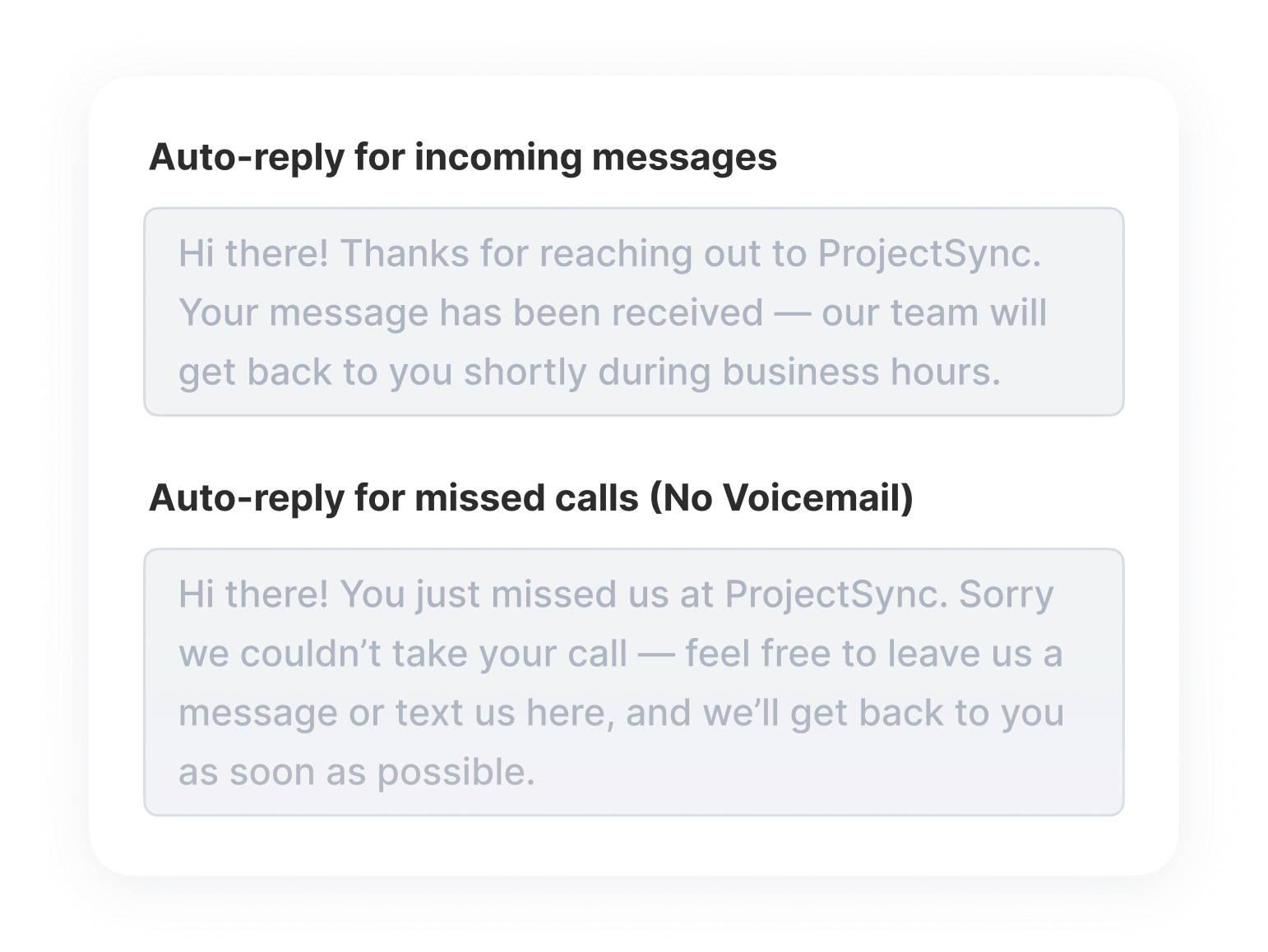
To improve follow-ups and responsiveness, DialLink also supports automatic text replies for missed calls and voicemails.
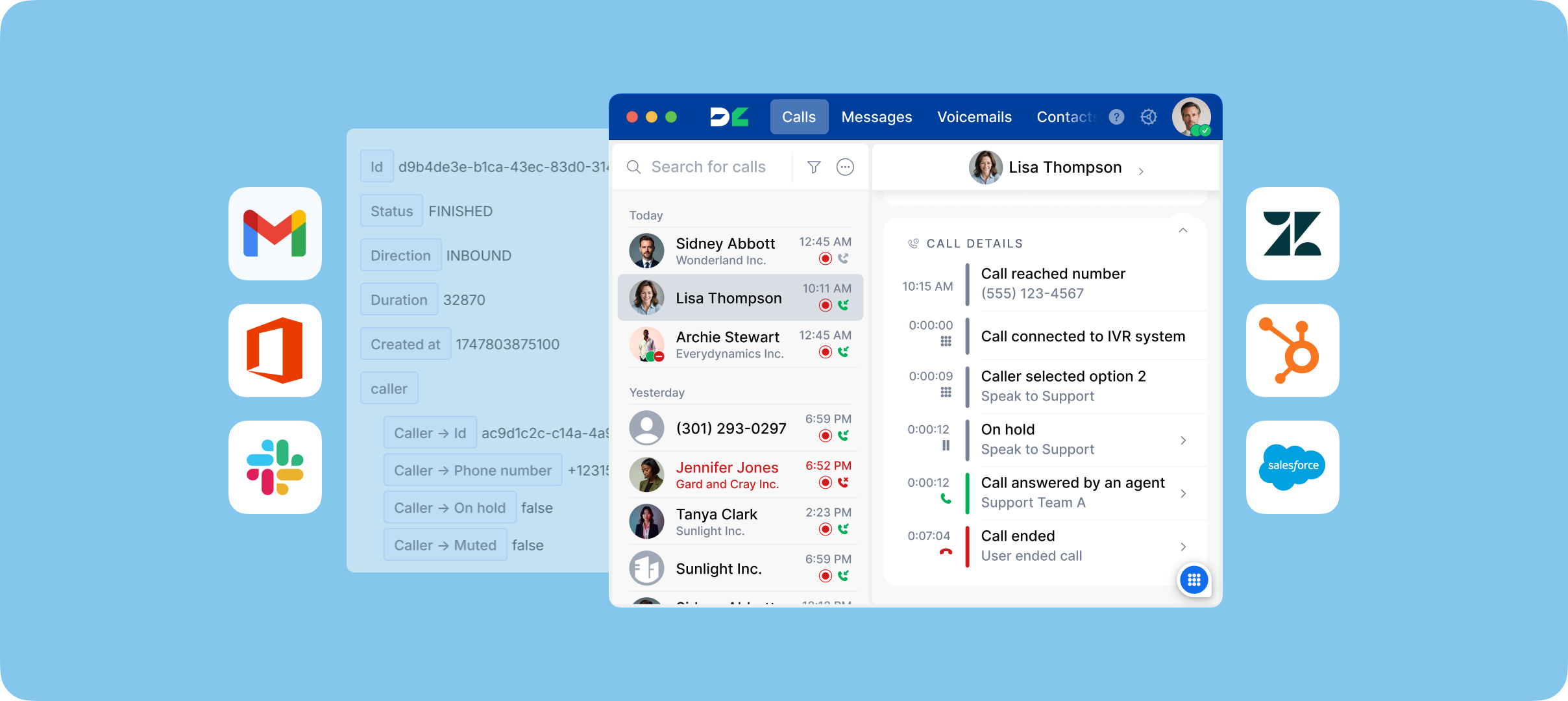
Unlike Google Voice, DialLink integrates with a wide range of third-party business tools, allowing teams to connect calling and messaging with the rest of their tech stack rather than being limited to a single ecosystem.
Pricing starts at $15 per user per month, with no additional subscriptions required. The auto attendant is included even in the base plan, along with features such as phone menus, ring groups, parallel calling, call forwarding, business messaging, and AI-powered transcriptions.
Think DialLink’s auto attendant could be right for your business? Start 7-day free trial and see how it works in practice.
Yes, Google Voice has an auto attendant, but it’s available only on paid Google Voice business plans. The auto attendant lets businesses automatically answer calls, play a greeting, and route callers based on key selections.
No, Google Voice auto attendant is not free. It is not included in the free personal Google Voice plan. To use an auto attendant, you need a paid Google Voice business plan (starting with the Standard plan), along with an active Google Workspace subscription.
To set up a Google Voice auto attendant, you need access to the Google Workspace Admin console. From there, you can follow a set of basic steps to create custom greetings, configure menu options, and define call routing.
You can also set up different auto attendants for business hours, after-hours, and holidays, allowing calls to be handled differently depending on when they come in.
A Google Voice multi-level auto attendant is an auto attendant setup that uses submenus to create more than one layer of call routing. For example, callers can select options from a main menu and then be directed to a second menu with more specific choices.
Featured Tags
Share


Arina Khoziainova
Content Writer at DialLink
Arina is a content writer with over 7 years of experience in the IT industry. At DialLink, she creates clear, insightful content that helps small business and startup owners simplify communication and drive growth using modern tools. With a strong focus on practical value, Arina transforms complex topics into accessible, actionable stories.

Keep Reading

Understanding Inbound Calls and How to Handle Them
Learn what inbound calls are, why they matter, and how to handle them efficiently.
November 27, 2025
11 minutes
What Is a VoIP Phone System?
Read about what a VoIP phone system is, how it outperforms traditional setups, and the main ways it’s used in everyday communication.
October 20, 2025
16 minutes

What Is a Virtual Phone System?
Learn what a virtual phone system is, how it works, and why it’s becoming the preferred communication solution for modern businesses.
October 17, 2025
10 minutes

What is Cloud Contact Center? Benefits, Features, and How It Works
A cloud-based call center offers small businesses a flexible and cost-effective alternative to traditional setups. Let’s explore what it is and how it operates.
September 18, 2025
14 minutes

What is Cloud Phone System? A Guide for Small Businesses and Startups
Read what a cloud phone system is, how it works, its key features, and the benefits it brings to small businesses.
September 11, 2025
15 minutes

Auto Attendant Call Flow Templates
Use these auto attendant templates to create your own business-hours, after-hours, and holiday call handling logic.
May 28, 2026
11 minutes
Types of Business Phone Systems: Cloud, VoIP, PBX & More
Discover different types of business phone systems, how they differ, and which options may be the best fit for your business.
January 07, 2026
12 minutes

Google Voice Business Phone System: Features, Pricing, and Limitations for Small Businesses
Learn how the Google Voice business phone system works, explore plans, features, and limitations for small businesses and startups.
January 05, 2026
10 minutes