
Reach More People Without Losing the Personal Touch
Outbound calling helps you generate leads, collect feedback, and build relationships, but only when clients pick up. DialLink’s business phone system helps you get more calls answered with local phone numbers, while a centralized contact book and CRM integrations let you dial faster and keep every conversation personal.

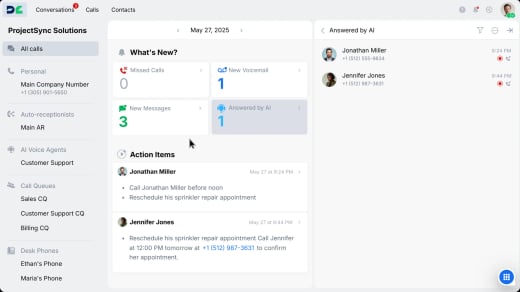

Turn more dials into answered calls
Skip voicemails and unanswered calls. Use local phone numbers to increase the chances your calls get answered.
Already have an existing phone number your prospects recognize? Easily transfer it over with our automated number porting process.
Choose Your Local Phone Number

Eliminate manual contact research
Save time by instantly accessing a centralized contact directory with all your contacts and their details in one place, so you can find and dial the right person faster.

Make every conversation feel personal
Connect DialLink with your CRM, like HubSpot or Salesforce, to sync calls, messages, and contact details in real time. View full customer context before every call for more personalized conversations and dial contacts right from your CRM with one click.
Save hours on admin work with AI
Stop spending time on administrative tasks that AI can handle instantly, so you can spend more time connecting with prospects and closing deals.
Record calls automatically
Capture every conversation for quality assurance, training, and compliance.

Find any conversation in seconds
Automatically categorize and tag calls by topic or outcome for easy searching and reporting.

Read text instead of replaying calls
Get instant transcripts of calls and voicemails to quickly locate important information.

Get actionable notes from every call
Extract key discussion points and action items so you know exactly what to follow up on.

Make calls from your business number on any device
Make outbound calls from any device connected to the internet:

Laptops and desktops
Access DialLink on your web browser or download the desktop app to make calls from your computer.

Mobile devices
Install the DialLink app on your iOS or Android device to call prospects on the go.

Desk phones
Get a desk phone with DialLink pre-installed or bring your own compatible device.

Reach prospects across multiple channels
Some prospects answer calls. Others prefer texts or WhatsApp. Reach them all from one platform with calls, SMS, and WhatsApp for Business messaging. Track every interaction in a unified view to see what works and adjust your approach for better response rates.
Connect DialLink to Your Essential Business Tools
Integrate DialLink with the business applications your team already relies on.



Frequently Asked Questions
What is outbound calling?
Outbound calling is the process of initiating calls to potential or existing customers. This strategy, often in sales and marketing, focuses on reaching out to leads, qualifying prospects, and creating opportunities for sales and engagement.
What are the types of outbound calling?
Outbound calling can be categorized based on the purpose or intent of the caller. Here are the main types:
Lead generation and cold outreach: Agents make high volumes of outbound calls to connect with new prospects, generate leads, and verify sales opportunities.
Sales calls to existing customers: Sales teams call current customers to upsell or cross-sell products or services, introduce upgrades, or promote exclusive deals.
Proactive customer service: Outbound call center agents reach out to inform customers about potential issues, such as service outages, delays, or other important updates.
Follow-ups and scheduled callbacks: Calls are made to follow up on previous interactions or to honor scheduled callback requests for ongoing discussions.
Customer retention calls: Outgoing calls are used to remind customers of upcoming renewals, offer incentives, and reduce customer churn.
Market research: Center agents contact a specific audience to conduct surveys and gather insights into market trends or preferences.
Customer feedback collection: Customer support teams collect feedback on products or services to gain valuable insights and improve offerings.
Appointment scheduling: Teams arrange sales meetings or consultations by calling potential customers to book appointments efficiently.
Is outbound calling the same as cold calling?
Not exactly. Cold calling is one type of outbound calling. Other types include warm calls to leads who have shown interest, follow-up calls to nurture ongoing relationships, and re-engagement phone calls to reconnect with previous customers.
What is the difference between inbound and outbound calling?
The distinction lies in who initiates the call. With outbound calling, the business is contacting customers or prospects; inbound calling is when customers reach out to the business, typically seeking information, assistance, or making inquiries.
What is an outbound call center?
An outbound call center is a customer service or sales operation where agents actively make calls to potential or existing customers, rather than receiving incoming calls like in an inbound call center. Businesses use outbound calling services for purposes such as lead generation, customer follow-ups, appointment setting, and sales outreach. Modern outbound call center solutions often include tools for call automation, performance tracking, and integration with CRMs, helping teams boost productivity and improve their conversion rates.
How are DialLink features priced?
DialLink offers three basic pricing plans, along with an add-on that can be bundled with any plan. For more information, visit our pricing page.


