
Create a Contact Center That Customers Actually Want to Call
Running a contact center means handling high volumes of inquiries across multiple channels while maintaining great customer service. DialLink’s business phone system gives small businesses and startups everything they need to quickly build a complete contact center from setting up phone numbers to automating routine tasks with AI.

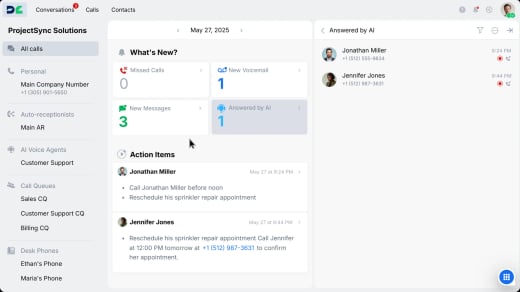
Make your business easy to reach and recognize
Give customers an easy, trusted way to contact your business and recognize your calls instantly.

Manage all your phone lines in one place
Easily set up a toll-free hotline for nationwide support or assign local numbers to each department. Manage every line and access complete call and message history from one platform. Already using a trusted number? Bring it with you easily through automated number porting.

Get more calls answered by showing your company name
Display your company name on outgoing calls with CNAM, so customers instantly recognize your business and feel confident answering.
Build a support journey that actually helps
Create a smooth, frustration-free experience for every caller.

Deliver a professional first impression
Add an auto-receptionist that welcomes callers with on-brand messages and routes them based on your business hours or call logic.

Reduce misdirected calls and end endless transfers
Automatically guide callers to the right department or self-service option with IVR menus that provide clear, intuitive choices.

Eliminate hold times for callers
Reduce caller frustration with a virtual wait line and smart ring orders that instantly connects them to available agents or offers a callback instead of holding.
Resolve more issues in less time
Keep your customers happy and your team productive with tools that make working together simple and effective.

Share one number across a team
Give multiple agents access to a shared business line to manage calls and messages together from one number.

Handle multiple calls with ease
Easily place callers on hold, switch between lines, and manage several conversations at once.

Transfer calls with full context
Move callers between agents with full call history and notes, ensuring a smooth handoff every time.

Bring in teammates into calls
Add another agent or expert to a live call to answer questions faster and resolve complex issues on the spot.

Collaborate through internal chat
Chat with teammates inside the same customer thread to share updates, tag colleagues, or request quick support.

Find calls that need attention
Use status filters to instantly find calls that require action or follow-up, ensuring no customer request slips through.

Support customers across channels without switching tools
Some customers prefer calls, others prefer texts. Managing each channel separately forces agents to switch between tools, wasting time and losing context. DialLink brings calls, SMS, and WhatsApp for Business into one unified platform. Every interaction is stored in a single thread per contact, giving agents complete conversation history and helping them stay focused and efficient.
Manage Calls and Messages from Any Device
Let your team work from any device connected to the internet:

Laptops and desktops
Use DialLink in your web browser or download the desktop app to make and manage calls directly from your computer.

Mobile devices
Install the DialLink app on iOS or Android to stay connected on the go while keeping your business number.

Desk phones
Use a DialLink-compatible desk phone or order one with the system pre-installed for a familiar office experience.
Continuously improve how you serve customers
Turn every conversation into an opportunity to identify patterns, analyze performance, and continuously learn, coach, and improve.
Never miss a coaching moment
Automatically record every call for training, coaching, and dispute resolution.

Find any conversation in seconds
Let AI automatically classify and tag every call, so you can find the exact conversation you need instantly.

Free agents from repetitive post-call work
AI-generated transcripts, summaries, and action items eliminate manual note-taking after every call.

Understand the complete caller journey
Get a complete view of every interaction with detailed call timelines showing transfers, IVR selections, hold times, and hangups.


Connect DialLink to Your Essential Business Tools
Integrate DialLink with the business applications your team already relies on.




Frequently asked questions
What is contact center software?
Contact center software helps businesses manage customer interactions via phone calls, messages, email, and other channels. Solutions typically provide call routing, automated responses, call recording, operator availability status, call queues, and CRM integration. By centralizing communications, contact center software streamlines operations, enhances productivity, improves the customer experience, and supports team collaboration.
How should my organization choose contact center software?
It’s important to select a solution that not only fits your budget but delivers all the core functionality your contact center requires. Carefully evaluate your business needs and inventory all the communication channels you need to support. When assessing solutions, first look for essential features like call routing, IVR systems, call queues, automated responses, call overflow handling, on-duty operator status, and alerts for no on-duty operators. Next, ensure the solution integrates seamlessly with your current CRM system and other business tools, offers AI-powered automation and insights, and has user-friendly interfaces for easy adoption. Last but not least, make sure it will scale easily as your business grows.
Do most enterprises use cloud contact center software?
More and more organizations, regardless of size, are choosing cloud-based solutions to gain benefits like flexibility, scalability, and cost-effectiveness. Unlike traditional on-premises systems, cloud-based contact center solutions enable businesses to manage customer interactions from anywhere, support remote teams, and scale resources during peak demand. Advanced features like AI-driven insights and seamless CRM integration make cloud-based contact center software a preferred choice for improving efficiency and customer service.
How are DialLink features priced?
DialLink offers three basic pricing plans, along with the DialLink Contact Center Add-On that can be bundled with any plan. For more information, visit our pricing page.


