Blog
Business Phone System
Scripts to Create Voicemail Message Greetings for Businesses

Scripts to Create Voicemail Message Greetings for Businesses
Find ready-to-use business voicemail greeting scripts tailored to different industries and situations, including after-hours and holidays.



In this article
- What is a Business Voicemail Greeting Message?
- Why Do Businesses Need Good Greeting Messages for Voicemail?
- Why Do You Need a Business Voicemail Greeting Script?
- Key Elements of a Professional Voicemail Greeting Script
- Ready-to-Use Greeting Messages for Business Voicemail
- How to Record Free Voicemail Greeting Messages?
Your voicemail greeting is often the very first impression callers have of your business. So, it’s worth making it a good one. A clear, professional voicemail greeting helps callers feel acknowledged, sets expectations, and reflects the level of service your business provides.
In this guide, you’ll find ready-to-use business voicemail greeting scripts tailored to different industries and situations, including after-hours and holidays.
What is a Business Voicemail Greeting Message?
A business voicemail greeting is a pre-recorded message that plays when someone calls your company, and no one is available to answer. It lets callers know they’ve reached your business, provides helpful information, and assures them their message will be returned.
Why Do Businesses Need Good Greeting Messages for Voicemail?
Even with the best intentions, it’s impossible to answer every call, especially if you’re a busy small business owner, startup founder, or solo service provider. Packed workdays often lead to missed calls, not to mention after-hours or holidays when clients may still try to reach your business.
If you don’t have a 24/7 answering solution like a human or AI receptionist, those calls will naturally go to voicemail. That’s why having professional voicemail greeting messages is essential. A well-crafted message acknowledges the caller, explains what to do next, and sets clear expectations about when they’ll hear back from you.
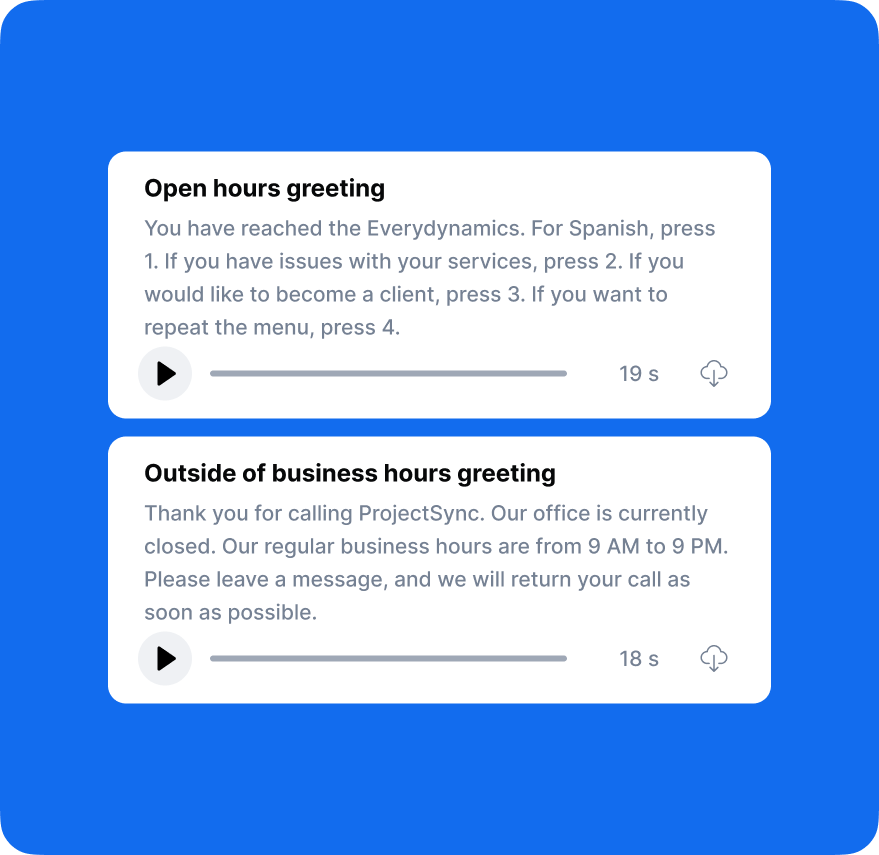
Why Do You Need a Business Voicemail Greeting Script?
Creating the best greeting message for your voicemail may seem simple, but it's surprisingly challenging to get right. You need to include all essential information without forgetting key details, while keeping your message short, concise, and informative. Without preparation, it's easy to ramble, sound unprofessional, or leave out important instructions that callers need.
A well-prepared voicemail greeting script ensures you cover everything necessary, maintain a professional tone, strike the right balance between brevity and completeness, and deliver your message confidently without awkward pauses or filler words.
Whether you're recording the voicemail greeting yourself or using a professional service, having a script ready makes the process smoother and guarantees a polished, effective result.
Key Elements of a Professional Voicemail Greeting Script
To ensure your voicemail greeting provides all necessary information, incorporate the following essential elements. Not every element is required for every greeting, but including the relevant ones creates a comprehensive, professional experience:
| Voicemail Greeting Element | Example | When to Include |
|---|---|---|
| Initial greeting | "Hello" or "Hi" | Always: Sets a friendly, welcoming tone. |
| Identification | "You've called Lisa Thompson" | Always: Confirms the caller reached the right person. |
| Company name | "at ProjectSync Solutions" | Always: Confirms the caller reached the right company. |
| Department | "in the Accounts Department" | Optional: Useful for large organizations with multiple departments. |
| Reason for unavailability | "I'm currently on annual leave" or "I'm away from my desk" | Always: Provides brief context for why you can’t answer. |
| Response timeline | "I'll return your call within 24 hours" or "Our team responds within one business day" | Highly recommended: Manages expectations and reduces frustration. |
| Alternative contact | "For urgent matters, please call +1 (212) 987-4567" | Highly recommended: Ensures urgent issues are handled promptly. |
| Alternative communication method | "For a quick response, email help@projectsync.com" | Optional: Offers flexible communication options. |
| Message instructions | "Please leave your name, phone number, and a brief message" | Always: Guides callers on what to include. |
| Closing | "Thank you for calling" or "I look forward to speaking with you" | Always: Ends the message on a positive note. |
Basic Structure of a Professional-Sounding Voicemail Greeting Script
Putting all these elements together, here is the recommended structure for creating the best voicemail greeting message:
[Initial Greeting] + [Your Name] + [Company Name] + [Department (optional)] + [Reason for Unavailability (optional)] + [Response Timeline] + [Alternative Contact/Method (optional)] + [Message Instructions] + [Closing]
Customize these elements based on your specific business needs, industry standards, and caller expectations to create a greeting that's both professional and helpful.
Ready-to-Use Greeting Messages for Business Voicemail
The details of what to say in a voicemail greeting are entirely up to you, but we’ve put together a collection of sample office voicemail greeting scripts for various situations and industries that you can use as-is or customize to fit your needs.
Standard Business-Hours Voicemail Greeting Script
"Hello, you've reached [Your Name] at [Company Name]. I'm either on another call or away from my desk at the moment. I'll return your call within 24 hours. Please leave your name, phone number, and a brief message after the tone. For urgent matters, please call +1 (212) 987-4567. Thank you for calling."
Holiday Voicemail Greeting Script
"Hello, you've reached [Your Name] at [Company Name]. Our office is currently closed for [Holiday Name] and will reopen on [Date]. For urgent matters, please email [email address] or call [alternative number]. Otherwise, please leave your name, phone number, and a message, and I'll return your call when we reopen. Happy [Holiday] and thank you for calling."
Out of Office Voicemail Greeting Script
"Hello, you've reached [Your Name] at [Company Name]. I'm currently out of the office until [Return Date] and will have limited access to voicemail. For immediate assistance, please contact [Colleague Name] at [phone number] or email [email address]. Otherwise, please leave your name, phone number, and a detailed message, and I'll return your call upon my return. Thank you for calling."
General Voicemail Greeting Script
"Hi, you've reached [Your Name] at [Company Name]. I'm unable to take your call right now, but your call is important to me. Please leave your name, phone number, and a brief message, and I'll get back to you as soon as I can. Thank you."
Small Business Voicemail Greeting Script
"Hi, you've reached [Your Name] at [Business Name]. Thank you for calling! I'm either busy or away from the phone right now. I return all calls within 24 hours. Please leave your name, phone number, and how I can help you, and I'll get back to you soon. I look forward to speaking with you!"
Restaurant Voicemail Greeting Script
General Voicemail Greeting Script:
"Hello, you've reached [Restaurant Name]. We're busy serving our guests. For reservations, please leave your name and number, and we'll return your call soon. Or book online at [website]. For delivery orders, visit [delivery platform]. Thank you!"
After-Hours Voicemail Greeting Script:
"Hello, you've reached [Restaurant Name]. We're currently closed. Our open hours are [hours], [days]. For reservations, please call back during business hours or book online at [website]. For delivery orders, visit [delivery platform]. Please leave your name and number for general inquiries, and we'll return your call soon. Thank you!"
Doctor's Office Voicemail Greeting Script
General Voicemail Greeting Script:
"Hello, you've reached [Doctor's Name]'s office at [Practice Name]. I am currently busy assisting other patients. Please leave your name, phone number, and reason for calling, and we'll return your call within two hours. Thank you for your patience."
After-Hours Voicemail Greeting Script:
"Hello, you've reached [Doctor's Name]'s office at [Practice Name]. Our office is currently closed. Our regular hours are [hours], [days]. If this is a medical emergency, please hang up and dial 911 immediately. For urgent medical concerns that cannot wait until our office reopens, please call our after-hours nurse line at [Phone Number]. For prescription refills, please contact your pharmacy directly. For non-urgent matters, please leave your name, date of birth, phone number, and a brief message, and we'll return your call on our next business day. Thank you."
Medical Office Voicemail Greeting Script
General Voicemail Greeting Script:
“Thank you for calling [Practice Name]. All of our representatives are currently assisting other patients. Your call is important to us. Please remain on the line, and the next available team member will assist you shortly. Alternatively, you can leave your name, phone number, the reason for your call, and we'll return your call within three hours. For medical emergencies, please hang up and call 911. Thank you.”
After-Hours Voicemail Greeting Script:
"Thank you for calling [Practice Name]. Our office is currently closed. Our office hours are [hours], [days]. If you're experiencing a medical emergency, please hang up and call 911 immediately. For urgent care needs, please visit your nearest urgent care facility or call our 24-hour on-call physician at [Phone Number]. For prescription refills, contact your pharmacy. For scheduling appointments or general inquiries, please leave your name, phone number, and a detailed message, and we'll return your call when we reopen. Thank you."
Dental Office Voicemail Greeting Script
General Voicemail Greeting Script:
"Hello, you've reached [Dental Office Name]. We're currently with other patients, but your call is important to us. Please stay on the line, and we'll be with you as soon as possible. If you'd like, you can leave your name, phone number, and reason for calling, and we'll call you back within one hour. If you're experiencing a dental emergency, please press 0 to reach our emergency line. Thank you for choosing [Dental Office Name]."
After-Hours Voicemail Greeting Script:
"Hello, you've reached [Dental Office Name]. Our office is currently closed. Our office hours are [hours], [days]. If you're experiencing a severe dental emergency, please call our emergency line at [Phone Number] or visit your nearest emergency room. For non-emergency matters, appointment scheduling, or general questions, please leave your name, phone number, and a brief message, and we'll return your call on our next business day. Thank you for choosing [Dental Office Name]."
Financial Advisor Voicemail Greeting Script
General Voicemail Greeting Script:
"Hello, you've reached [Contact Name] at [Firm Name]. I'm currently meeting with a client or away from my desk, but I check messages regularly throughout the day. Please leave your name, phone number, and a brief description of how I can assist you, and I'll return your call within four hours. Thank you for calling."
After-Hours Voicemail Greeting Script:
"Hello, you've reached [Contact Name] at [Firm Name]. You've called outside of our regular business hours, which are [hours], [days]. Please leave your name, phone number, and a brief message, and I'll return your call on the next business day. You can also email me at [Email Address]. Thank you for calling."
Law Firm Voicemail Greeting Script
General Voicemail Greeting Script:
"Hello! You've reached [Contact Name] at [Firm Name]. I'm currently in court, in a meeting, or with another client. Please leave your name, phone number, case reference number if applicable, and a brief description of your legal matter, and I'll return your call within four hours. Thank you."
After-Hours Voicemail Greeting Script:
"Hello! You've reached [Contact Name] at [Firm Name]. Our office is currently closed. Our business hours are [hours], [days]. Please leave your name, phone number, case reference number if applicable, and a detailed message, and I'll return your call on the next business day. You can also email me at [Email Address]. Thank you."
Medical Assistant Voicemail Greeting Script
General Voicemail Greeting Script:
"Hello, you've reached [Contact Name], medical assistant for [Doctor Name] at [Practice Name]. I'm currently assisting patients and unable to take your call right now. Please leave your name, phone number, and a detailed message about your needs, and I'll return your call within two hours. Thank you."
After-Hours Voicemail Greeting Script:
"Hello, you've reached [Contact Name], medical assistant for [Doctor Name] at [Practice Name]. Our office is currently closed. Our office hours are [hours], [days]. If this is a medical emergency, please hang up and dial 911 immediately. For urgent medical issues that cannot wait, please call our after-hours nurse triage line at [Phone Number]. For prescription refills, contact your pharmacy. For test results, appointment scheduling, or general questions, please leave your name, date of birth, phone number, and a detailed message, and I'll return your call on our next business day. Thank you."
Real Estate Voicemail Greeting Script
General Voicemail Greeting Script:
"Hi, you've reached [Company Name]. All our agents are currently assisting other clients. Please leave your name, phone number, and let us know whether you're buying, selling, or have questions about a specific property. We look forward to helping with your real estate needs!"
After-Hours Voicemail Greeting Script:
"Hi, you've reached [Company Name]. You’ve called outside our regular business hours, which are [hours], [days]. Please leave your name, phone number, and a brief message about what you’re looking for, whether you're buying, selling, or have questions about a listing. We’ll return your call first thing in the morning. Thanks for calling, and we look forward to speaking with you!"
Realtor Voicemail Greeting Script
General Voicemail Greeting Script:
"Hi, you've reached [Contact Name] with [Company Name]. Thanks for calling! I'm currently out with clients or showing properties. Please leave your name, number, and what you're looking for, whether it's buying, selling, getting a market analysis, or exploring your options, and I'll get back to you within a couple of hours. Feel free to text me at this number for an even faster response. I'm excited to help you achieve your real estate goals!"
After-Hours Voicemail Greeting Script:
"Hi, you've reached [Contact Name] with [Company Name]. Although it's after hours, I'm committed to providing you with excellent service. Please leave your name, phone number, and details about your real estate needs, and I'll return your call first thing tomorrow morning. You can also text me at this number anytime. I look forward to working with you!"
Script for voicemail greeting “Do not leave a message”
“Hi, you’ve reached [Company Name]. We’re not available to take your call right now. Please note that this voicemail is not monitored, so no messages will be received. For assistance, please contact us at [email] or visit [website]. Thank you.”
How to Record Free Voicemail Greeting Messages?
Once you have your voicemail greeting scripts, the next question is how to record them. Should you do it yourself, hire a voice artist, or book a studio?
There’s also a free option for creating professional business voicemail greetings: DialLink’s voicemail greeting generator.
Our generator uses text-to-speech technology to create polished, professional voicemail greeting messages for your business. You can choose from five languages and select either a male or female voice. Each greeting is generated instantly, and you can create up to five unique voicemail greetings and download them — all completely free.
Use one of the voicemail greeting scripts above that best fits your situation, paste it into DialLink’s voicemail greeting generator, and download the generated voicemail greeting.
A strong business voicemail greeting should include your company name, the reason you can't answer the call, what information you want the caller to leave, and when they can expect a response. You can also add alternative contact options, such as an email address or website, if the matter is urgent. Optional additions include your business hours and a brief, friendly closing.
To sound professional, keep your message clear, concise, and friendly. Avoid background noise, speak at a steady pace, and use straightforward language. Maintain a polite tone and be specific about what callers should do next. Using a high-quality recording or a text-to-speech tool like DialLink’s voicemail greeting generator with a natural voice can also make the message sound polished.
A voicemail greeting should generally be 20–30 seconds. This is long enough to provide essential information without overwhelming or frustrating the caller. Short, clear, and direct messages create a better caller experience.
Featured Tags
Share


Arina Khoziainova
Content Writer at DialLink
Arina is a content writer with over 7 years of experience in the IT industry. At DialLink, she creates clear, insightful content that helps small business and startup owners simplify communication and drive growth using modern tools. With a strong focus on practical value, Arina transforms complex topics into accessible, actionable stories.

Keep Reading

How to Record a Voicemail Greeting?
Explore available recording methods, compare their pros and cons, and reveal how to get a voicemail greeting recording for free.
December 03, 2025
11 minutes
Top 10 Best Medium-Sized Business Phone Systems in 2026
Compare the top business phone systems for medium-sized businesses to find a solution that fits your team’s size, budget, and growing communication needs.
October 21, 2026
25 minutes
Top 10 Best Business Phone Systems for Small Businesses in 2026
Compare the 10 best small business phone systems based on features, pricing, and ease of use to find the right fit for your business.
October 20, 2026
23 minutes

Best Auto-Attendant Systems & Services for Small Businesses
Explore the best auto attendant systems and software for small businesses. Learn features, types, and top providers.
December 23, 2025
10 minutes

Auto Attendant vs Call Queue: What Small Businesses Need to Know
Discover the differences between auto attendants and call queues, and how your small business phone system can use both for better call handling.
December 16, 2025
8 minutes

Auto Attendant vs IVR: What’s the Difference and Which One to Choose for a Small Business
Discover how auto attendants and IVR systems differ, how they work together, and which call routing option fits your small business best.
December 15, 2025
9 minutes

Local Vanity Phone Numbers for Business: What They Are and How to Get One
Read about what a vanity local phone number is, how businesses use them, and how to get one for your company.
December 12, 2025
8 minutes

Business Voicemail Greeting Examples for Every Situation (and Tips)
Explore a collection of voicemail greeting examples tailored to various industries and scenarios.
December 11, 2025
12 minutes