Blog
Business Phone System
How to Record a Voicemail Greeting?

How to Record a Voicemail Greeting?
Explore available recording methods, compare their pros and cons, and reveal how to get a voicemail greeting recording for free.



In this article
- What Are Recorded Voicemail Greetings?
- What Should Be Included in Pre-Recorded Voicemail Greetings?
- Why Is It Important to Record a Professional Voicemail Greeting?
- How to Record a Business Voicemail Greeting
- How to Record a Greeting on Voicemail: The Best and Most Affordable Way
- How to Record a Professional Voicemail Greeting for Free
Every business owner knows the reality: no matter how diligently you monitor your phone, some calls will inevitably go to voicemail. But here's what you can control: the experience callers have when they reach your voicemail.
A professional, well-crafted voicemail greeting transforms a potentially frustrating moment into a positive touchpoint that keeps callers informed, engaged, and confident enough to leave a detailed message or call back at a better time.
In this guide, we'll explore available recording methods, compare their pros and cons, and reveal how to get a voicemail greeting recording for free.
What Are Recorded Voicemail Greetings?
Recorded voicemail greetings are audio messages that play automatically when you're unable to answer an incoming call. These recorded voicemail greetings serve as your virtual representative, ensuring callers receive important information even when you're unavailable.
A well-crafted voicemail greeting typically accomplishes several key objectives:
- Confirms the caller has reached the correct number by identifying yourself or your business
- Explains your current unavailability without excessive detail
- Guides the caller on next steps, whether that's leaving a detailed message, trying an alternative contact method, or calling back at a specific time
- Reassures the caller that their call matters and will be returned promptly
The ultimate goal is to ensure every caller feels acknowledged and valued, even in your absence, while providing them with a clear path forward.
What Should Be Included in Pre-Recorded Voicemail Greetings?
If you've ever found yourself wondering “What to say when recording a voicemail greeting?”, you're not alone. Below is a comprehensive checklist of essential elements your professional business voicemail greeting should include:
1. A warm, professional introduction: Start by clearly identifying yourself or your business. Include your full name and company name to immediately confirm the caller has reached the correct number. A friendly, confident tone sets a welcoming atmosphere and establishes credibility from the very first second. For example: "You've reached Sarah Johnson at Acme Consulting." or "Thank you for calling Riverside Medical Center."
2. State your availability without over-explaining: Briefly acknowledge why you're unable to take the call, whether you're in a meeting, assisting another client, away from your desk, or out of the office. Keep this concise and professional without oversharing details.
For example: "I'm currently unavailable to take your call" or "I'm away from my desk at the moment".
For extended absences: If you're on vacation or have prolonged unavailability, mention specific dates: "I'm out of the office until Monday, December 2nd, and will have limited access to voicemail."
3. Provide alternative contact options: Give callers other ways to reach you or get the assistance they need. This shows a customer-focused approach and helps ensure urgent requests don’t fall through the cracks. You can include a colleague’s name and contact information for urgent matters, your email address for non-urgent questions, and an expected response timeframe such as “I return calls within 24 business hours.”
If relevant, you may also add an emergency contact, your standard business hours if you're currently unavailable, and a link to your website or support portal for immediate help.
4. Clear, specific instructions for leaving a message: Don't simply ask callers to "leave a message"; provide specific guidance on what information to include.
Consider saying: "Please leave your name, phone number, and a brief message, and I'll return your call as soon as possible."
This ensures you have everything needed to return their call efficiently and prioritize urgent matters appropriately.
5. Set clear expectations for response time: Manage caller expectations by indicating when they can expect to hear back from you. Whether it's "within 24 hours", "by end of business today", or "when I return on Monday, March 15th", this transparency reduces caller frustration.
6. Professional, appreciative sign-off: End your greeting with a courteous closing that expresses genuine gratitude for the caller's time and interest. This leaves callers with a positive final impression and reinforces your commitment to excellent customer service.
Examples of effective closings:
- "Thank you for calling, and I look forward to speaking with you soon"
- "I appreciate your call and will get back to you shortly"
- "Thanks for reaching out. Have a great day!"
Why Is It Important to Record a Professional Voicemail Greeting?
For businesses, a professional voicemail greeting helps prevent missed opportunities. When callers don’t hear a clear, welcoming message, they might doubt they’ve reached the right number or hang up without leaving a message. A good greeting reassures them, encourages them to leave their name and number, and gives you a chance to follow up so you can turn that call into potential business.
For callers, it creates a smoother, more straightforward experience. Instead of endless ringing or uncertainty, they hear a clear message with the information they need, so they know exactly what to do next.
How to Record a Business Voicemail Greeting
Once you have a script that covers all the essential elements mentioned above, the next question becomes "How do I record my voicemail greeting?". Depending on your budget, resources, and quality requirements, there are several methods available. Let's explore each option along with their respective advantages and disadvantages to help you choose the best approach for your business.
Do It Yourself (DIY Recording)
For many startup owners, solopreneurs, and individual professionals, recording a new voicemail greeting using a smartphone or computer is often the first option that comes to mind. And for good reason: this approach is the most accessible, requiring only you, a quiet space, and your device. However, while DIY recording offers significant advantages in terms of cost and convenience, it does come with certain limitations worth considering.
| Pros | Cons |
|---|---|
| Cost-effective: Completely free, no additional expenses required. | Quality varies: Without proper equipment or technique, audio may sound unprofessional. |
| Quick and flexible: Record and update your greeting anytime without waiting for others. | Background noise issues: Home or office environments may introduce distracting sounds. |
| Easy to update: Change your greeting instantly for vacations, holidays, or schedule changes. | No professional polish: May lack the clarity, pacing, and tone that trained voice artists provide. |
| Immediate control: Make revisions on the spot until you're satisfied. | Time-consuming: Multiple takes may be needed to achieve acceptable results. |
| Authentic and personal: Your own voice creates a genuine connection with callers. | Requires confidence: Some people feel uncomfortable recording or hearing their own voice. |
Professional Recording Studios
If you're looking to elevate the quality of your pre-recorded business voicemail greetings to the highest possible standard, booking time at a local recording studio is an option worth considering. Professional studios offer sound engineers who can record and produce your greeting using professional-grade equipment and acoustic expertise, ensuring broadcast-quality results.
| Pros | Cons |
|---|---|
| Highest quality possible: Professional acoustics, equipment, and engineering deliver superior audio. | Most expensive option: Often $100 to $500+ per session depending on studio and location. |
| Expert guidance: Engineers help with delivery, pacing, tone, and technical optimization. | Least flexible: Any update requires booking more studio time and paying additional fees. |
| Professional environment: Soundproof booths eliminate background noise and unwanted audio. | Requires scheduling: Must book sessions during studio hours, which may not fit your availability. |
| Additional production capabilities: Can add music, effects, multiple voices, or complex audio layers. | Overkill for simple needs: Too much for a basic voicemail unless part of a larger branding project. |
For most businesses looking to record a single voicemail greeting, professional studio recording represents an unnecessarily expensive option. The substantial investment only makes sense if you're developing comprehensive audio branding or require complex multi-voice productions.
Hire a Professional Voice Artist (Freelance)
A middle-ground option that delivers professional quality without the overhead of a recording studio is engaging a freelance voice-over artist through platforms like Fiverr, Upwork, Voices.com, or Voice123. These trained professionals specialize in creating polished, broadcast-quality voicemail greetings from their own home studios.
| Pros | Cons |
|---|---|
| Professional quality: High-clarity audio with polished tone and delivery. | Higher cost: Usually $50–$300+ depending on the artist and usage rights. |
| Variety of voices: Choose from different ages, genders, accents, and vocal styles to match your brand. | Turnaround time: Final recordings may take 24–72 hours or longer depending on workload. |
| Expertise and experience: Voice artists know how to convey emotion, professionalism, and engagement. | Less flexible for updates: Any script changes require rehiring the artist and paying additional fees. |
| Studio-quality equipment: Professional setups reduce background noise and audio issues. | Revision limitations: Most services include only 1–3 revisions; extra changes cost more. |
This option strikes an excellent balance between professional quality and reasonable cost for businesses that want to make a strong impression without the expense of a recording studio. Additionally, freelance platforms give you access to diverse voice talent, allowing you to choose specific vocal characteristics for your pre-recorded female voicemail greetings, authoritative male voice recordings, friendly young professional tones, or any other style that aligns with your brand identity and target audience.
How to Record a Greeting on Voicemail: The Best and Most Affordable Way
Considering all the available options above, you might find yourself stuck thinking, "How do I record my voicemail greeting with better quality than DIY but without professional costs?" Fortunately, there's a solution that bridges this gap: AI-powered voice generation tools.
Platforms like ElevenLabs, Murf.ai, and others leverage advanced text-to-speech technology to convert your written script into natural-sounding voice recordings using artificial intelligence. This approach offers a compelling middle ground between DIY recording and hiring professional voice talent. Let's examine the pros and cons:
| Pros | Cons |
|---|---|
| Affordable: Typically $10–$30/month for unlimited recordings, much cheaper than hiring voice artists. | May sound artificial: AI voices can still lack natural warmth and emotional nuance. |
| Instant results: Generate recordings in seconds without waiting for a professional. | Subscription costs: Requires ongoing monthly payments instead of a one-time fee. |
| Easy updates: Change your greeting anytime by editing the text—no re-recording required. | Limited emotional range: AI may struggle with tone, emphasis, and natural flow. |
| Variety of voices: Access multiple languages, accents, ages, and styles to match your brand. | Learning curve: May take time to learn the platform and optimize voice settings. |
| No recording skills needed: No need for vocal performance or audio setup. | Caller perception: Some callers may notice the AI voice, affecting perceived authenticity. |
While the AI platforms mentioned above offer excellent quality, they still require paid subscriptions. However, if you're looking for a way to record a professional voicemail greeting completely free, there's an even better option available.
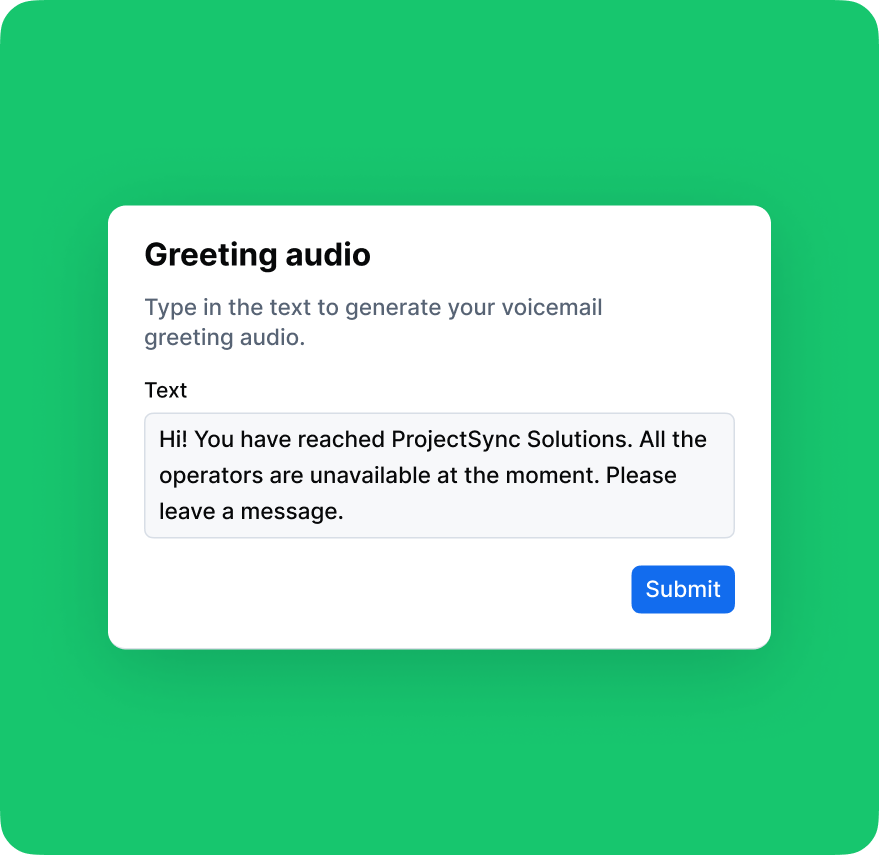
How to Record a Professional Voicemail Greeting for Free
DialLink's voicemail greeting generator allows you to create up to 5 professional audio messages at absolutely no cost. No subscription required, no credit card needed. Here's what makes it an ideal solution for budget-conscious businesses:
- 100% free: Generate up to 5 high-quality voicemail greetings without spending a penny.
- Multiple languages: Choose from 5 language options: English, Spanish, French, German, and Portuguese.
- Voice selection: Select between professional female or male voice options to match your brand preference.
- Full customization: Simply paste your custom script, and the AI generates your personalized greeting instantly.
- Complete ownership: Download and use your free pre-recorded voicemail greetings on your own terms, with no restrictions or licensing fees.
- No technical skills required: User-friendly interface requires no audio editing or recording experience.
This free voicemail greeting recording service delivers the quality benefits of AI voice generation without the ongoing subscription costs, making it the most affordable way to create professional voicemail greeting recordings that enhance your business image and caller experience.
How to Record a New Voicemail Greeting with DialLink?
Recording a voicemail greeting with DialLink is simple and straightforward. The entire process takes just a few minutes. Follow these easy steps:
Step 1: Access the generator: Navigate to DialLink's voicemail greeting generator page.
Step 2: Select your voice and language: Choose your preferred voice style (male or female) and select from 5 available languages: English, Spanish, French, German, or Portuguese.
Step 3: Preview the voice: Click "Listen to" beside each voice option to hear a sample and ensure it matches your brand's tone and style before proceeding.
Step 4: Create your script: You have two options:
- Select one of the pre-written greeting templates and customize it to fit your specific needs.
- Insert your own completely custom script that you've prepared.
Step 5: Generate your greeting: Click the "Generate" button and wait a few seconds while the AI creates your voicemail greeting.
Step 6: Review and refine: Listen to the complete audio file to ensure it meets your expectations. If you'd like to make adjustments to the wording, simply edit your script and generate a new version. You can repeat this process up to 5 times.
Step 7: Download your file: Once you're happy with the final result, click "Get File." Your professional voicemail greeting will be delivered directly to your email address, ready to upload to your phone system.
That's it! In just a few minutes, you'll have a professional, high-quality voicemail greeting recording without spending a dime or requiring any technical expertise.
There are several ways to record a professional voicemail greeting, depending on your budget and available resources. With DialLink’s voicemail greeting generator, you can create up to five professionally recorded greetings for free.
Follow these essential best practices to record a good voicemail greeting. Keep it concise (20-30 seconds maximum), speak clearly at a moderate pace, and always include your name and business name so callers know they've reached the right place. Thank them for calling, provide clear instructions on what information to leave (name, phone number, reason for calling), and set transparent expectations about when you'll return their call (e.g., "within 24 hours"). Record in a quiet environment to eliminate distracting background noise.
You can create one yourself using a free online tool like DialLink’s voicemail greeting generator. It lets you create a professional, ready-to-use greeting with AI voice options and no special equipment needed.
Featured Tags
Share


Arina Khoziainova
Content Writer at DialLink
Arina is a content writer with over 7 years of experience in the IT industry. At DialLink, she creates clear, insightful content that helps small business and startup owners simplify communication and drive growth using modern tools. With a strong focus on practical value, Arina transforms complex topics into accessible, actionable stories.

Keep Reading

Scripts to Create Voicemail Message Greetings for Businesses
Find ready-to-use business voicemail greeting scripts tailored to different industries and situations, including after-hours and holidays.
December 04, 2025
12 minutes
Top 10 Best Medium-Sized Business Phone Systems in 2026
Compare the top business phone systems for medium-sized businesses to find a solution that fits your team’s size, budget, and growing communication needs.
October 21, 2026
25 minutes
Top 10 Best Business Phone Systems for Small Businesses in 2026
Compare the 10 best small business phone systems based on features, pricing, and ease of use to find the right fit for your business.
October 20, 2026
23 minutes

Best Auto-Attendant Systems & Services for Small Businesses
Explore the best auto attendant systems and software for small businesses. Learn features, types, and top providers.
December 23, 2025
10 minutes

Auto Attendant vs Call Queue: What Small Businesses Need to Know
Discover the differences between auto attendants and call queues, and how your small business phone system can use both for better call handling.
December 16, 2025
8 minutes

Auto Attendant vs IVR: What’s the Difference and Which One to Choose for a Small Business
Discover how auto attendants and IVR systems differ, how they work together, and which call routing option fits your small business best.
December 15, 2025
9 minutes

Local Vanity Phone Numbers for Business: What They Are and How to Get One
Read about what a vanity local phone number is, how businesses use them, and how to get one for your company.
December 12, 2025
8 minutes

Business Voicemail Greeting Examples for Every Situation (and Tips)
Explore a collection of voicemail greeting examples tailored to various industries and scenarios.
December 11, 2025
12 minutes