Blog
Business Phone System
Auto Attendant Call Flow Templates

Auto Attendant Call Flow Templates
Use these auto attendant templates to create your own business-hours, after-hours, and holiday call handling logic.



Getting started with a call flow can feel confusing. With so many options, it’s not always clear what will work best for your business and your callers. The best way to start is by creating an auto attendant call flow template before touching your phone system settings. This helps you define the logic clearly and avoid mistakes.
In this article, we’ll cover what to include in your auto attendant template. We’ll share examples and show you how to use them to build your own call flow.
What is an Auto Attendant Call Flow Template?
A call flow template is a visual planning tool that outlines how incoming calls are handled and routed within your phone system. It acts as a blueprint for your auto attendant setup, helping you define what happens from the moment a call comes in to its final destination. Using a template, you can validate your call handling logic before building it into your phone system.
Typically, a call flow template is presented as a diagram that maps out key elements such as greetings, business hours, menu options, routing paths, and fallback scenarios like voicemail or an AI voice agent.
The more detailed your template is, the better. Include every decision point a caller might encounter and define what happens next at each step. This helps prevent dead ends, reduces confusion, and ensures calls are handled smoothly from start to finish.
What’s Inside an Auto Attendant Call Flow Diagram
A call flow diagram is built using a range of phone system features that help you design how calls are handled in different scenarios. The exact set of tools available depends on your phone system, but most platforms offer a similar core set of components, such as greetings, business hours settings, and menu options.
Think of these features as building blocks, each serving a specific purpose. When combined, they help you create a structured and flexible call flow tailored to your business needs.
Let’s take a closer look at what you might have in your “toolbox” and what each feature does.
Auto attendant
An auto attendant is the starting point of your call flow. It’s an automated answering system assigned to a phone number that picks up incoming calls, plays a pre-recorded greeting, and move callers to the next step based on your business hours and predefined rules.
Pre-recorded greetings
Pre-recorded greetings are audio messages used throughout your call flow to communicate with callers. They do more than just welcome callers and confirm they’ve reached the right business by mentioning your company name. They also guide callers through each step of their journey. For example, explaining menu options, setting expectations about wait times, informing callers that no one is available and offering alternatives like leaving a voicemail.
In practice, greetings act as your voice within the system, helping maintain a clear and professional experience while calls are being routed automatically.
Business hours, after hours, and holiday schedules
These act as decision points in your call flow, allowing you to define your business schedule and ensure it’s automatically applied when routing calls.
You can configure your open and closed hours down to specific times, and the system will route calls differently based on those conditions. For example, sending calls to your team during business hours and to voicemail after hours.
Holiday schedules let you override your regular hours for specific dates when your availability changes.
The key benefit is consistency: once set up, the system automatically follows your predefined rules, ensuring calls are handled correctly without manual intervention.
User
A user represents an individual person in your phone system. In a call flow, users are typically the final destination, where calls are routed when a specific team member needs to answer and handle the conversation.
Voicemails
Voicemail is a common endpoint in a call flow where calls are directed when they cannot be answered. Callers are prompted to leave a message, which your team can review and respond to later. It’s often used as a fallback option during busy periods or outside business hours.
Ring groups
Ring groups are collections of users assigned to a shared phone number. When a call comes in, it can ring multiple team members at once or in a specific order.
Phone menus (IVR)
A phone menu, or IVR (Interactive Voice Response), is a major decision point in your call flow. When callers reach a menu, they are presented with options, and each selection routes them to a different branch of the call flow.
Call queues
Call queues are used when incoming call volume exceeds the number of available agents. Instead of being dropped or sent away, callers are placed in a virtual waiting line, where they can wait until the next available team member is free. Queues can include features like hold music, position announcements, automated callback, and estimated wait times to improve the caller experience.
AI voice agent
An AI voice agent can act as a final destination in a call flow, similar to a user or voicemail. For example, it can handle after-hours calls, answer common questions, or collect information from callers when your team is unavailable.
It can also be used as an intermediate step before reaching a human agent. In this role, the AI can qualify requests, gather key details, or resolve simple inquiries, ensuring that when calls are transferred, your team has the context they need to respond efficiently.
Auto Attendant Flowchart Templates
There are many ways businesses can structure their call flows. The exact setup depends on your internal processes and the types of requests your callers have, so every call flow will have its own specifics.
While there’s no one-size-fits-all auto attendant flow chart template, we can share examples of auto attendant flowcharts for common use cases. You can use them as starting points and adapt them to fit your business needs.
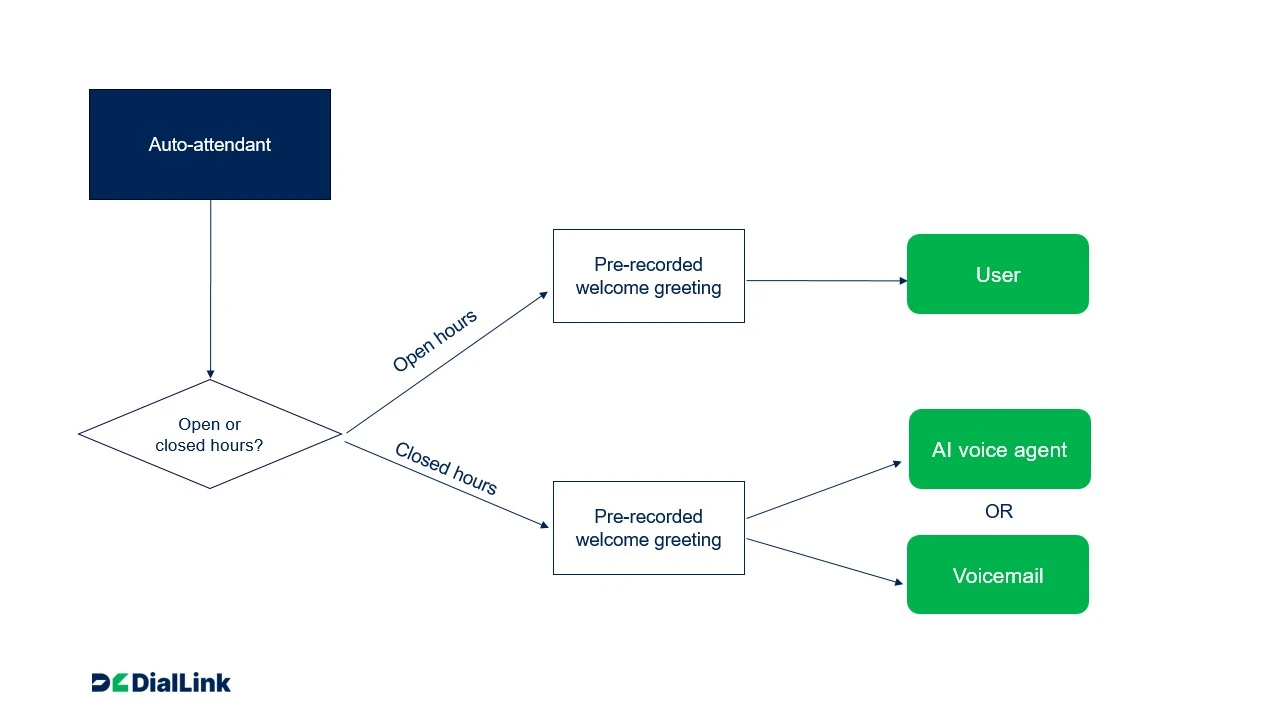
Simple one-person team auto-attendant call flow template
This template is designed for solo businesses that want to present a professional image to their clients. It provides a simple starting point built around a single phone number, with clearly defined flows for business hours and after-hours handling.
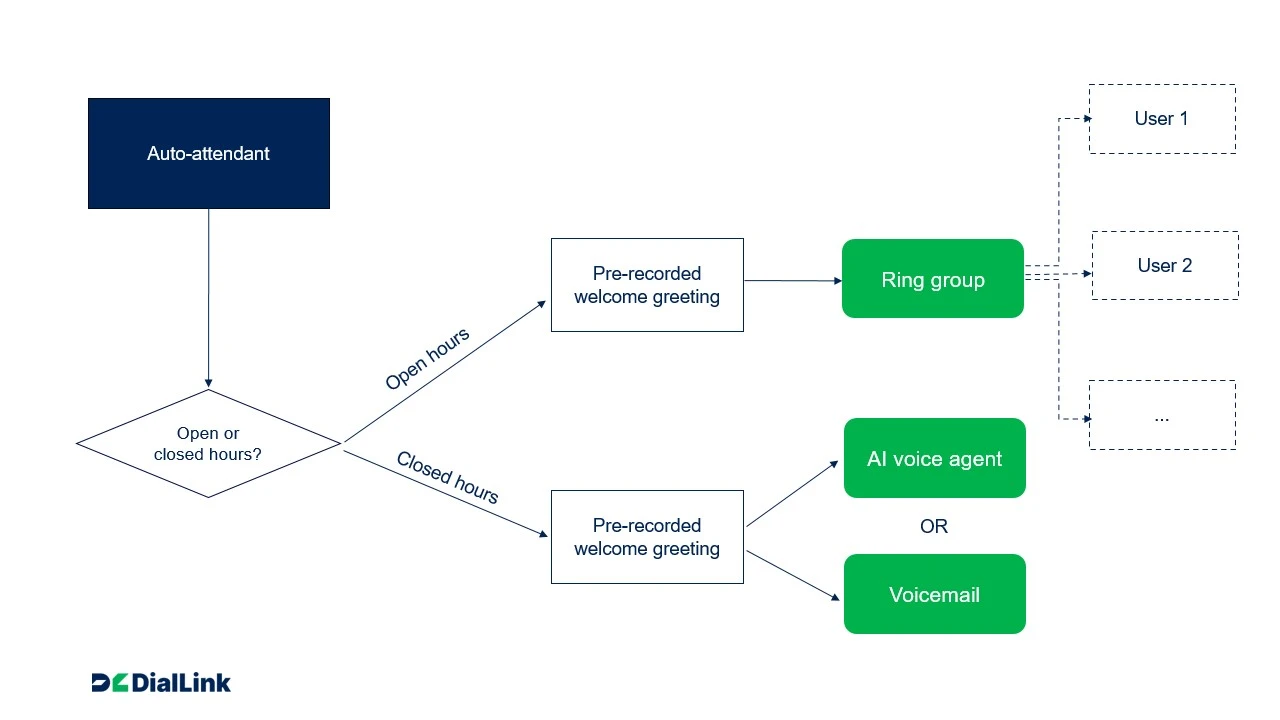
Small team auto attendant flowchart template
Use this template for small teams, from two people (for example, you and an assistant) to slightly larger groups where everyone handles calls from a single shared number. It works best when there is no strict role-based routing and any team member can answer all incoming calls.
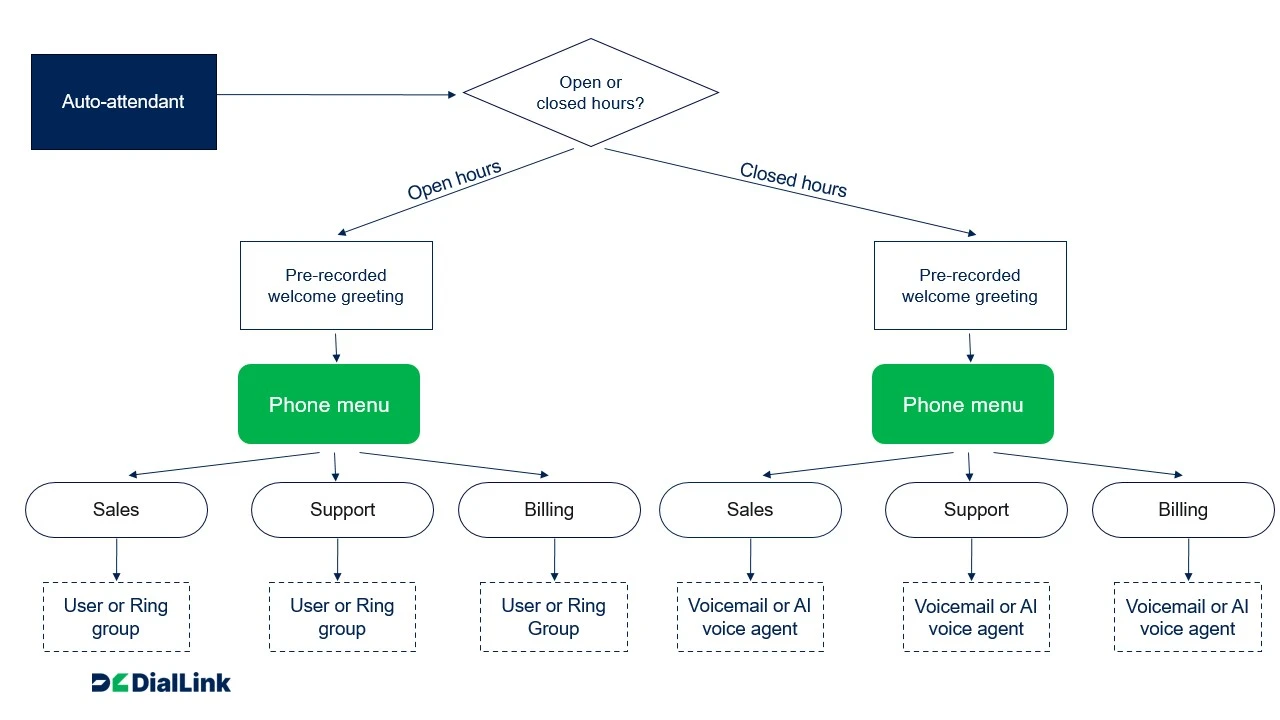
Role-based auto attendant call flow template
This template is designed for medium-sized businesses with defined departments, as well as smaller teams where individuals have distinct roles. It routes calls from a single company phone number using a phone menu, directing callers to the appropriate team or person based on their needs.
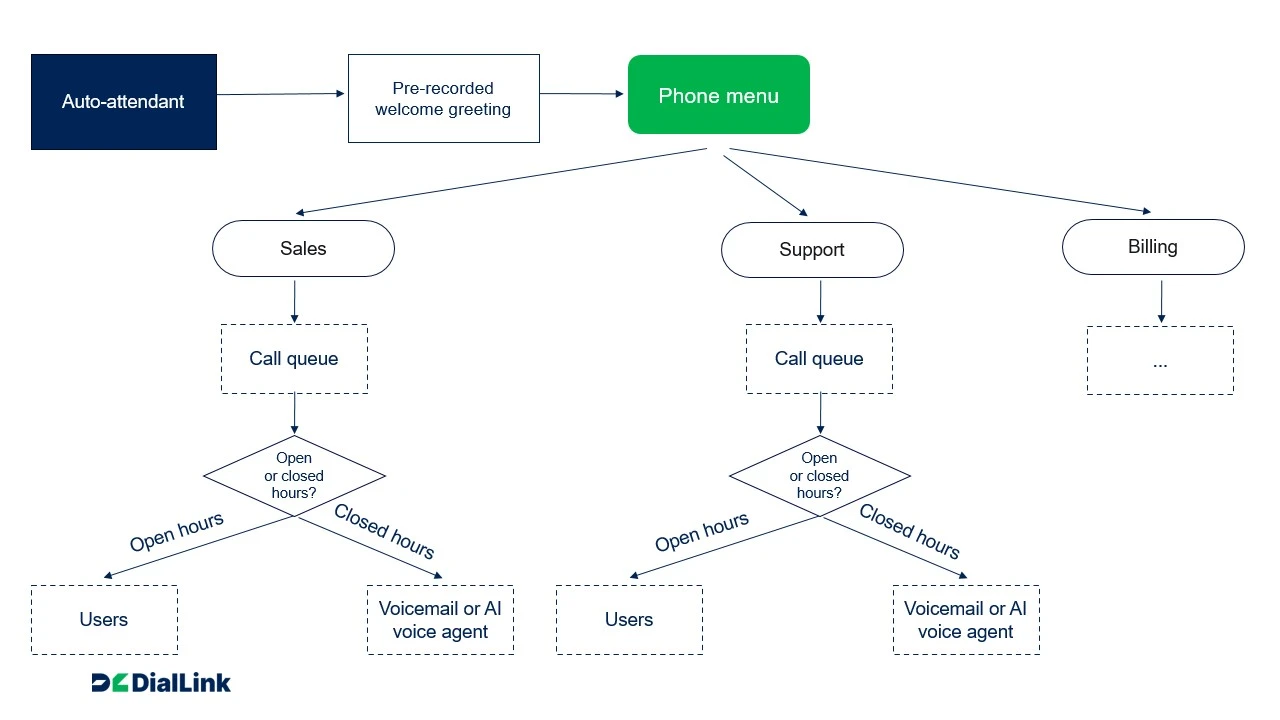
High-volume auto-attendant flowchart template
This template works best for businesses that handle a steady medium to high volume of calls and have dedicated departments with multiple team members. It routes calls from a single company phone number through a phone menu and places them into a virtual queue, where callers wait until the next available team member can answer.
How to Create Your Own Auto Attendant Call Flow Diagram
Creating a call flow can feel overwhelming at first. There are multiple elements to think through: caller needs, team structure, availability, and the different ways calls can be routed. It’s easy to overcomplicate things or miss important scenarios.
To help you define a clear and effective call handling logic, we have outlined a practical step-by-step approach:
Step 1: List common caller intents
Start with a simple question: Why do people call your business?
Think through real situations based on your day-to-day operations. For example, sales inquiries, support requests, billing questions, or general information. Instead of trying to capture every edge case, group similar requests into a few clear categories that represent the majority of your calls.
To make this step more actionable, try to estimate the volume for each category, even if it’s just high, medium, or low. Consider which requests are urgent and which can wait, and identify any that could potentially be handled automatically, such as answering basic questions.
This step helps you prioritize routing paths and understand where your call flow needs to be the most efficient.
Step 2: Define who handles what type of calls
Once you understand why people call, the next step is to map those needs to your team. Look at who is responsible for handling each type of request and whether you have clearly defined roles or shared responsibilities.
In smaller teams, it is common for everyone to handle most calls, which allows for a simpler setup. In larger teams, responsibilities are often split across departments or individuals, which requires more structured routing. By comparing call types with your available resources, you can also identify gaps. For example, areas where call volume is high but staffing is limited.
This step helps you decide whether calls should go to a single person, a group, or a dedicated department.
Step 3: Define business hours and availability
Next, define when your business is open and when your team is available to answer calls. This includes regular working hours, as well as any variations such as weekends or seasonal changes. You should also think through what happens outside of those hours.
It’s just as important to plan what happens outside of those hours. A well-designed call flow should always provide the caller with a clear next step, even when no one is available. Depending on your setup, this could mean directing calls to voicemail, routing them to an AI voice agent, or offering alternative ways to get in touch.
The same applies to holidays or special schedules. Planning for these scenarios ensures that your call handling remains consistent and that callers are never left without guidance.
Step 4: Map call handling logic
With a clear understanding of caller needs, team structure, and availability, you can start mapping how calls should be handled.
Begin with business hours, since this is when most interactions take place. If your team is small and handles all types of calls, the most effective approach is often the simplest one: routing calls directly to a group of team members. Adding extra steps, such as menus, can slow down the experience without adding value.
If you have different teams handling different types of requests, a phone menu becomes useful. It allows callers to select the option that best matches their needs and be routed accordingly.
Step 5: Visualize your call flow
Once the logic is clear, turn it into a visual diagram. You can start with a template that matches your situation and adapt it to your needs.
Map the entire journey from the moment a call comes in. Include each step in sequence, such as greetings, business hours checks, menu options, routing paths, and fallback scenarios.
As you build the diagram, think in terms of decision points. Each time the system needs to determine what happens next, represent it as a branch in the flow. For example, this could include checking whether the business is open or whether someone is available to answer the call. This makes it much easier to identify missing steps, unnecessary complexity, or unclear transitions.
Step 6: Add the caller experience
After the structure is in place, focus on what callers will actually hear as they move through the flow. This includes your initial greeting, any menu instructions, messages played while waiting, and voicemail prompts.
Step 7: Test real scenarios
Before implementing the flow in your phone system, take time to walk through it from a caller’s perspective. Imagine different situations, such as calling during busy hours, reaching the wrong menu option, or trying to contact the business after hours.
This exercise helps you uncover friction points that may not be obvious when looking at the diagram. If possible, ask someone outside your team to review the flow as well. A fresh perspective often highlights unclear instructions or unnecessary steps.
From Template to Working Phone Tree
Building an auto attendant call flow template is an important step in organizing how your business handles incoming calls. It allows you to think through the logic in advance, create a structured plan, and avoid routing mistakes that can lead to missed calls or poor caller experience.
Once your template is clear and polished, the next step is to bring it to life in your phone system. This is where having the right tool makes a real difference. A good phone system should make it easy to translate your diagram into a working setup without adding unnecessary complexity.
With DialLink business phone system, you can set up your auto-attendant call flow and adapt it as your needs evolve. It includes all the core components you need to build a flexible setup tailored to your business. You don’t need a dedicated IT team to build or manage your call flow. Everything is designed to be accessible, so you can focus on creating an experience that works for both your team and your callers.
Start your 7-day free trial of DialLink and see how easy it is to build and manage your call flows in practice.
An auto attendant is a feature that answers and routes calls, while a call flow is the overall logic that defines how calls move through your system, including menus, routing paths, and fallback options.
Your template should be detailed enough to cover all common scenarios your callers may encounter during business hours, after-hours, and holiday schedules. The goal is to map out every key decision point and ensure that each possible branch is clearly defined, so there are no gaps or dead ends in your flow.
Not necessarily. An auto-attendant can be used without IVR phone menus, for example, in simple call flows that do not require distributing calls between different departments or teams.
However, for more advanced setups where callers need to choose between different teams, departments, locations, or types of requests, adding an IVR phone menu is a good option.
Featured Tags
Share


Arina Khoziainova
Content Writer at DialLink
Arina is a content writer with over 7 years of experience in the IT industry. At DialLink, she creates clear, insightful content that helps small business and startup owners simplify communication and drive growth using modern tools. With a strong focus on practical value, Arina transforms complex topics into accessible, actionable stories.

Keep Reading
Types of Business Phone Systems: Cloud, VoIP, PBX & More
Discover different types of business phone systems, how they differ, and which options may be the best fit for your business.
January 07, 2026
12 minutes

Google Voice Business Phone System: Features, Pricing, and Limitations for Small Businesses
Learn how the Google Voice business phone system works, explore plans, features, and limitations for small businesses and startups.
January 05, 2026
10 minutes

Auto Attendant Message Examples and Scripts for Small Businesses
Find a list of auto attendant message examples, samples, and scripts that you can use for your small business phone system.
December 25, 2025
10 minutes

Auto Attendant Recordings: Examples, Samples and Best Practices for Small Businesses
Explore auto attendant recording examples, samples, and tips for small businesses and startups to create professional phone greetings.
December 24, 2025
7 minutes

Best Auto-Attendant Systems & Services for Small Businesses
Explore the best auto attendant systems and software for small businesses. Learn features, types, and top providers.
December 23, 2025
10 minutes

Google Voice Auto Attendant: What It Is and How It Works
Explore how Google Voice auto attendant works and whether it’s right for your small business.
December 22, 2025
9 minutes

Auto Attendant vs Call Queue: What Small Businesses Need to Know
Discover the differences between auto attendants and call queues, and how your small business phone system can use both for better call handling.
December 16, 2025
8 minutes

Auto Attendant vs IVR: What’s the Difference and Which One to Choose for a Small Business
Discover how auto attendants and IVR systems differ, how they work together, and which call routing option fits your small business best.
December 15, 2025
9 minutes