
The Business Phone System for Law Firms
Managing client communication with confidentiality and compliance is critical for law firms. DialLink’s business phone system provides a unified platform to make and receive calls, send SMS and WhatsApp messages, collaborate with your legal team, and automate client interactions using AI agents.

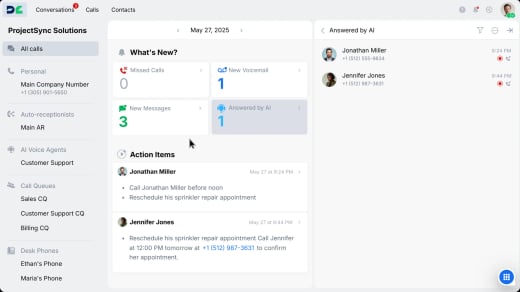
Streamline Call Management for Your Legal Practices

Easily manage your firm’s phone numbers
Establish local or toll-free numbers for different legal departments or locations and manage them from one centralized platform. Easily keep your existing number with automated porting and zero downtime.

Customize your call flows in minutes
Automatically direct incoming calls to the right attorney or paralegal based on practice area, client type, or case urgency. Set up after-hours routing so urgent matters are immediately handled instead of being sent to voicemail.

Never miss a potential client call
Ensure coverage even when attorneys are in court or unavailable by using call queues and ring groups that route calls to the next available team member.
Stay Connected with Clients via Text and WhatsApp

Chat with clients through messages
Send appointment reminders, case updates, and follow-ups via SMS from your business number, with all conversations archived for compliance and record-keeping.

Engage clients on WhatsApp for Business
Create a professional WhatsApp Business account to send messages and share files with clients. Manage all WhatsApp conversations from the same client view as calls and SMS for complete visibility.
Collaborate Efficiently on Client Matters

Bring in expertise during client calls
Warm-transfer calls to partners or specialists with full case context, or conference in team members to resolve complex issues immediately without requiring a callback.

Coordinate case strategy privately
Discuss with attorneys and paralegals through internal threads within the client record to align on legal strategy while keeping communication organized and confidential.
Ensure Compliance & Secure Client Conversations

Record calls with legal consent announcements
Enable call recording with customizable disclaimers to meet state and federal regulations while maintaining ethical transparency.

Keep call records and outcomes automatically
Automatically capture call transcripts, summaries, and action items, reducing admin work and keep every interaction documented for case files and compliance.

Ensure client privacy and confidentiality
Protect sensitive information with encrypted communication, role-based permissions, and audit logs that support legal requirements.

Why Law Firms Choose DialLink

Work from court, office, or home
Handle client calls and messages from any device including desktop, mobile app, web browser, or desk phone.

Easy setup and management
Launch in minutes using an intuitive dashboard, with no IT team or complex configuration required.

Secure client communications
Keep all client data and conversations encrypted with role-based access controls that meet compliance standards.
Connect DialLink to Your Essential Law Firm Tools
Integrate DialLink with the business applications your team already relies on.




Frequently asked questions
What’s the best phone system for a law firm?
A business phone system like DialLink allows law firms to manage all client calls and messages from one platform while using AI to automate intake, lead qualification, and scheduling consultations.
Can I record client calls with DialLink?
Yes, you can enable call recording where legally permitted and set consent notifications to comply with two-party consent laws.
How does AI help law firms save time?
AI agents, call summaries, and action items reduce the burden of manual intake, note-taking, and follow-up work.
Can I keep my current office number?
Yes. DialLink supports number porting with zero downtime.
Does DialLink support remote legal teams?
Absolutely. Our desktop and mobile apps let attorneys and staff work from anywhere without compromising communication.


