
Meet DialLink: The Best Grasshopper Alternative for Teams with Growing Needs
If Grasshopper no longer meets your business needs or feels outdated, it may be time to explore more modern alternatives to Grasshopper. DialLink is a leading Grasshopper alternative that offers a business phone system for calls, messaging, and internal team chats.

Why DialLink is the #1 Alternative to Grasshopper
Here’s why DialLink should be at the top of your list as a Grasshopper phone alternative:

Add teammates without upgrading your plan
Grasshopper’s entry plan is limited to one user, so even a two-person team has to move to a pricier plan to work from one account.
With DialLink, you can add teammates on any plan, including the entry plan, so your team can answer calls and texts together from day one.

Keep every call organized from day one
Unlike Grasshopper, DialLink includes essential features such as ring groups and parallel calls starting from the basic plan, rather than locking them behind higher tiers or paid add-ons.

Access more messaging channels in one platform
Grasshopper is limited to SMS, while DialLink supports more messaging options. In addition to SMS, DialLink lets you handle MMS and WhatsApp messages from a single app, keeping customer conversations in one place.

Chat internally without switching between apps
Handle issues and coordinate next steps directly inside the DialLink app. Internal team chats are built into each customer conversation, making it easy for teams to collaborate with full context.
Grasshopper doesn’t offer internal threads, which means teams must coordinate responses and resolve issues using external tools.

Connect your business phone system to your favorite tools
Automatically sync calls, texts, and other data to your CRM or other business tools using native integrations or Zapier. Your team can also get real-time notifications about calls and messages, in tools like Slack or Microsoft Teams, so nothing slips through the cracks.
Grasshopper doesn’t support third-party integrations, which can leave customer conversations siloed and create extra manual work for your team.

Get more options for every work style
Grasshopper is limited to mobile and desktop apps only, which can be restrictive for teams that prefer an office setup.
DialLink gives teams more flexibility to work and take calls from anywhere. In addition to desktop and a mobile app, DialLink also supports desk phones for in-office use.
Get Advanced AI Features in the Same App
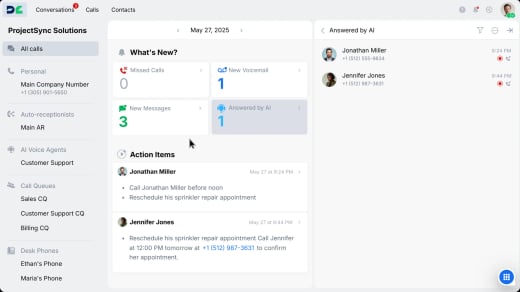
DialLink includes more than standard call and voicemail transcripts, giving even small teams access to advanced AI features from day one, all in the same app and without paying for costly add-ons.
Organize calls for better tracking
Automatically categorize calls by topic and assign tags, making it easy to find them later without manual effort.

Instantly save contacts from incoming calls
Add unknown callers as new contacts with their names and numbers detected automatically.

Stay available to customers around the clock
Both DialLink and Grasshopper offer AI voice agents, but Grasshopper requires a separate subscription to a third-party AI receptionist service. DialLink’s AI voice agents are built into the same app and answer calls 24/7. DialLink also offers AI messaging agents that respond to customers on SMS and WhatsApp, which Grasshopper doesn’t provide.

DialLink vs Grasshopper: Feature-by-Feature Comparison
See how DialLink and Grasshopper compare across key features to choose the right solution for your business.
Functionality | Grasshopper | DialLink |
US phone numbers |  | |
Unlimited calling in US & Canada | | |
Unlimited texting in US & Canada | | |
Number porting | | |
Toll-free numbers | | |
International numbers | – | |
International calling & messaging | – | |
Caller ID names (CNAMs) | | |
Voicemails | | |
Custom business hours | | |
Desktop & mobile apps | | |
Desk phone support | – | |
Call transfers | | |
Call forwarding | | |
Parallel calls | Not available in the basic plan | |
Group calling | | |
Ring groups | Requires an additional purchase | |
Auto-receptionists | | |
IVR menus | | |
Call queues | – | |
Automated callback | – | |
Custom hold music | | |
Call overflow handling | – | |
On-duty status for operators | – | |
Alerts for no on-duty operator | – | |
Call timeline | – | |
Phone extensions | | |
WhatsApp for Business | – | |
AI-suggested messages | | |
Message auto-reply | | |
Automatic spam call detection | – | |
Call & voicemail transcripts | | |
AI call tagging | – | |
AI call summaries | | |
AI action items | | |
Sentiment analysis | | |
AI voice agents | Requires an additional purchase | |
AI messaging agents | – | |
Knowledge base for AI agents | Requires an additional purchase | |
AI voice agent integrations | Requires an additional purchase | |
AI contact suggestions | – | |
Open API | – | |
CRM integration | – | |
Pre-built Zapier integration | – | |
Internal chats | – | |
Price per user (annual) | From $14 | From $15 |
Why Companies Choose DialLink
as Their Grasshopper Phone Alternative
Here’s what our customers have to say about their experience with DialLink.
DialLink makes it much easier to manage our communications across calls and texts. As a small team, we really appreciate how simple it is to set everything up without unnecessary complexity. That ease of use made a big difference for us when choosing a phone system.
Owner
Real Estate Agency
Getting started with DialLink is easy
Whether you’re switching from Grasshopper or evaluating other Grasshopper competitors, DialLink helps you get up and running quickly with minimal setup.

Sign up for an account
Create your account from a web browser or download the DialLink app on your device.

Get your phone number
Receive your business number during registration or port your existing number to DialLink.

Start calling and texting
Begin making calls and sending messages right away.
Frequently Asked Questions
What is the best alternative to Grasshopper?
Choosing the best alternative comes down to your business needs and budget. DialLink is a strong option if you want an affordable phone system that unifies calls, texts, WhatsApp for Business, and internal chats, along with built-in advanced call management and AI features.
Can I keep my phone number if I switch from Grasshopper?
Yes, you can transfer your current business phone number to DialLink when you switch from Grasshopper through the number porting process.
Is DialLink cheaper as a Grasshopper phone alternative?
Pricing depends on the plan and features you need. Compare DialLink plans side by side with Grasshopper plans to see which option fits your budget.
Does DialLink offer free plan to test?
DialLink offers a 7-day free trial, so you can test the platform before committing to a plan.