
Meet DialLink: The Best Quo (formally OpenPhone) Alternative
Looking for reliable alternatives to OpenPhone that are simple to set up and easy even for a two-person team? DialLink’s business phone system has you covered with one platform for all your calls, texts, and internal chats.

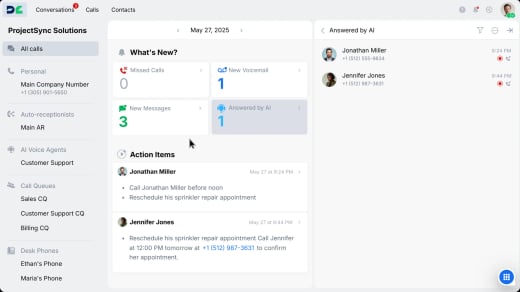
Why DialLink is the #1 Alternative to OpenPhone
If you’re exploring OpenPhone alternatives, here’s why DialLink should be at the top of your list:

Get more calling features at the same price
With DialLink, you get all the calling features available in OpenPhone and even more. For example, the Essential plan includes a single phone menu (IVR) to route calls efficiently, while higher tiers add unlimited call queues with automated callbacks and operator status controls to manage high call volumes and distribute calls seamlessly.

Access all your messaging channels in one platform
DialLink lets you add WhatsApp for Business among calls, text, and voicemails, directly to the same app, so you can manage all customer conversations in one place without switching between tools or platforms.

Get more options for every work style
With DialLink, you don’t have to settle for a one-size-fits-all approach. You can adapt your communication setup to fit how and where your team works. DialLink supports desktop software, a mobile app for on-the-go access, and desk phones, either by installing the app on supported models or purchasing desk phones with the app preinstalled.
Get Built-in AI Features at No Extra Cost
While both platforms include AI tools at no additional charge, DialLink offers more built-in AI features that help you manage and analyze calls better.
Actionable insights from every conversation
Along with call transcripts and summaries, DialLink’s AI creates action items and performs sentiment analysis to measure customer satisfaction.

Automatic spam call detection
Automatically identify and block unwanted or suspicious calls, such as robocalls, telemarketing, or scam attempts, before they reach your team.


DialLink vs OpenPhone
Feature Comparison
See how DialLink and OpenPhone compare across key features to choose the right solution for your business.
Functionality | OpenPhone | DialLink |
Cloud-based phone system |  | |
Number porting | | |
International numbers | – | |
Toll-free numbers | North America only | |
Branded calling | – | |
Mobile apps | | |
Desk phone support | – | |
Auto-receptionists | | |
IVR menus | | |
Call queues | – | |
Automated callback | – | |
Call holding | | |
Custom hold music | | |
Warm call transfers | | |
Parallel calls | | |
Group calling | | |
Call overflow handling | | |
On-duty status for operators | – | |
Alerts for no on-duty operator | – | |
Call history | – | |
WhatsApp for Business integration | – | |
AI-suggested messages | | |
RCS messaging | – | |
Automatic spam call detection | – | |
Call and voicemail transcripts | | |
AI call tagging | | |
Call summaries | | |
Action items | | |
Sentiment analysis | – | |
AI voice agents | | |
AI knowledge base | | |
AI Agent Integration | – | |
AI contact suggestions | | |
Public RESTful API | | |
CRM integration | | |
Zapier integration | | |
Internal chats | | |
Contact enrichment | – | |
Price per user when paid annually | From $15 | From $15 |
Why Companies Choose DialLink
as Their OpenPhone Alternative
Here’s what our customers have to say about their experience with DialLink.
Getting started with DialLink is easy
Whether you’re switching from OpenPhone or evaluating other alternatives, DialLink helps you get up and running quickly with minimal setup.

Sign up for an account
Create your account from a web browser or download the DialLink app on your device.

Get your phone number
Receive your business number during registration or move an existing one to your DialLink account.

Start calling and texting
Enjoy 7 days of free access and begin making calls and sending messages right away.