
The Business Phone System for Recruiting
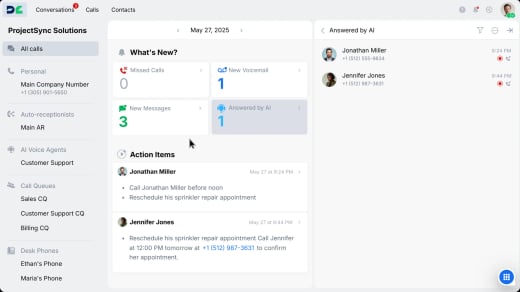
DialLink gives recruiting teams the tools to reach, engage, and nurture top talent more effectively. With our business phone system, you can add multiple virtual numbers to connect with candidates through calls and texts from one unified platform.

Easily Connect with Top Talent

Set up dedicated lines for roles or clients
Get a dedicated phone number for each market, department, or client you recruit for and manage all your lines from one centralized platform.

Get more candidates to answer your calls
Show your company name when calling candidates instead of an unknown number to dramatically increasing answer rates.

Never miss a candidate call
Automatically route calls by job type, location, or client, and distribute them across your team to ensure an immediate response.
Engage Candidates on Their Preferred Channels

Text candidates from a business number
Send interview reminders, job alerts, and quick updates via text for faster candidate responses and engagement.

Build relationships on WhatsApp for Business
Connect with candidates globally through their preferred messaging app. WhatsApp makes it easy to nurture talent and maintain ongoing conversations.

Stand out with rich, branded messages
Use RCS to send rich messages with job descriptions, videos, and application buttons that make your opportunities stand out.
Collaborate Across Your Recruiting Team

Share candidate conversations across your team
Give recruiters access to shared phone lines with complete call and message history. Every team member has full context on candidate interactions.

Coordinate internally during candidate outreach
Chat internally within the same candidate thread to discuss feedback, next steps, or client requirements without switching apps.
Automate Recruiting Tasks with AI

Capture every detail from candidate calls
AI automatically generates call transcripts, summaries, and action items from screening calls so recruiters can focus on evaluating talent instead of taking notes.

Record and organize candidate conversations
Record every call for quality checks, new recruiter training, and compliance. Automatically tag calls by role, candidate, or client for instant retrieval.

Why Recruiters Choose DialLink

Centralized recruiting conversations
Manage all candidate calls and messages seamlessly from a single app.

Built for small to medium size firms
Set up your phone system in minutes with no IT, hardware, or technical skills needed.

Work and recruit from anywhere
Stay connected with candidates on desktop, mobile, or web, wherever you are.
Connect DialLink to Your Recruitment Tools
Integrate DialLink with the business applications your team already relies on.




Frequently Asked Questions
What is a business phone system for recruiting?
A business phone system like DialLink allows recruiters to manage all candidate calls and texts in one platform while leveraging AI to automate screening, scheduling, and follow-ups.
How do AI voice agents help recruiting teams?
AI voice agents handle routine screening calls, collect candidate information, answer FAQs, and route qualified candidates to recruiters automatically.
Can DialLink help reduce time-to-hire?
Yes. By automating early candidate interactions, pre-screening, and scheduling, DialLink shortens hiring cycles and prevents losing top candidates to competitors.
How secure is candidate data with DialLink?
DialLink uses end-to-end encryption for call recordings, voicemails, and transcripts to comply with employment data privacy laws.
Can I integrate DialLink with my ATS?
Yes. You can integrate DialLink with your ATS or any other app using the DialLink API. DialLink also integrates with CRMs and other platforms through native integrations and Zapier.
Can I keep my current recruiting phone numbers?
Absolutely. You can port your existing and trusted phone number to DialLink with no downtime.
How much does DialLink cost for recruiting agencies?
We offer flexible pricing for staffing firms of any size. Visit our pricing page to see available plans.


