
How DialLink Leverages MCP to Streamline AI Integrations
Discover how DialLink leverages MCP to connect AI agents with AI models and business tools, enabling them to solve real business challenges.



In this article
- What is MCP?
- How Does MCP Work?
- MCP vs Traditional API Integration
- How Does DialLink Uses MCP for Its AI Products?
- What Can AI Agents Do with MCP?
- Real-Life Example: How MCP-Enabled AI Agents Solve Business Problems
- What Makes DialLink’s Approach Unique?
- The Future of MCP
- Connect Your AI Agents to the Tools You Already Use
Today, it’s no surprise that AI agents can write text, generate code, or chat like humans. But when it comes to taking more complex actions within your business ecosystem, such as updating a CRM record, scheduling a meeting, or filing a support ticket, they often fall short. The reason is simple: once businesses realized the need to connect AI with their tools, they turned to traditional third-party integrations that weren’t designed for AI. As a result, each new tool or data source required a custom connector to an LLM, making the process resource-intensive, costly, and difficult to maintain.
This is where MCP comes in. MCP introduces a universal, open standard that allows AI agents to connect directly with tools, data, and services. Instead of relying on one-off integrations or hand-coded workarounds, AI agents now have a simple, standardized way to plug into the systems businesses already use.
In this article, we’ll explore what MCP is, explain how it works, explain what AI agents can do with it, highlight real-world examples, and show how DialLink uses MCP to streamline AI integrations.
What is MCP?
MCP, stands for Model Context Protocol, is an open standard developed by Anthropic. While it may sound like another confusing technical abbreviation, the core idea is simple: it allows AI systems (like AI voice agents and AI messaging agents) to communicate seamlessly and securely with other software tools, services, and data.
As Forbes notes, MCP represents a significant step forward in AI integration by providing a universal standard that simplifies connections between AI systems and diverse data sources. This open-source protocol addresses the challenges of fragmented data access, enabling more efficient and context-aware AI applications. By making it easier to interact with different tools without compatibility issues, MCP improves both the accuracy and relevance of AI-generated responses.
How Does MCP Work?
Before we dive into real-world examples of how MCP helps AI agents solve business problems, let’s start with the basics. As mentioned earlier, MCP creates a unified language that allows AI agents and software systems to communicate consistently.
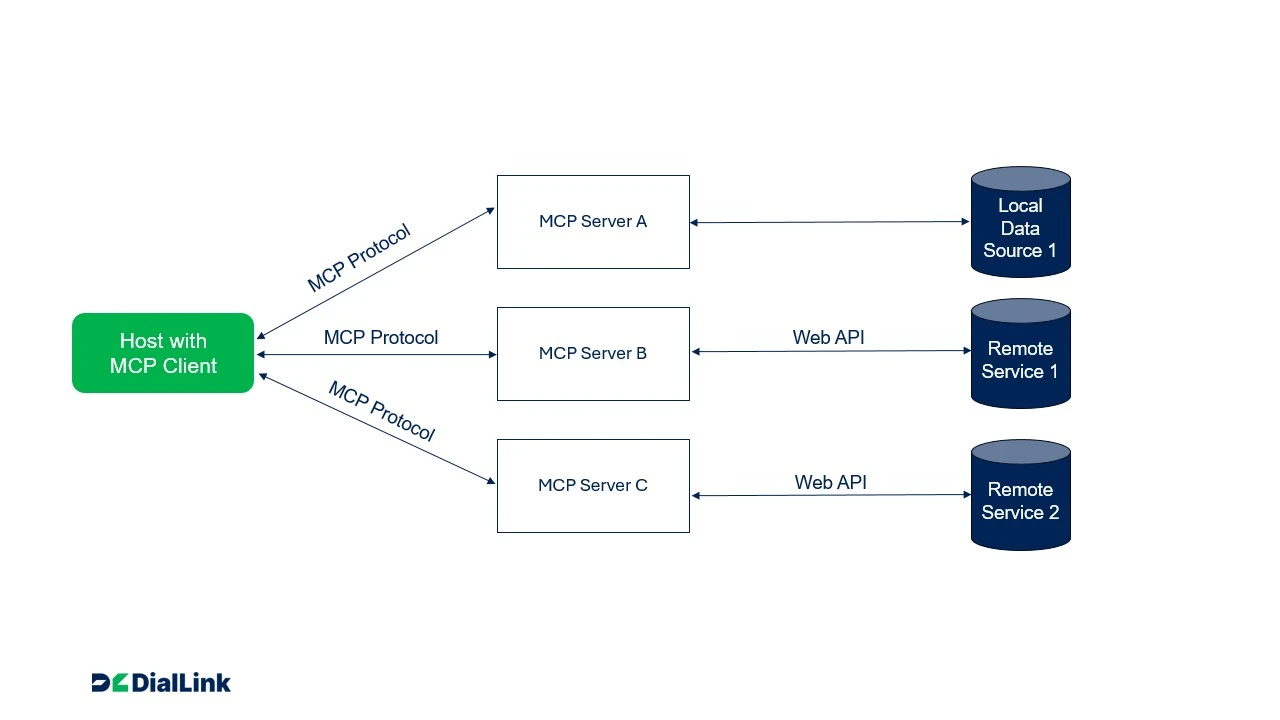
At its core, MCP follows a client–server architecture:
- The client interacts with the user, receives requests, and passes them to servers.
- The server interprets those requests, connects to the right data source or service, processes them, and sends back results.
Here is a graphic representation of how the whole “MCP” works under the hood:
Key components of MCP
To understand how MCP actually works in practice, it helps to look at the main building blocks that make up this architecture. Each part plays a specific role, and together they allow your AI tools to connect, communicate, and act across your business tools.
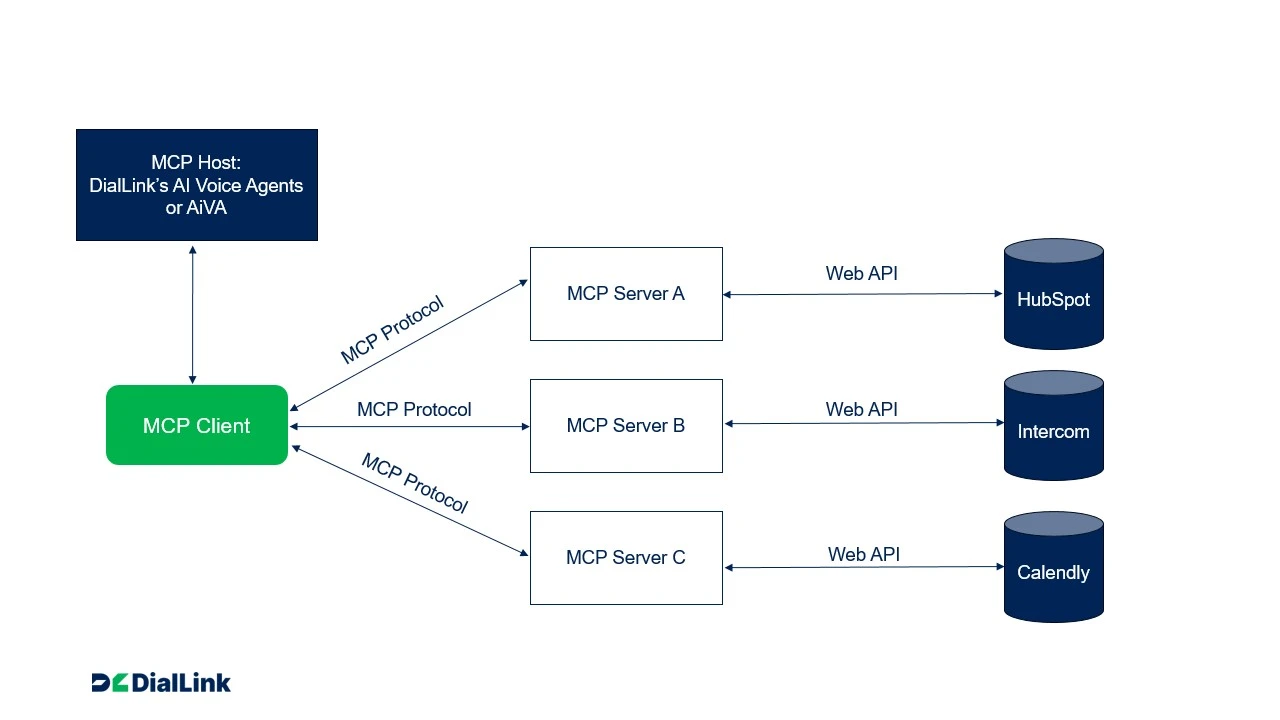
- MCP host: The AI-powered tool (like DialLink’s AI voice or messaging agents) that take requests from end-users and based on them wants to access data or perform actions. One host can connect to multiple MCP servers, each responsible for different tools or data sources.
- MCP client: The component that lives inside the AI tool. When the AI wants to use a service, it goes through the client to talk to the appropriate server. The client manages all the back-and-forth: sending requests, receiving responses, and passing the results back to the AI.
- MCP protocols: MCP defines standardized rules for how clients and servers exchange information. This ensures that no matter what system you connect to — Salesforce, HubSpot, Zendesk, or even a local file system — an AI tool can interact with it. Typically, MCP uses structured formats like JSON to keep communication consistent and easy for both sides (client and server) to understand.
- MCP servers: The smart connectors between MCP clients and third-party applications or data sources. Servers translate requests from the AI into commands/API calls that the target tool can understand. Once the third-party app or data source responds, the MCP server translates that response back into a format the AI can use and sends it back to the client.
Example: A Cal.com MCP server can take the request “Check available calendar slots in the next two days”, turn it into an API call for Cal.com, and return the results to an AI tool, which can then respond naturally to the end user.
- Local data source: Files, databases, or applications running on your computer or internal servers. An MCP server can give the AI secure access to those resources without exposing them directly.
- Remote services: Cloud-based tools like HubSpot, Shopify, or Zendesk. The MCP server connects to these services’ APIs and acts as the bridge so the AI agent can fetch data or perform actions.
Using these components together, MCP supports continous communication between AI tool and external systems. That means the AI can both read data (e.g., check order history) and perform actions (e.g., update a CRM record or schedule a meeting) in a single interaction. This architecture ensures AI agents can go beyond answering questions; they can actively work across your tools in real time.
Read a simple breakdown of how AI voice agents work, explained in plain terms.
MCP vs Traditional API Integration
Before MCP, the only way to connect AI tools to third-party applications was through traditional APIs. This worked, but it came with major limitations. Most integrations were designed for human-driven workflows, so AI could only read data rather than act on it. Each new integration required developers to:
- Build a unique API connector for every tool
- Write custom code to handle authentication and data formatting
- Feed the data into models
This approach was expensive, time-consuming, and difficult to scale.
MCP has changes the approach. Instead of writing a new integration from scratch each time, MCP introduces a standardized layer on top of existing APIs. Here’s how it works differently:
- An MCP server still uses a system's native API internally but presents a standardized interface to any AI client.
- Developers can write an MCP integration once and reuse it across many AI applications.
- Teams spend less time maintaining multiple API connectors and more time enabling AI agents to work with real business data.
It’s important to note that MCP doesn’t replace APIs. APIs remain essential for their purposes. What MCP does is make those APIs AI-friendly, giving agents a simple and scalable way not just to receive data but also to act on it in real time.
How Does DialLink Uses MCP for Its AI Products?
DialLink leverages MCP technology in two powerful ways:
- Connecting its AI products to business tools: DialLink’s AI voice agents and AI messaging agents can be integrated with popular platforms such as HubSpot, Intercom, Asana, and Cal.com.
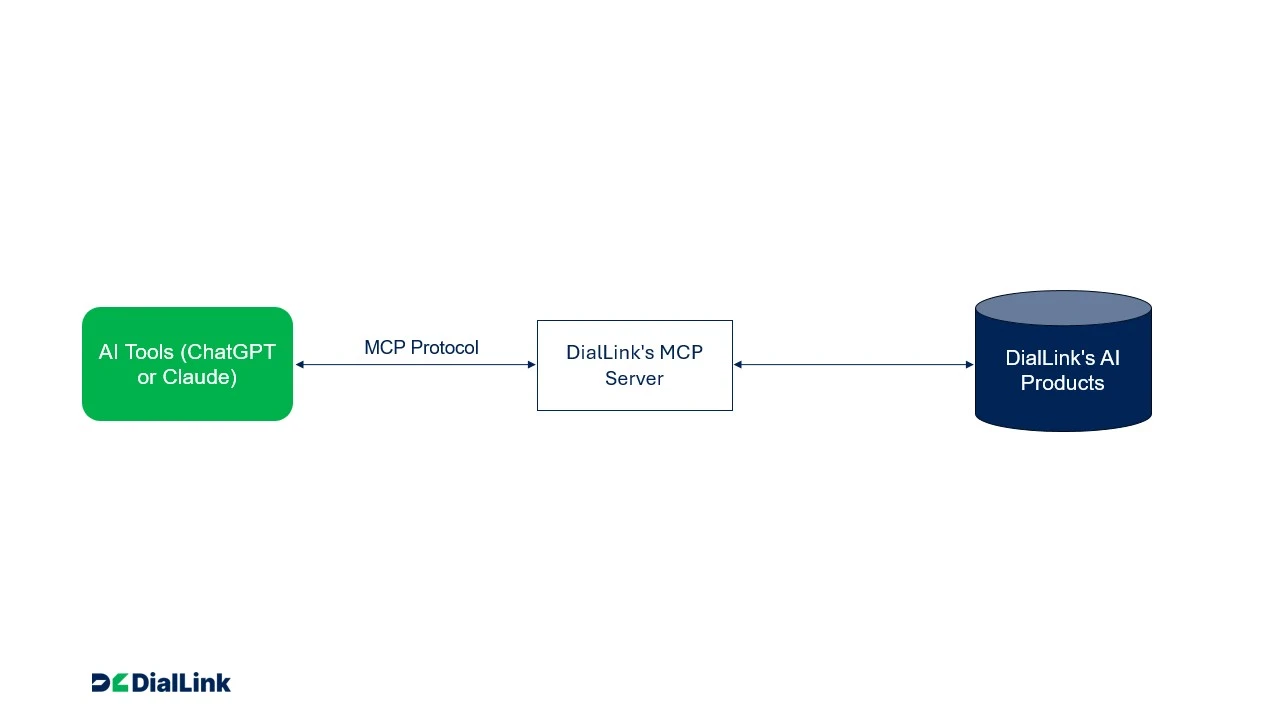
- Offering its own MCP server: Third-party AI tools like Claude or ChatGPT can connect directly to DialLink business phone system. From a single chat, you can check your message history and call activity, send texts, manage your contacts, and place calls through AI voice agents.
Let’s look at each approach more closely:
Connect DialLink’s AI Agents with Third-Party Business Tools
DialLink’s AI Voice Agents and AI messaging agents can integrate with systems like HubSpot, Intercom, Asana, and Cal.com through the MCP server that those platforms provide.
Unlike traditional integrations, DialLink makes the process simple and streamlined. Businesses follow a guided setup with ready-made templates and configuration options. This zero-code approach means even small businesses without technical resources can enable advanced AI workflows in minutes.
Here’s how the MCP process works in this case:
Connect Third-Party AI to DialLink Business Phone System
To give businesses full flexibility, DialLink provides its own MCP server. It lets third-party AI tools like Claude or ChatGPT connect directly to DialLink Business Phone System, so you can manage everyday communication tasks from a single chat, without switching between apps.
Once connected, you can ask your AI tool to:
- Check your message history and call activity
- Send texts to customers or teammates
- Manage your contacts, like adding new ones or updating details
- Place calls through AI voice agents, such as appointment reminders or reservation confirmations
For example, you could ask Claude to show which calls you missed yesterday and then text those customers to let them know you'll follow up. Or you could have ChatGPT add a new lead to your contacts and ask an AI voice agent to call a restaurant to confirm a group reservation.
In this case, the logic of the MCP process is as follows:
What Can AI Agents Do with MCP?
MCP gives AI systems the ability to establish direct, two-way communication with external tools and services. This capability is especially powerful for AI agents like DialLink’s because it transforms them from simple responders into active participants in your business workflows. By connecting to tools, MCP allows voice agents to do far more than just answer questions. They can:
- Access real-time data: MCP lets agents instantly retrieve customer records, account details, or live order statuses from connected systems while on a call. That means a customer asking, “Has my order shipped?” can get an immediate, accurate answer — no hold music, no escalation to a human rep.
- Perform actions across business systems: AI agents can take meaningful actions like scheduling appointments or updating CRM record, not just relay information.
- Orchestrate across multiple tools at once: Instead of assigning separate AI agents for each business system, one MCP-enabled agent can coordinate tasks across platforms in a single conversation. All of this happens seamlessly, without the customer ever realizing multiple systems are involved.
- Deliver personalized and context-aware experiences: Because MCP allows access to multiple data sources simultaneously, AI agents can respond with context that feels natural and tailored.
Real-Life Example: How MCP-Enabled AI Agents Solve Business Problems
To really see the difference MCP makes, let’s look at a simple scenario: booking a hair salon appointment.
Booking by phone with an AI voice agent
Imagine a customer calls the salon after business hours. The salon already uses an AI voice agent to handle incoming calls. The customer says:
"Hi, I'd like to book an appointment with Jessica for a haircut this Thursday after 3 PM."
Without MCP:
- The AI voice agent can take the request, but it can't access the salon's scheduling tool.
- The customer leaves their details: name, phone number, preferred time, and service.
- Later, a staff member has to check the calendar manually, find an available slot, and call or text the customer back.
- If the requested time isn't available, the back-and-forth continues until both sides agree on a slot.
With MCP:
- The AI voice agent connects directly to the salon's booking system, such as Cal.com or Calendly.
- During the call, the agent checks the calendar in real time, sees that 4:30 PM is available, and offers it right away.
- The customer confirms, and the AI voice agent books the appointment on the spot.
Booking by text with an AI messaging agent
Now imagine the same customer prefers to text. Late in the evening, they send a message to the salon's number by SMS or WhatsApp for Business:
"Hi, can I book a haircut with Jessica this Thursday after 3?"
Without MCP, the AI messaging agent could only collect the customer's details and pass them to the team, leaving the customer waiting for a reply the next day.
With MCP, the AI messaging agent checks the salon's calendar in real time and replies within seconds: "Jessica has an opening Thursday at 4:30 PM. Would you like me to book it?" The customer replies "Yes," and the agent confirms the booking in the same conversation. It can also update the customer's record in the CRM, so the team has the full picture the next morning.
What Makes DialLink’s Approach Unique?
As MCP-enabled AI becomes more widely available, DialLink takes a different approach to bringing AI agents and MCP together. Here's what sets it apart:
-
Built for SMBs and startups: Unlike enterprise-focused platforms, DialLink is tailored for small and mid-sized businesses. It emphasizes fast setup, ease of use, and affordability, removing barriers like heavy infrastructure or lengthy deployment cycles. In practice, even a five-person team can deploy MCP-powered AI voice agents and AI messaging agents without extra IT staff or specialized training.
-
AI agents built into the phone system: If you're looking for a business phone system with AI built in, DialLink has you covered. AI voice agents work alongside call management features like call queues, IVR menus, call forwarding, and transfers, while AI messaging agents work alongside business messaging on SMS and WhatsApp for Business.
On top of that, your team gets other AI-powered capabilities such as call transcriptions, summaries, action items, and sentiment analysis, all within the same platform.
-
Zero-code implementation: DialLink is designed for ease of use. MCP servers can be set up in minutes without a single line of code, and businesses can turn on integrations with tools like HubSpot or Salesforce through simple configuration steps.
To make adoption even easier, DialLink provides ready-to-use templates that can be used as-is or customized to define how your AI agents work. What might seem like a complex technical setup becomes accessible even for non-technical teams.
-
One unified MCP server: DialLink provides a single MCP server that lets third-party AI tools like Claude or ChatGPT connect directly to DialLink business phone system. From one chat, you can check call activity and message history, send texts, manage contacts, and place calls through AI voice agents. This unified design simplifies connections across your AI tools and communication workflows.
The Future of MCP
While MCP is still in its early stages, it is evolving rapidly. Let’s look at Anthropic’s MCP roadmap for the next six months and see what potential benefits it can bring to businesses.
Agents: Support for Asynchronous Operations
What’s changing: MCP will support long running or delayed tasks with greater resilience, including better handling of disconnections and reconnections.
Business impact: AI agents will be able to handle more complex workflows without breaking. For example, an AI agent could request a customer’s loan application status or generate an inventory report that takes several minutes and still deliver the result during the same interaction.
Authentication & Security Improvements
What’s changing: MCP will introduce fine-grained authorization, improved credential management, enterprise SSO support, and secure downstream authorization methods.
Business impact: Security is often the biggest barrier to adopting new technology. These improvements will make MCP safer and more practical to implement. Companies will be able to confidently connect sensitive systems knowing access is tightly controlled, compliant, and auditable. For SMBs, built-in secure defaults mean MCP can be adopted without hiring extra IT staff. For enterprises, MCP will integrate more easily with existing security frameworks.
Multimodality
What’s changing: MCP will expand beyond text to support other data types such as images, audio, and video.
Business impact: This might open up entirely new use cases. Imagine an AI agent not only scheduling appointments but also analyzing an uploaded photo of a damaged product and attaching it to a support ticket. Or an AI agent that can summarize both a recorded conversation and an attached document in a single workflow. Multimodal MCP will allow businesses to provide richer interactions and streamline processes that today require multiple manual steps.
Connect Your AI Agents to the Tools You Already Use
MCP is more than just another technical standard. It's a major step forward in AI integration, giving AI agents a universal way to connect with business tools and data. It has already given AI agents practical skills, from looking up customer records in your CRM to checking product availability in your online store. And as MCP continues to evolve, the opportunities for businesses will keep growing.
DialLink Business Phone System brings MCP to both calls and texts. AI voice agents answer inbound calls and AI messaging agents reply to SMS and WhatsApp for Business texts, and both can connect to your business tools to book appointments, update CRM records, and more.
Ready to see what AI agents can do with your business tools? Start your 7-day free trial.
Featured Tags
Share


Arina Khoziainova
Content Writer at DialLink
Arina is a content writer with over 7 years of experience in the IT industry. At DialLink, she creates clear, insightful content that helps small business and startup owners simplify communication and drive growth using modern tools. With a strong focus on practical value, Arina transforms complex topics into accessible, actionable stories.

Keep Reading

What Is MCP? A Guide to Model Context Protocol
Discover what Model Context Protocol (MCP) is, how it works, and why it’s revolutionizing AI voice agents, call automation, and integrations for SMBs and startups. Learn key benefits, detailed use cases, and future trends.
August 05, 2025
14 minutes

Artificial Intelligence Calls: Definition, Examples, and How It Works
Learn what artificial intelligence calls are, how they work, and how your business can benefit from using AI-powered voice calling solutions.
October 22, 2025
12 minutes

Text-to-Speech and Speech-to-Speech: How Each Can Benefit Your Business?
Explore both technologies that power AI voice agents, their pros and cons, and how to choose the best fit for your business needs.
September 23, 2025
16 minutes

5 Ways AI Appointment Setters Simplify Scheduling for Your Business
Discover how AI appointment setters automate scheduling by handling calls and texts, capturing lead details, and booking appointments directly into calendar.
July 07, 2025
8 minutes

Adapt or Fall Behind: The Truth About Conversational AI for Small and Medium Businesses
Cut through the AI hype and explore the real-world benefits small businesses can achieve today with conversational AI.
June 30, 2025
12 minutes

How AI Voice Works: A Simple Guide to the Tech Behind AI Calls (And Why It’s Not Sci-Fi Anymore)
Read a comprehensive breakdown of how AI voice agents work, explained in simple terms, but grounded in serious technology.
June 26, 2025
9 minutes

AI Voice Agents 101: A Simple Guide for Small Business and Startup Owners
Discover how AI voice agents help small businesses and startups answer calls, capture leads, and assist customers using the latest AI technology.
June 19, 2025
13 minutes

Conversational AI in Insurance: Enhancing Claims & Customer Support
Discover the leading conversational AI in insurance solutions — from intelligent chatbots to AI voice agents — that streamline claims, enhance customer support and reduce costs.
June 16, 2025
10 minutes